AESIP Help Desk: How to Get Support Fast
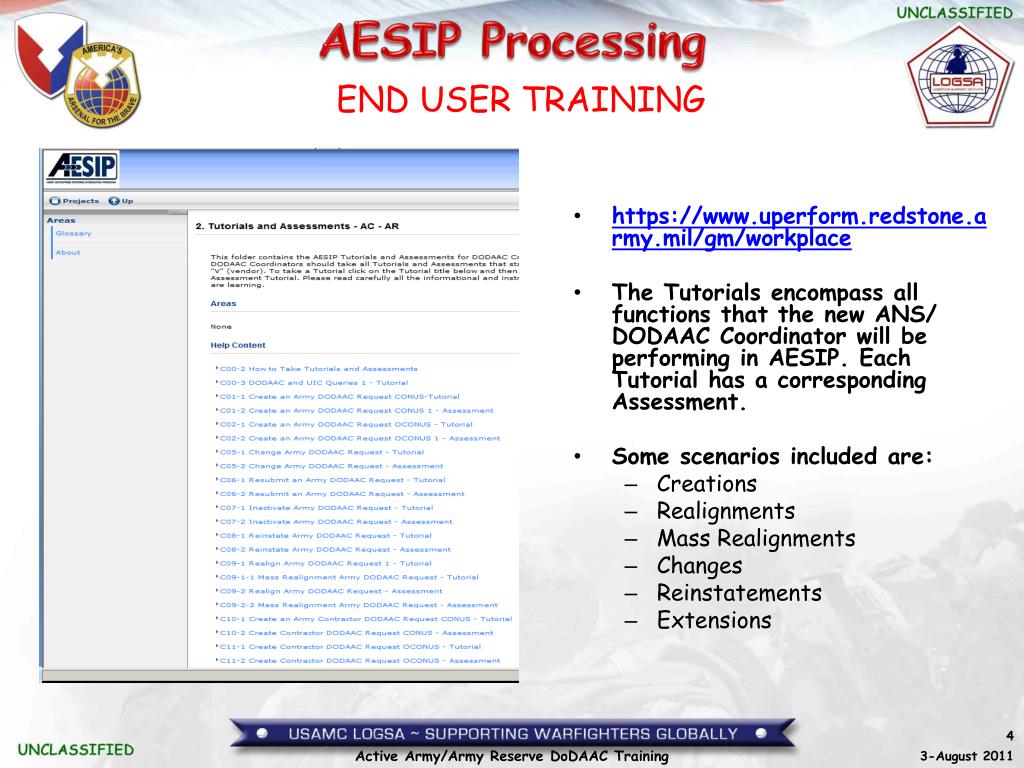
When managing Army enterprise logistics, timely data synchronization is critical to mission readiness. The Army Enterprise Systems Integration Program (AESIP) serves as the central hub connecting major enterprise resource planning (ERP) platforms across the service branch, including GCSS-Army, LMP, and GFEBS. When data pipelines fail, master data requests stall, or user permissions break down, contacting the aesip help desk is often the fastest route back to normal operations.

Whether you are a logistics officer trying to push an urgent material master record, a maintenance clerk dealing with an interface mismatch, or a contractor onboarding to the platform, navigating Army support channels can be challenging. This guide breaks down what the support team handles, how to submit an actionable ticket, and how to resolve common problems independently.
What Does AESIP Support Cover?
AESIP is not just another standalone software application; it is the master data broker and enterprise integration engine for the U.S. Army. As a result, the technical support desk handles a specific set of functional and technical challenges that differ from standard local IT or S-6 issues.
1. Master Data Management (MDM)
The core function of AESIP is maintaining single, authoritative records for critical Army assets and organizations. The support desk assists users with:
- Material Master: Creation, extension, or modification of National Stock Numbers (NSNs), part numbers, and standard descriptions.
- Customer and Vendor Master: Establishing and updating Department of Defense Activity Address Codes (DoDAACs), Unit Identification Codes (UICs), and commercial vendor records.
- Financial & Force Structure Data: Synchronizing data elements needed for seamless accounting between logistics systems and financial repositories.
2. System Interfaces and Middleware
Because AESIP sits in the middle of multiple ERP ecosystems, interface bottlenecks can delay supply transactions. If data sent from the Logistics Modernization Program (LMP) fails to populate within Global Combat Support System-Army (GCSS-Army), the help desk investigates middleware routing failures, message queue stalls, and mapping discrepancies.
3. Access, Roles, and Governance
Users frequently run into access denial issues when attempting to run transaction codes or access specific hubs. Support staff handle governance, risk, and compliance (GRC) workflow inquiries, System Access Requests (SARs), and issues stemming from DD Form 2875 verification.
How to Contact the AESIP Help Desk
Support for AESIP is structured through tiered support channels within the broader Army Enterprise Service Desk (AESD) framework. Depending on your operational environment and connectivity, several contact methods are available.
Online Support Portals
The fastest and most trackable way to request help is through the self-service web portal. Using an authenticated Common Access Card (CAC), personnel can log into the AESD or dedicated enterprise portal (typically accessible via standard .mil networks). Submitting via the portal allows you to select AESIP-specific categories, attach system logs, and view real-time ticket notes from technicians.
Telephone Support
For urgent operational stoppages or system-wide outage alerts, phone support provides direct access to Tier 1 triage representatives. When calling from commercial lines or Defense Switched Network (DSN) phones:
- CONUS (Toll-Free): 1-866-333-5753 (or the primary AESD consolidated help line)
- DSN Access: Connect through standard Army enterprise operator lines routing to enterprise logistics support.
- OCONUS Units: Specific toll-free country access numbers are posted on the Army enterprise portal, routing directly to the global consolidated desk.
Email Submissions

While web portals are preferred for compliance and tracking, certain automated reporting systems and unclassified queries can be routed to the official functional mailbox designated for AESIP support. Always verify the current organizational inbox on the Army portal, as email addresses are periodically updated to reflect domain consolidations under Army Enterprise Service Management.
How to Submit a High-Quality Support Ticket
Vague tickets lead to prolonged delays. When a user submits a ticket stating only "system error," support staff must spend multiple days asking basic clarifying questions. To ensure your ticket is assigned to a Tier 2 or Tier 3 functional specialist immediately, compile the following details before submitting:
- User Details: Full name, DoD ID number (EDIPI), unit, UIC, and contact phone number/email.
- Environment: Specify whether you are operating in the Production (PRD) environment, quality assurance/test, or training sandbox.
- Transaction Information: Provide the exact SAP transaction code (T-code), WebDynpro application name, or portal link where the failure occurred.
- Identifier Keys: Include the relevant DoDAAC, NSN, document number, purchase order, or Batch ID.
- Exact Error Messages: Copy and paste the full error text. If an error number exists (e.g., /AESIP/MDM_MSG 042), include it.
- Full-Screen Screenshots: Capture the entire window, including the status bar at the bottom showing system messages and the taskbar timestamp.
Troubleshooting Before You Contact Support
Before submitting a ticket, check for these frequent local issues that mimic system-level outages:
1. CAC / PKI Credential Issues
Authentication failures are among the most common reasons users cannot reach AESIP services. Ensure your DoD certificates are properly updated in ActivClient or your operating system's native certificate store. If your browser prompts you to select a certificate, ensure you select the Authentication or PIV certificate rather than the Signature or Email certificate.
2. Browser Compatibility and Cache
Many Army enterprise tools require modern Chromium-based browsers (such as Microsoft Edge or Google Chrome) configured to run in specific compatibility modes. If dropdown menus do not populate or search buttons do not respond, perform a complete cache and cookie clear, restart the browser, and verify that pop-up blockers are not silencing system dialog windows.
3. Check the System Outage Schedule
AESIP routinely undergoes scheduled maintenance, monthly software releases, and data synchronizations—frequently during weekend or late-night maintenance windows. Check the enterprise dashboard for scheduled downtime announcements before reporting an unexpected server disconnection.
Understanding the Ticket Lifecycle and Escalation
Once your ticket is submitted, it moves through standard IT Service Management (ITSM) tiers:
- Tier 1 (Triage): Handled by AESD agents who verify your account status, ensure basic connectivity, and validate ticket details.
- Tier 2 (Functional & Technical Support): Assigned to functional subject-matter experts who understand Army logistics workflows, SAP configuration, and master data validation rules.
- Tier 3 (Engineering & Developers): Reserved for code bugs, database deadlocks, interface mapping defects, or enterprise-wide outages.
If an issue directly impacts mission readiness or deployment timelines, request that your unit logistics officer (S-4/G-4) escalate the incident priority with a clear Operational Impact Statement explaining the delay to troop movement, maintenance deadlines, or critical supply distribution.
Summary
The AESIP support system is designed to resolve complex, cross-functional data issues that stand between logistics personnel and mission readiness. By gathering transaction data, taking clear screenshots, and understanding the role of master data governance, you can drastically reduce resolution times and keep your unit's supply chain operating at peak efficiency.