Best Gameplay Sliders in College Football 25: Realistic Overhaul
EA Sports College Football 25 brought back the beloved franchise with explosive offenses, a chaotic atmosphere, and the incredibly fast-paced speed of modern college football. However, out of the box, the default Heisman and All-American difficulties often lead to predictable game scripts, robotic CPU play-calling, and basketball-score blowouts that lack the true chaos and strategic depth of Saturday afternoons. If you want a more grounded, authentic simulation, tuning your settings is essential. Finding the best gameplay sliders in college football 25 will completely transform your Dynasty or Road to Glory campaigns.

Why Default Sliders Fall Short
Out-of-the-box settings in College Football 25 lean heavily toward arcade-style accessibility. On default All-American or Heisman difficulties, users frequently notice a few glaring issues:
- Unrealistic Pass Completion Rates: Both user and CPU quarterbacks routinely complete 80% to 90% of their passes, rendering defensive back ratings irrelevant.
- Explosive Run Defenses: Lineagers shed blocks with superhuman speed, making the run game feel clogged unless you manipulate blocking sliders.
- Inconsistent Special Teams: Kick meters can feel overly forgiving or punishing, while the CPU rarely punts in standard situations.
To fix these issues, you need a balanced set of custom sliders that penalize mistakes, reward smart play-calling, and allow player ratings to truly matter on the field.
Recommended Core Settings
Before diving into numerical slider adjustments, your baseline game configuration must be set up correctly to ensure a fair and realistic foundation. Without these proper settings, slider tweaks will not function as intended.
Game Options and Rules
- Difficulty: All-American or Heisman (Heisman provides better CPU aggression, but All-American with adjusted sliders often yields more realistic stats).
- Game Style: Simulation
- Quarter Length: 11 to 12 minutes with a 20-second accelerated clock (this generates realistic play counts and total offensive yardage matching real-world averages).
- Speed Threshold: 48 to 50. (A setting around 48 gives explosive, high-speed players a noticeable edge in the open field without completely breaking pursuit angles).
The Best Gameplay Sliders in College Football 25
The following slider set is tuned to balance the running game, tighten up pass defense, and reduce the frequency of AI-assisted perfection. Adjust these values under your main Settings menu before starting your next game or advancing your dynasty.
Player Skill (User)

- QB Accuracy: 42 (Reduces pinpoint laser throws on the run and punishes poor throwing mechanics).
- Pass Blocking: 50 (Gives you adequate time to read the defense while still making elite pass rushers a threat).
- Catching: 48 (Introduces occasional drops on contested catches and over-the-middle hits).
- Run Blocking: 45 (Prevents massive, unrealistic holes from opening up on every inside zone run).
- Fumbles: 52 (Penalizes ball-carriers who hold onto the ball too long or run directly into multiple defenders).
- Pass Defense Interceptions: 35 (Lowers user user-pick frequency to stop every defended pass from turning into an interception).
- Pass Coverage: 55 (Helps zone defenders react more naturally to route breaks).
- Tackling: 48 (Creates realistic missed tackle animations based on player ratings).
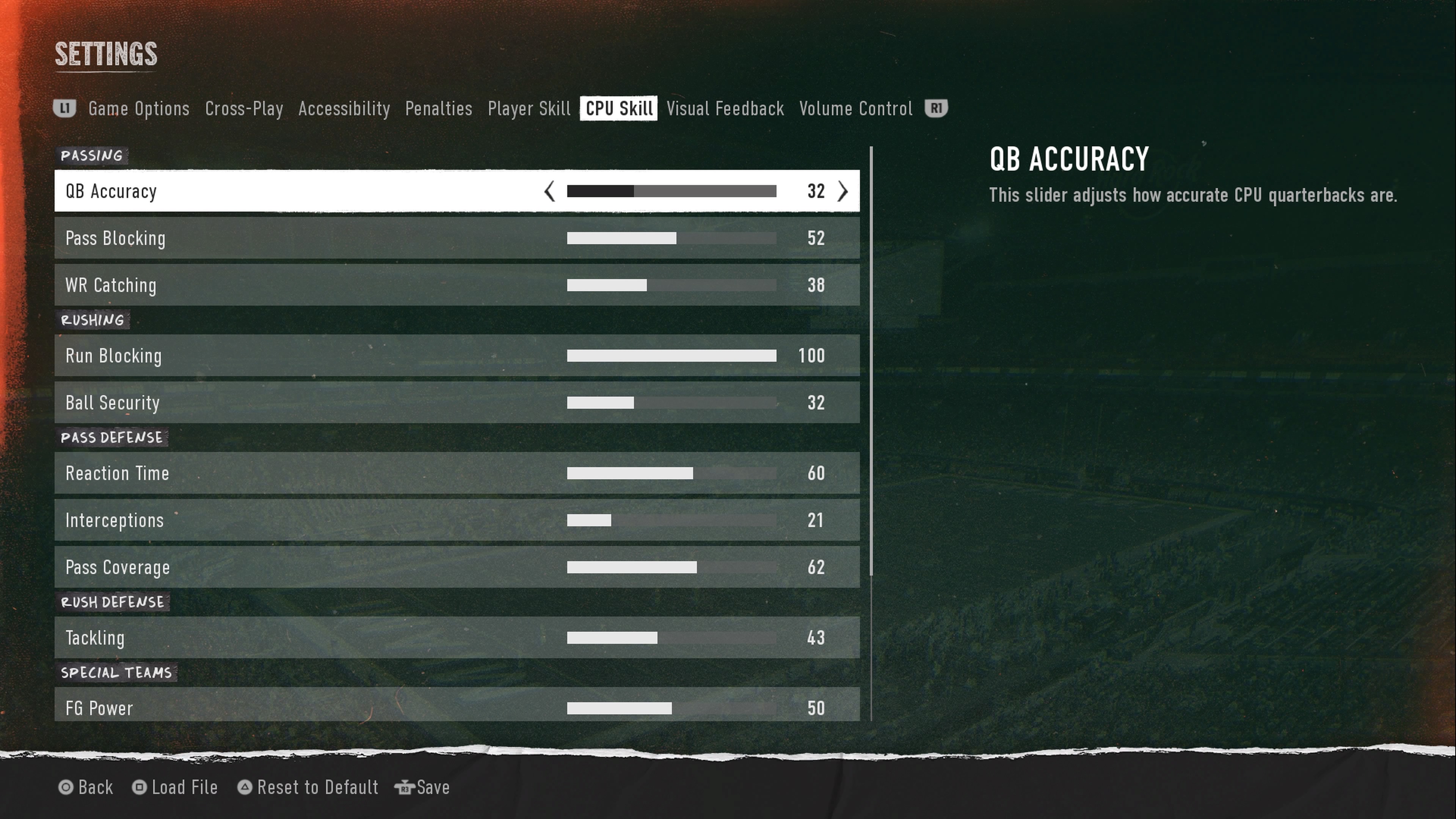
CPU Skill
The CPU needs a slight boost in certain areas to compensate for human decision-making, while being reigned in on others to prevent unfair rubber-banding.
- QB Accuracy: 40 (Stops lower-rated FCS or Group of 5 quarterbacks from playing like Patrick Mahomes).
- Pass Blocking: 45 (Allows your defensive line to generate realistic pressure without needing constant blitzes).
- Catching: 48 (Keeps receiver drops realistic without turning the game into a comedy of errors).
- Run Blocking: 52 (Gives the CPU a viable ground game, forcing you to commit to stopping the run).
- Fumbles: 50 (Standard fumble rate for computer ball-carriers).
- Pass Defense Interceptions: 38 (Prevents CPU defenders from making unrealistic, superhuman leaping interceptions with their backs turned).
- Pass Coverage: 55 (Forces you to go through your progressions instead of relying on open deep routes).
- Tackling: 50 (Balanced open-field tackling from AI defenders).
Special Teams and Penalties
Special teams in College Football 25 can make or break a close game. Fine-tuning these metrics ensures that field goals and punts behave predictably.
Special Teams Sliders
- FG Power: 50
- FG Accuracy: 42 (Makes long kicks challenging and adds pressure to clutch field goal attempts).
- Punt Power: 52
- Punt Accuracy: 50
- Kickoff Power: 50
Penalty Settings
Penalties dictate how the game flows and how much breathing room offensive linemen and defensive backs have. To encourage a realistic penalty count, turn the following up:
- Offside: 75
- False Start: 90 (Crucial for creating hostile road environments where crowd noise actually causes offensive line miscues).
- Holding: 55
- Facemask: 55
- Pass Interference: 75 (Ensures downfield battles are heavily contested and flags are thrown for sticky coverage).
- Roughing the Passer: 50
Tips for Fine-Tuning Your Experience
Every player has a different skill level and preference for how a football game should play out. Use these guidelines to tweak the sliders further:
- Play a Few Test Games: Don't judge a slider set after a single quarter. Play at least two full games to observe statistical trends in passing yards, completion percentages, and rushing totals.
- Adjust CPU QB Accuracy First: If you find games are still too high-scoring, drop the CPU QB Accuracy down by increments of 3 until completion rates hover around 60% to 65%.
- Account for Team Ratings: Remember that playing as Georgia versus playing as a 1-star program should feel vastly different. Sliders provide the framework, but team disparities will still shine through.
By implementing these adjustments, you will experience a much deeper, more rewarding simulation that captures the unpredictable drama of college football.