Best Jordan 4 Wallpapers: HD & 4K Sneaker Art
Since its debut in 1989, the Air Jordan 4 has stood as one of the most culturally significant silhouettes in footwear history. Designed by Tinker Hatfield, the sneaker introduced iconic design elements like molded plastic eyestay wings, side-panel mesh netting, and visible Air cushioning. Today, that distinctive architectural geometry makes the silhouette a favorite subject for digital creators and sneakerheads looking for top-tier jordan 4 wallpapers to customize their smartphones, tablets, and desktop displays.

Whether you want a moody, minimalist lock screen or a vibrant 4K macro shot showcasing tumbled leather grain, finding the right background is about balancing sneaker culture with clean display aesthetics. This guide breaks down the most iconic colorways to look for, visual wallpaper styles, and technical tips to ensure your display looks razor-sharp.
Iconic Colorways That Make the Best Jordan 4 Wallpapers
Not every sneaker translates equally well to a digital display. The best wallpaper choices highlight the signature contrast cuts and materials unique to the AJ4 silhouette. If you are curating your background rotation, prioritize these standout colorways.
The OG Icons: Bred and White Cement
The originals remain unbeatable for vintage appeal:
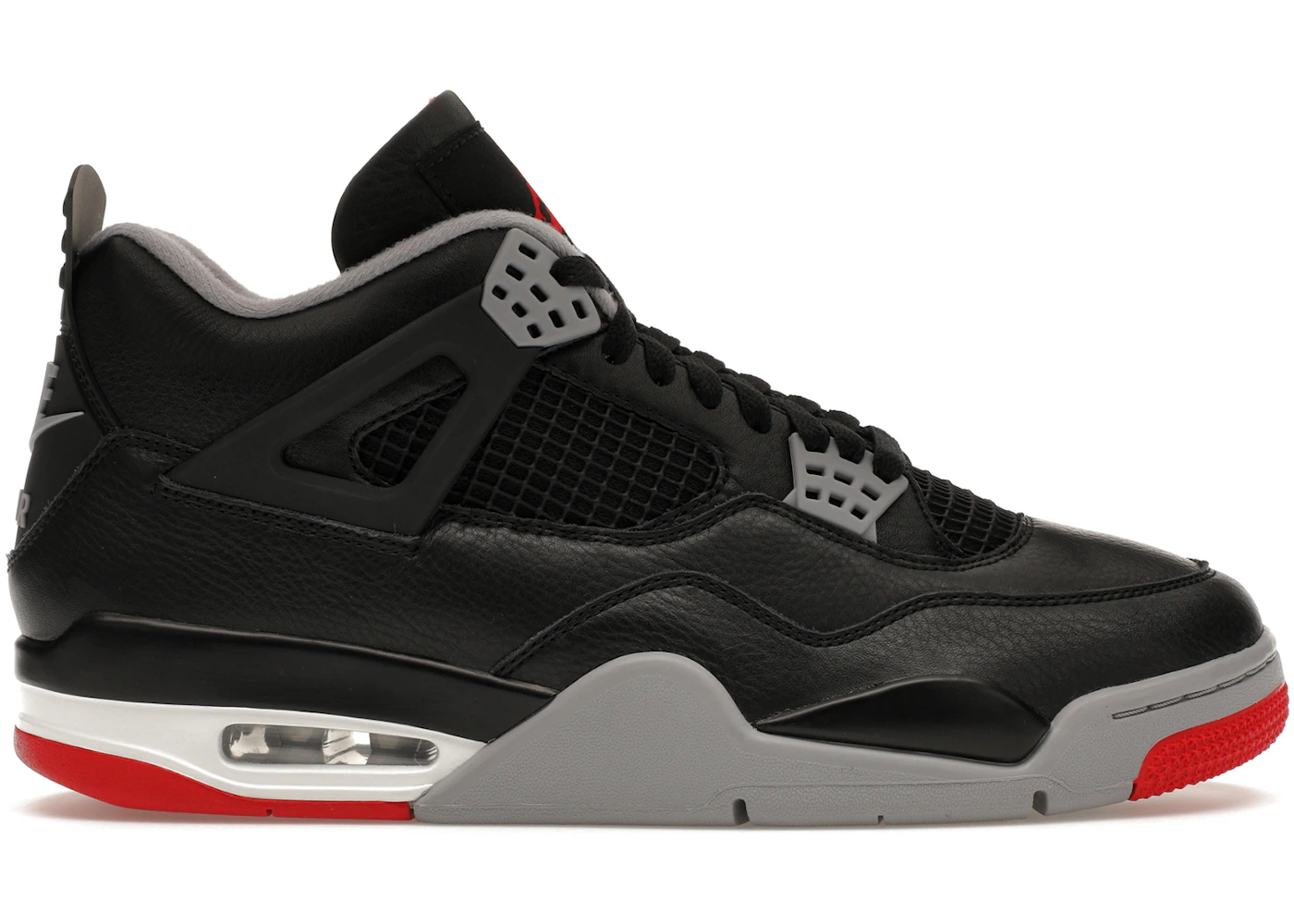
- Jordan 4 “Bred” (Black Cement): Featuring deep black nubuck, Cement Grey accents, and sharp Fire Red hits, this colorway looks exceptionally striking on dark mode interfaces. The high contrast naturally separates the shoe from dark backgrounds.
- Jordan 4 “White Cement”: Famous for its speckled paint pattern on the wings and midsole, the White Cement brings an airy, retro-industrial vibe. Close-up shots of the speckled heel tab (especially the classic “Nike Air” branding) make for timeless wallpapers.
Hype Collaborations: Off-White, Travis Scott, and KAWS
Collaborative releases give digital artists rich palettes and unexpected materials to showcase:
- Off-White x Air Jordan 4 “Sail”: Virgil Abloh’s monochromatic masterpiece uses translucent TPU, raw edges, and signature “AIR” typography. Wallpapers featuring the “Sail” lean heavily into warm, neutral, cream-toned aesthetics that pair effortlessly with light mode mobile themes.
- Travis Scott “Cactus Jack”: Dressed in vibrant University Blue suede with red interior lining, this pair creates an energetic focal point for screens needing a pop of color.
- KAWS x Air Jordan 4: Rendered in tonal grey or black premium suede with etched Mickey-inspired hands and glow-in-the-dark outsoles, KAWS wallpapers project an artistic, upscale streetwear look.
Modern Minimalists: Military Black and Pure Money
For clean desk setups or distraction-free lock screens, monochromatic models are ideal:
- Military Black: Blending white smooth leather with light grey suede mudguards and pitch-black accents, this modern classic offers a balanced, balanced composition that does not clash with phone app icons.
- Pure Money: An all-white leather construction featuring metallic silver hardware. High-key, studio-lit wallpapers of the Pure Money deliver a clean, clinical aesthetic.
Aesthetic Wallpaper Styles for Sneaker Displays
Sneaker art has evolved beyond basic product catalog photos. When searching for wallpapers, look for compositions that match how you actually use your screen.

1. Macro Photography and Material Close-Ups
Instead of showing the entire shoe, macro wallpapers zoom in on individual details: the grid pattern of the urethane-coated mesh netting, the grain of the leather, or the contrast stitching along the mudguard. These close-up crops work exceptionally well as phone home screens because the subtle textures create depth without competing with your app icons.
2. True Black OLED and AMOLED Wallpapers
If you own an iPhone with a Super Retina display or a modern Samsung Galaxy device, choose backgrounds with pure black (#000000) backdrops. Having a floating Jordan 4 illuminated by dramatic rim lighting against absolute black not only makes the colors pop, but it also conserves battery life by turning off inactive pixels.
3. Vector Art and Streetwear Illustrations
Digital illustrators frequently reimagine the Jordan 4 in anime, cyberpunk, or flat-vector illustration styles. These creative reinterpretations often incorporate iconic Chicago Bulls color schemes, Japanese calligraphy, or nostalgic 90s streetwear patterns, offering a graphic-novel flair that sets your screen apart from standard photo setups.
Screen Resolution and Sizing Guidelines
Nothing ruins a good wallpaper faster than low resolution, awkward cropping, or muddy compression. To keep your favorite sneaker looking crisp, aim for files that match or exceed your native screen specs.
- Mobile Aspect Ratios (19.5:9 to 20:9): Modern smartphones are taller and narrower than older models. Look for vertical images with a minimum resolution of 1170 × 2532 pixels (iPhone standard) or 1440 × 3120 pixels (Android QHD+). This ensures you can scale and align the shoe without losing detail.
- Desktop and Ultrawide (16:9 and 21:9): For PC monitors and MacBooks, accept nothing less than 3840 × 2160 (4K UHD). For ultrawide monitors, aim for 3440 × 1440. In landscape orientation, look for dynamic action shots or studio layouts where the shoes sit off-center to leave room for desktop folders.
- File Format: Always download wallpapers in uncompressed PNG or high-quality WEBP. JPEG files pulled directly from social media platforms often suffer from heavy compression artifacts, especially around the sharp edges of the Jordan 4’s netting and laces.
How to Set Up the Ultimate Sneaker Lock Screen
Modern mobile operating systems give you powerful tools to elevate your wallpaper setup. Here is how to get the most out of your Jordan 4 backgrounds:
- Leverage the iOS Depth Effect: On iOS 16 and later, the lock screen can place subjects slightly in front of the time display. Choose a portrait shot where the collar, tongue, or heel tab of the shoe extends toward the upper third of the image. The software will separate the shoe from the backdrop, creating an authentic 3D poster effect.
- Color-Match Your UI Elements: Both iOS and Android (Material You) allow you to tint lock screen clocks, widgets, and app icons. Pick a prominent accent color from the shoe—such as Infrared, Tour Yellow, or Pine Green—and apply it to your system clock font for a cohesive theme.
- Use Wallpaper Shuffle: Cannot decide between the Black Cat and the Lightning 4s? Set up an automated lock screen shuffle. You can configure your phone to cycle through your curated sneaker collection every time you wake the display or tap the screen.
- Leave Breathing Room for Widgets: If you rely on lock screen widgets for weather, calendar events, or battery levels, choose images where the sneaker sits in the lower two-thirds of the canvas. This keeps your essential data legible without obscuring the footwear.
The Air Jordan 4 represents an intersection of hardwood heritage and modern street style. By pairing the right colorway, sharp resolutions, and complementary UI tweaks, your device display can reflect that same legendary design language every time you wake your screen.