Best MLB The Show 22 Sliders for Realistic Gameplay
Understanding MLB The Show 22 Sliders

Out of the box, San Diego Studio provides a balanced gameplay experience, but it rarely captures the exact statistical realities of a true 162-game MLB season. Whether you find hitting too easy on All-Star difficulty or notice that outfielders cover too much ground, tweaking your MLB The Show 22 sliders is the single best way to fix these issues. Sliders allow you to adjust dozens of variables, ranging from pitch speed and CPU trade frequency to fielder reaction times and solid hit probabilities.
Finding the right slider set transforms a standard arcade-style baseball video game into an authentic simulation. If you play franchise mode or offline diamond dynasty offline modes, custom sliders are essential for ensuring that player ratings actually matter on the field.
Key Areas to Adjust for Realistic Gameplay
Before diving into a specific custom slider profile, it helps to understand what each major category actually controls. Most experienced players focus on four main pillars of the game: hitting, pitching, fielding, and CPU behavior.
1. Hitting and Batting Adjustments
Hitting in MLB The Show 22 can feel polarizing. You might string together ten hits in one game and get no-hit the next. To create a smoother curve, consider these adjustments:
- Human Contact: Lowering this slightly (around 4 to 5 ticks below default) reduces cheap bloop hits and rewards proper timing and PCI placement.
- Power: Keep this near default or bump it up by one or two points if you feel home runs are underrepresented compared to modern MLB fly-ball rates.
- Solid Hits: Raising this slider slightly ensures that barreled balls actually result in extra-base hits rather than loud outs to the warning track.
2. Pitching and Control Tweaks
Pitcher stamina and control sliders heavily dictate how long starting pitchers last in franchise games. In default settings, the CPU and human pitchers often throw complete games too easily.
- Pitcher Control: Lowering human and CPU control slightly forces pitchers to miss the zone more often, leading to higher walk rates that mirror real-life baseball.
- Pitcher Stamina: Increasing this value forces managers to pull tired starters around the 80-to-100 pitch mark, giving relief bullpens a more active role.
- Pitch Speed: If you play on Hall of Fame or Legend, you may not need to touch this. However, on Veteran or All-Star, increasing pitch speed makes fastballs feel genuinely fast and reduces late reactions.
3. Fielding and Baserunning Realism
Video: MLB The Show 22 Trying out my new slider settings for better gameplay

Defensive range is often criticized if left at default levels. Outfielders routinely track down gaps that should be extra-base hits.
- Fielder Reaction: Lowering this by 5 to 10 points gives hitters a fighting chance in the gaps and creates more realistic double-play frequency.
- Fielder Arm Accuracy: Adjusting this makes throws from the outfield and infield more variable, occasionally resulting in wild throws on high-pressure plays.
Recommended Realistic Slider Setup
If you want a plug-and-play solution that mimics authentic MLB statistics on All-Star or Hall of Fame difficulty, use the following baseline configuration. These settings are heavily inspired by community favorites from Operation Sports.
- Dynamic Difficulty: Off
- Batting Interface: Zone (Recommended for skill-based outcomes)
- Pitching Interface: Pinpoint or Meter
- Human Contact: 45
- Human Power: 50
- Human Timing: 50
- Human Solid Hits: 55
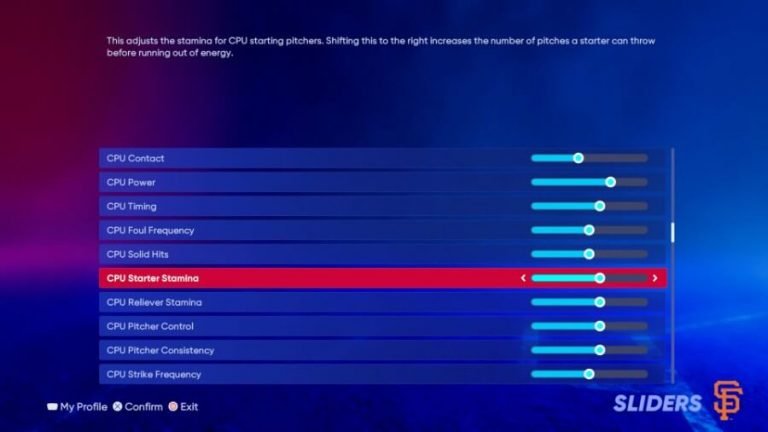
- Human Starter Stamina: 60
- Human Reliever Stamina: 50
- Human Pitch Control: 40
- CPU Contact: 50
- CPU Power: 50
- CPU Timing: 50
- CPU Strike Frequency: 48
- CPU Starter Stamina: 60
- CPU Reliever Stamina: 50
- CPU Pitch Control: 42
- Fielder Reaction: 40
- Fielder Arm Strength: 50
- Fielder Arm Accuracy: 45
- Baserunner Speed: 50
How to Test and Fine-Tune Your Sliders
No single slider set is universally perfect for every player because everyone has different controller skills, reaction times, and preferred difficulties. Once you apply a baseline setup, play a three-to-five-game sample size and look at your box scores.
Ask yourself these questions during your evaluation:
- Are starting pitchers consistently finishing games, or are bullpens getting used? (Adjust stamina if needed).
- Are strikeout totals matching modern baseball trends, where high strikeouts are common? (Adjust contact and control).
- Do game scores look like football scores, or are tight pitching duels happening?
Make small, incremental adjustments of two to three points at a time. Changing too many sliders at once makes it impossible to tell which adjustment fixed or broke your gameplay experience.
Conclusion
Taking the time to configure your MLB The Show 22 sliders elevates the game from a standard sports title to a personalized baseball simulator. By reigning in fielder reactions, fine-tuning pitcher stamina, and adjusting control metrics, you will experience a franchise or exhibition mode that looks, feels, and plays just like a real afternoon at the ballpark.