Build a Custom Coin Tracker That Fits Your Style
Why Standard Coin Software Often Falls Short

If you have ever downloaded a generic coin collecting app or bought a pre-printed logbook, you probably noticed a common problem. They rarely match how your brain actually works, nor do they reflect your unique aesthetic. Some apps focus entirely on bullion values, ignoring the historical beauty of your ancient Roman denarii. Others provide rigid database fields that leave no room for your personal notes, provenance history, or high-resolution photography.
Collecting coins is an art as much as it is a science. Your inventory method should honor that. When you take the time to create a coin tracker that fits your style today, you transform a tedious administrative chore into an extension of your hobby. Whether you prefer minimalist spreadsheets, visual Notion databases, or a bespoke physical ledger, building a system tailored to your tastes ensures you will actually keep it updated.
Determine Your Collecting Style and Core Needs
Before choosing a platform or designing a layout, take a step back to analyze what you actually collect and why. Different numismatic niches require entirely different tracking metrics.
Identify Your Focus Areas
Ask yourself what data points truly matter to your specific collection. If you collect modern bullion, you need real-time spot price integration, metal weight purity, and acquisition premiums. If you collect rare US type coins, you care more about grading service certification numbers (NGC or PCGS), strike quality, and population reports. If ancient coins are your passion, your tracker needs space for mint locations, ruler reigns, catalog references (like Sear or RIC), and historical context.
Define Your Aesthetic Preference
Style matters because motivation matters. If you despise looking at dense, gray data grids, a traditional spreadsheet will make you abandon your tracking efforts within a month. Conversely, if you love clean data architecture, a visual kanban board might feel too unstructured. Match your tracking medium to your personal workflow style.
Popular Methods to Build Your Custom Coin Tracker
You do not need to be a software developer to build a customized system. Several accessible platforms let you spin up a personalized dashboard with minimal effort.

1. The Visual Database (Notion or Airtable)
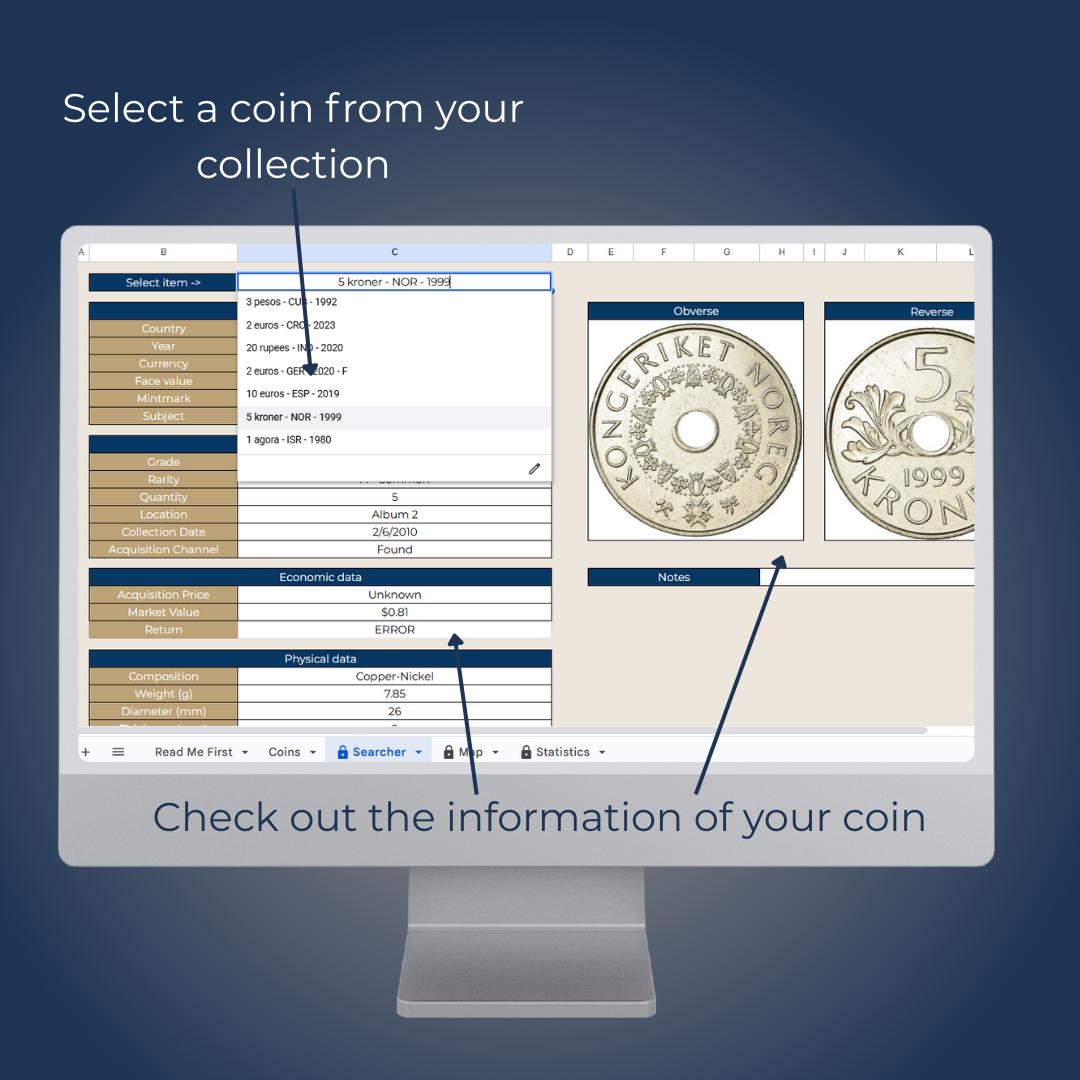
Tools like Notion and Airtable have revolutionized personal collections management. They allow you to build relational databases that blend rich text, image galleries, and data tables.
- Pros: Highly visual, supports embedded images of obverse and reverse sides, accessible across mobile and desktop, and infinitely customizable.
- Cons: Requires a short learning curve to set up formulas and gallery views.
2. The Flexible Spreadsheet (Google Sheets or Microsoft Excel)
For purists who love raw data control, a customized spreadsheet remains the gold standard. You can color-code rows by coin grade, set up conditional formatting for acquisition dates, and use simple formulas to calculate total portfolio value.
- Pros: Ultimate control over calculations, easy data export, and zero reliance on third-party app longevity.
- Cons: Less visually engaging unless you put extra effort into formatting and image insertion.
3. The Bespoke Physical Ledger
Digital fatigue is real. Many collectors prefer the tactile satisfaction of fountain pen ink on thick, archival-grade paper. Buying a blank leather-bound journal allows you to design custom page layouts with sketches, rubbings, and handwritten provenance notes.
- Pros: Completely private, screen-free experience, and creates a generational heirloom object.
- Cons: Hard to search quickly, difficult to update if you sell or trade frequently, and vulnerable to physical damage.
Step-by-Step Guide to Setting Up Your Tracker
Once you choose your medium, follow a structured process to populate your new system without feeling overwhelmed.
- Establish Your Essential Fields: Start with the non-negotiables: Coin Name/Type, Year, Country/Issuer, Grade, Purchase Date, and Purchase Price.
- Add Custom Tags: Create tags that reflect your collecting quirks. Use tags like 'Needs Upgrade', 'Inherited', 'Submitted for Grading', or 'Display Cabinet'.
- Incorporate High-Resolution Imagery: Take clear, well-lit photos of both the obverse and reverse. Visual records are invaluable for insurance purposes and quick reference.
- Document Provenance and History: Leave a dedicated text block for auction house history, previous owners, or historical background notes. This is where your tracker gains real personality.
Maintaining Your Tracking Habit
The best coin tracker in the world is useless if you neglect to update it. To ensure long-term success, adopt a proactive workflow. Whenever you acquire a new piece, take photos and log the basic details immediately before putting the coin in your safe or display case. Set aside a quarterly review session to update bullion valuations, check insurance coverage limits, and admire the growth of your collection. By building a tracker that honors your personal aesthetic and collecting goals, you turn inventory management into an enjoyable ritual.