Can I Get Cox Internet in My Area? How to Check
If you are moving to a new home or shopping for a faster broadband connection, you are likely asking: can I get Cox internet in my area? Cox Communications is the third-largest cable television and broadband provider in the United States, serving over 6 million residential and commercial customers. However, like most cable and fiber operators, its footprint is regional rather than nationwide.
Because cable franchise agreements and network infrastructure dictate where providers can build, Cox may dominate one city while being completely unavailable in the neighboring township. Here is a definitive guide on how to check your exact address, where Cox operates, and what to do if coverage stops just short of your home.
How to Verify Cox Availability at Your Exact Address
Internet availability cannot be determined accurately by zip code alone. Broadband infrastructure runs along specific utility poles and underground conduits; one side of a street may have service while the opposite side does not. Follow these steps to confirm availability:
- Use the Official Cox Address Checker: Go to the Cox website and enter your exact street address, apartment/unit number, and zip code. The tool cross-references Cox’s internal billing and tap database to give an immediate yes or no.
- Call Cox Direct Sales: If you are moving into new construction that does not appear on automated address lookups, call Cox customer service. Request a "site survey" or "serviceability check." An engineer will review physical plant maps to see if a nearby tap can be extended to your property.
- Inspect Your Home’s Wiring: If you already have access to the property, look for coaxial wall plates stamped with cable branding or an exterior network interface box on the side of the house. While an existing coax jack doesn't guarantee active service, it indicates the home was wired for a cable provider.
Can I Get Cox Internet in My Area? Coverage by State
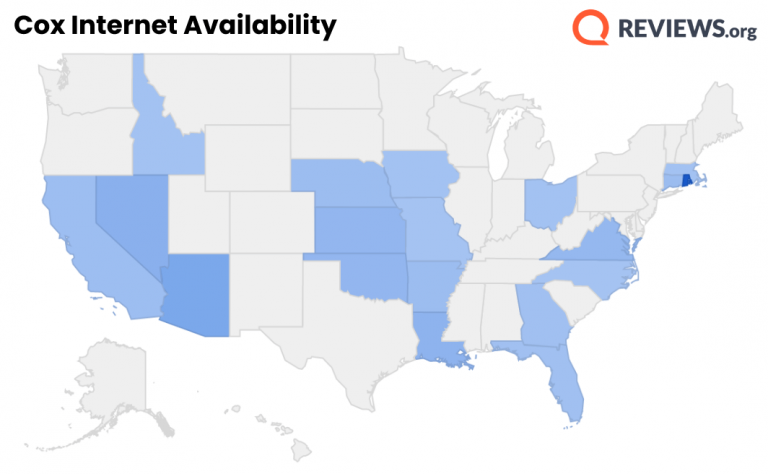
Cox operates across parts of 19 states. In some states, Cox has an extensive metropolitan presence; in others, it serves only a handful of military bases or select counties. Below is an overview of the primary regions where Cox maintains an active broadband network.
- West & Southwest: Arizona (major presence in Phoenix, Tucson, and Flagstaff), Nevada (Las Vegas, Henderson), California (San Diego County, Orange County, Santa Barbara, Palos Verdes).
- Central & Midwest: Oklahoma (Oklahoma City, Tulsa), Nebraska (Omaha), Kansas (Wichita, Topeka), Iowa (Council Bluffs), Arkansas (Northwest Arkansas, Fort Smith), Idaho (Sun Valley area), Ohio (Cleveland suburbs).
- South: Louisiana (Baton Rouge, New Orleans, Lafayette), Florida (Pensacola, Fort Walton Beach, Gainesville), Georgia (Macon, Warner Robins).
- East Coast & Mid-Atlantic: Virginia (Northern Virginia suburbs, Hampton Roads, Roanoke), Rhode Island (statewide presence including Providence), Connecticut (Meriden, Enfield, Manchester).
If you live outside these 19 states, Cox does not operate residential wireline broadband in your market, and you will need to look to alternative cable or fiber providers.
Why Cox Might Be in Your City but Not on Your Street
It is frustrating to discover that your city is listed as a Cox market, yet your specific address cannot order service. Several logistical and legal factors cause these micro-gaps in coverage:
Franchise Boundaries and Municipal Territories
Local governments traditionally granted non-exclusive franchise agreements to cable operators. Over decades of consolidation, telecom companies divided territory. In Northern Virginia, for example, Cox may service one side of a county boundary, while Comcast (Xfinity) holds the infrastructure on the other side.
Apartment Complexes and HOA Exclusivity
If you live in a multi-dwelling unit (MDU)—such as a condo, townhome community, or apartment complex—the property owner or Homeowners Association may have signed a marketing or bulk-wiring agreement with a specific provider like AT&T, Spectrum, or a local fiber utility. Even if Cox lines run beneath the public street outside your gate, the landlord may not permit Cox technicians to wire individual units.
Distance from the Nearest Distribution Tap
For standalone single-family homes, especially in semi-rural areas, a physical distribution line (feeder cable) must be within a standard distance—typically 150 to 300 feet—from your home to execute a standard installation drop. If your home sits 800 feet back on a private driveway, connection requires an expensive line extension that may cost several thousand dollars in civil construction fees.
Cox Network Speeds and Plans
If Cox is available at your address, you will generally be able to choose from several speed tiers delivered over either a Hybrid Fiber-Coaxial (HFC) network or pure Fiber to the Home (FTTH), depending on local network modernization.
- Go Fast (100 Mbps): Suitable for basic web browsing, email, and one or two simultaneous video streams.
- Go Faster (250 Mbps): Handles multi-device households, casual gaming, and routine 4K streaming.
- Go Even Faster (500 Mbps): Ideal for remote workers uploading files, smart home systems, and active multi-user households.
- Go Super Fast (1,000 Mbps / 1 Gbps): High-capacity bandwidth designed for heavy concurrent usage, large game downloads, and continuous streaming.
- Go Beyond Fast (2,000 Mbps / 2 Gbps): Available primarily in modernized DOCSIS 3.1 or FTTH areas, offering ultra-low latency and extreme bandwidth.
Note: Cox imposes a monthly data allowance of 1.25 TB (1,280 GB) across standard residential tiers in most markets. Heavy users who exceed this allotment can purchase an unlimited data add-on for an additional monthly fee.
Alternatives If Cox Is Not Available
If your address check reveals that Cox does not service your home, several alternative connection types can deliver reliable broadband:
- Local Fiber Providers: Check availability for pure fiber providers such as AT&T Fiber, Verizon Fios, Quantum Fiber, or regional municipal fiber networks. Fiber offers symmetrical download and upload speeds with no data caps.
- Alternative Cable Operators: If Cox is absent, your market is almost certainly wired by another primary cable operator, such as Spectrum (Charter) or Xfinity (Comcast).
- 5G Home Internet: Providers like T-Mobile Home Internet and Verizon 5G Home use fixed cellular signals to power home Wi-Fi. This is an increasingly viable alternative for urban and suburban homes lacking good wireline options, typically featuring flat rates and no hard data caps.
- Low-Earth Orbit Satellite: For rural locations where neither cable, fiber, nor dependable cellular signals reach, satellite providers like Starlink offer low-latency broadband anywhere with an unobstructed view of the sky.
Tips Before Finalizing Your Installation
Once you verify that Cox is available and select a tier, keep these practical points in mind to control costs and ensure a smooth setup:
- Evaluate Equipment Fees: Cox rents its proprietary Panoramic Wi-Fi gateway for a recurring monthly fee. You can eliminate this charge by purchasing your own standalone DOCSIS 3.1 cable modem and Wi-Fi router certified for the Cox network.
- Check Contract Terms: Cox frequently offers lower promotional rates in exchange for a 1- or 2-year service agreement. If you plan to move within a year, opt for the month-to-month plan to avoid early termination fees.
- Ask About Affordable Connectivity or Low-Income Programs: For eligible households, programs like Cox Connect2Compete provide discounted internet service to families with school-aged children receiving government assistance.