Cost Center Table in SAP: Essential Tables & Guide
Understanding the Cost Center Table in SAP
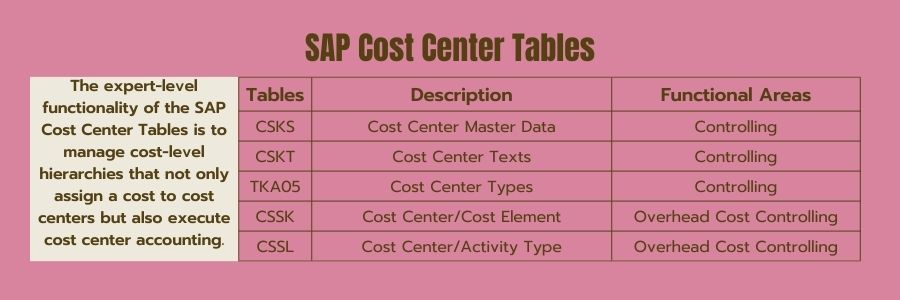
In SAP Controlling (CO), cost centers are the foundational building blocks for internal managerial accounting. They allow organizations to track where costs occur within a business structure, such as departments, plants, or project teams. Behind every cost center you view in the SAP GUI lies a robust database structure. Knowing the primary cost center table in SAP is essential for functional consultants, technical analysts, and power users who need to extract, report, or migrate master data.
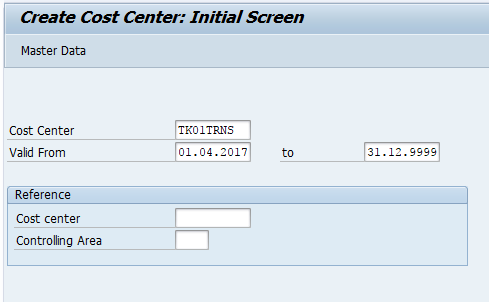
SAP stores cost center data across multiple tables to maintain normalization, performance, and data integrity. While users typically interact with transactions like KS01, KS02, and KS03, the system pulls and writes this information directly to underlying database tables. Understanding these tables helps you build custom SAP Queries (SQVI), write ABAP reports, or troubleshoot data migration issues via LSMW and LTMC.
Core Tables for Cost Center Master Data
Cost center master data is split between general structural attributes and language-dependent descriptive texts. The two most critical tables you must know are CSKS and CSKT.
1. CSKS: Cost Center Master Data
The CSKS table is the master table for cost centers in SAP. Every time a new cost center is created, a record is added here. Because cost centers are time-dependent, CSKS stores historical changes based on validity start and end dates.
Key fields in the CSKS table include:
- KOKRS: Controlling Area
- KOSTL: Cost Center
- DATAB: Valid-from Date
- DATBI: Valid-to Date
- VERAK: Person Responsible
- ABTEI: Department
- WAERS: Currency
- KHINR: Standard Hierarchy Area
Because CSKS stores data per validity period, a single cost center can have multiple entries if its attributes change over time. When querying CSKS, always filter by the relevant controlling area and validity dates to avoid duplicate results.
2. CSKT: Cost Center Texts
While CSKS holds the structural identifiers and attributes, the descriptive names of the cost centers are stored in the CSKT table. This separation allows SAP to support multiple languages for the same cost center.
Key fields in the CSKT table include:
- KOKRS: Controlling Area
- KOSTL: Cost Center
- SPRAS: Language Key (e.g., 'E' for English, 'D' for German)
- DATBI: Valid-to Date
- KTEXT: General Name (Short description)
- LTEXT: Long Text
To pull a complete list of cost centers with their descriptions, you must perform a table join between CSKS and CSKT using the Controlling Area, Cost Center, and Validity End Date as join conditions, while filtering CSKT by your desired language key.
Supporting Tables in Cost Center Accounting
Video: Creating and Managing Cost Centers in SAP 📊
Beyond the core master data tables, several other tables relate directly to cost center structures and planning activities.
1. CRMS: Cost Center Group Master Data
Cost centers are rarely viewed in isolation; they are organized into standard hierarchies. The group structures and nodes are managed via table SETHEADER and SETLEAF, which handle general sets in SAP. However, specific linkages and group assignments can be analyzed through table views related to Controlling Area groups.
2. COSS and COSP: Cost Center Totals
If you are looking beyond master data into transactional balances, you will interact with cost center totals tables:
- COSP: CO Object: Cost Totals for External Postings
- COSS: CO Object: Cost Totals for Internal Postings
These tables aggregate actual and planned costs by cost center, fiscal year, and cost element, serving as the basis for financial reporting.
How to View and Query Cost Center Tables
SAP provides standard tools to inspect and extract data from these tables without needing advanced programming skills.
- SE16 or SE16N (Data Browser): Enter transaction code SE16N, type 'CSKS' or 'CSKT', and press Enter. Here, you can apply filters such as Controlling Area or Person Responsible to view raw table contents.
- SQVI (Quick Viewer): Create a quick view joining CSKS and CSKT. Link them on fields KOKRS and KOSTL to generate an Excel-exportable report containing both cost center IDs and their corresponding descriptions.
- SE11 (ABAP Dictionary): Use SE11 to inspect the technical structure, data elements, and foreign key relationships of the cost center tables.
Best Practices for Working with SAP Cost Center Tables
When writing reports or performing data extracts involving the cost center table in SAP, keep these technical considerations in mind:
Always include date filters: Because SAP cost center master data is time-sliced, failing to filter by valid dates will return historical iterations you may not need.
Mind the language key: When querying CSKT, always restrict the `SPRAS` field to a single language. Otherwise, your query will multiply rows for every language installed in the system.
Performance optimization: When joining CSKS and CSKT in custom programs, ensure secondary indexes are utilized or restrict the Controlling Area (`KOKRS`) early in the selection screen to improve execution speed.
Mastering these tables bridges the gap between functional accounting processes and technical data management, empowering you to generate accurate financial insights across your enterprise.