Cox High Speed Internet Packages: Complete Guide
Navigating Cox High Speed Internet Packages

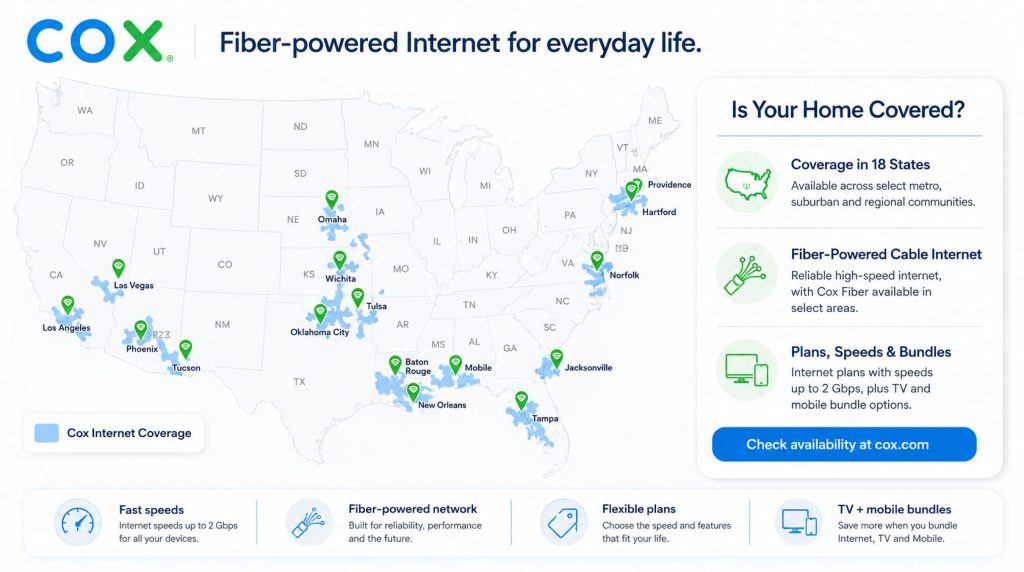
Choosing the right home internet service can feel overwhelming, especially with so many tiers and promotional offers on the table. If you live within their coverage footprint, Cox Communications is one of the largest cable internet providers in the United States, known for delivering robust multi-gigabit connections to millions of homes.
Whether you live alone, work from home, or manage a bustling household full of gamers and 4K streamers, understanding cox high speed internet packages is the first step toward securing a reliable connection. In this guide, we break down the available speeds, data limits, equipment fees, and hidden costs to help you make an informed decision.
Overview of Cox Internet Tiers
Cox structures its internet lineup using a tier system based primarily on maximum download speeds. Upload speeds on their cable network are typically lower than download speeds, which is standard for hybrid fiber-coaxial (HFC) networks, though their newer fiber-to-the-home expansions offer symmetrical speeds in select areas.
Starter and Value Plans (Up to 100 Mbps to 250 Mbps)
For light internet users—such as single occupants who primarily browse the web, check emails, and stream standard-definition video—lower-tier plans offer an affordable entry point.
- Starter (up to 100 Mbps): Best for 1-2 light users. Handles basic browsing, social media, and occasional video calls effortlessly.
- Internet Essential (up to 250 Mbps): A step up that comfortably supports multiple devices streaming HD video or casual online gaming.
Mid-Tier and Fast Plans (Up to 500 Mbps)
If your household features multiple connected devices, smart home appliances, and regular video conferencing, mid-tier options strike a strong balance between performance and cost.
- Internet Preferred (up to 500 Mbps): Excellent for households with 3 to 5 users. It easily accommodates simultaneous 4K video streaming, online learning, and working from home without stuttering.
Gigabit and Multi-Gig Plans (1 Gbps to 2 Gbps)
Power users, competitive online gamers, and large families handling heavy data loads will want to look at Cox's highest-speed offerings.
- Internet Gigablast (up to 1 Gbps): Provides lightning-fast download speeds, making heavy file downloads and cloud backups nearly instantaneous.
- Internet Two Gig (up to 2 Gbps): Available in select fiber-wired neighborhoods, delivering ultra-high bandwidth for massive households and tech enthusiasts.
Pricing, Contracts, and Promotional Rates
When shopping for Cox high speed internet packages, you will notice that advertised rates are usually promotional prices guaranteed for the first 12 to 24 months. Once the promotional period expires, your monthly bill will typically increase to the standard non-promotional rate.

Fortunately, Cox generally does not require a fixed-term annual contract for standard residential internet plans. This gives you the flexibility to upgrade, downgrade, or cancel your service without paying early termination fees (ETFs), provided you are not bundled into a promotional TV or phone package that specifies a contract term.
Data Caps and Unlimited Options
Most Cox internet plans come with a standard data allowance of 1.25 terabytes (1,280 GB) per month. For the average household, 1.25 TB is more than enough to browse, game, and stream video daily.
However, if you have a household of heavy data users who frequently download massive game files, stream 4K content around the clock, or run a home-based digital media business, you might approach this limit. If you exceed 1.25 TB, Cox automatically adds 50 GB blocks of data to your account for $10 each, up to a monthly maximum overage charge.
To avoid overage fees, Cox offers an Unlimited Data Add-on for an additional monthly flat fee. This add-on completely removes the monthly cap, giving you peace of mind if your household consumes terabytes of data regularly.
Equipment: Renting vs. Buying
To get online, you need a modem and a wireless router. Cox offers their proprietary Panoramic Wifi Gateway, which combines both modem and advanced Wi-Fi routing capabilities into a single device.
- Cox Gateway Rental: Cox charges a monthly equipment rental fee for the Panoramic Wifi Gateway. This fee often includes advanced security features and access to the nationwide Cox WiFi hotspot network.
- Third-Party Equipment: You can choose to buy your own cable modem (DOCSIS 3.0 or DOCSIS 3.1 depending on your speed tier) and a separate Wi-Fi router to eliminate the monthly rental fee entirely. Ensure that any third-party modem you purchase is officially approved by Cox for your specific speed tier.
Installation Options
Getting set up with Cox is relatively straightforward:
- Easy Connect (Self-Installation): Cox mails you a self-installation kit containing the gateway, cables, and instructions. You plug it in, follow the app prompts, and activate your service for a nominal fee or sometimes for free.
- Professional Installation: If your home lacks active cable wiring or you prefer a technician to handle the setup, you can request a professional technician visit. This option usually carries a one-time installation fee.
Pros and Cons of Cox Internet
Weighing the advantages and potential drawbacks helps ensure you choose the right provider for your needs:
- Pros: Wide availability across multiple states, exceptional download speeds up to 2 Gbps, no annual contracts on standalone plans, and a reliable hybrid-fiber network.
- Cons: Monthly data caps on most plans (unless you pay extra for unlimited), upload speeds are slower than download speeds on cable tiers, and promotional rates increase after the first year or two.
How to Choose the Best Plan for Your Home
To select the ideal tier among the available Cox high speed internet packages, evaluate your daily digital habits. If two people are primarily checking email and streaming Netflix in HD, a 150 Mbps to 250 Mbps plan is more than sufficient and saves you money. If you have four or more heavy users, smart security cameras, and work remotely with large data transfers, investing in the 500 Mbps or 1 Gbps plan guarantees seamless performance without frustrating bottlenecks.