Design Your Childhood Dream Home with Behr Paint Visualizer
Bring Your Childhood Visions to Life
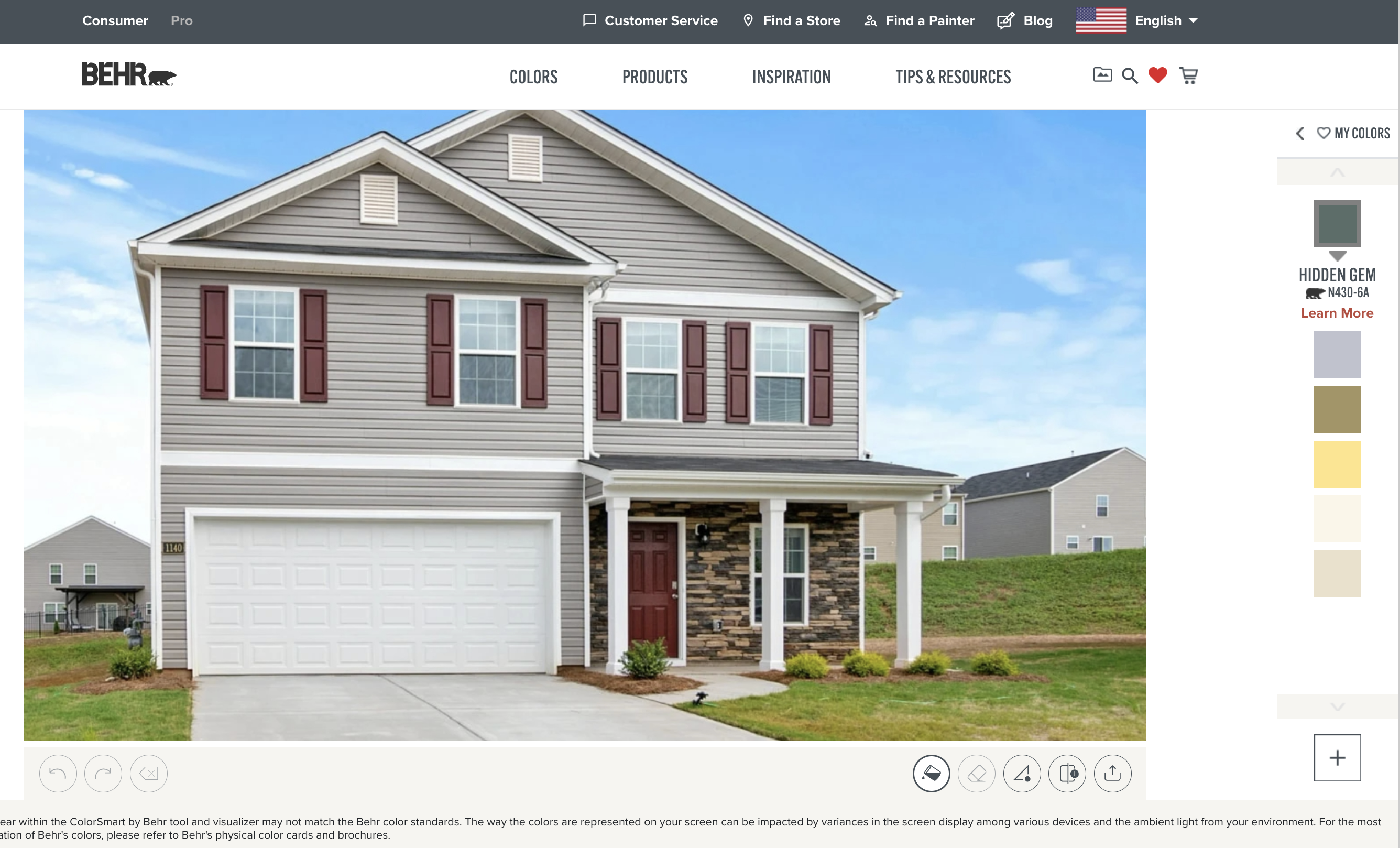
We all remember what our ultimate dream home looked like when we were children. For some, it was a vibrant, pastel-hued castle; for others, it was a cozy cabin washed in warm, earthy tones. As adults, we often settle for neutral gray walls out of fear that a bold color choice will go wrong. However, you no longer have to guess how a bright turquoise or a deep forest green will look in your actual living room. With the Behr Paint Visualizer software, you can finally get the dream home of your childhood without taking any financial or aesthetic risks.
Painting your home is one of the most cost-effective ways to completely transform its vibe. Yet, standing in the aisle of a hardware store staring at hundreds of paint chips can lead to choice paralysis. Digital visualization tools change the game by letting you test colors before you ever pick up a roller or buy a gallon of primer.
How the Behr Paint Visualizer Works
Technology has made home renovation remarkably accessible. The Behr color visualizer tool is designed to be user-friendly, catering to both tech-savvy renovators and complete beginners. You do not need an interior design degree to navigate the platform and start experimenting.
Step 1: Choose Your Starting Point
You have two main paths when using the software:
- Upload a Photo: Take a clear, well-lit picture of your own room, exterior, or kitchen cabinets and upload it to the platform.
- Use Sample Rooms: If you are planning a move or want a blank slate, you can browse Behr's extensive library of pre-loaded room templates categorized by living rooms, bedrooms, kitchens, and exteriors.
Step 2: Map and Mask the Surfaces
Once your image is loaded, the software allows you to define the walls, trim, and ceilings. Advanced edge-detection technology helps trace the boundaries of your walls, though you can manually fine-tune the selection to ensure absolute precision around windows, baseboards, and furniture.
Step 3: Apply and Test Colors
This is where the magic happens. You can browse Behr’s massive catalog of colors—spanning classic whites, bold jewel tones, and soothing pastels—and apply them to your digital room with a single click. Watch how a room instantly shifts from drab to dreamy.
Translating Childhood Nostalgia into Modern Palettes
Recreating your childhood dream home doesn't mean your space has to look juvenile or dated. The secret lies in translating those nostalgic color cravings into sophisticated, livable modern palettes using Behr's curated collections.
Video: Behr Paint Colors (Windows Phone App)

If you dreamed of a sunny, bright yellow bedroom, look into buttery, muted yellows like Behr’s "Trade Winds" or "Lemon Drop" to keep the space feeling airy rather than overwhelming. If your childhood imagination leaned toward a dramatic superhero lair or a deep ocean theme, rich navy blues or charcoal grays can deliver that same moody, immersive atmosphere while maintaining adult elegance.
Key Features to Maximize Your Design Experience
To get the most out of the Behr Paint Visualizer, you should explore some of the platform's advanced features that go beyond simple color swapping.
Coordinate Color Palettes
A successful room design relies on color harmony. The tool doesn't just let you paint walls; it helps you select complementary shades for trim, ceilings, and accent walls. Behr’s built-in color harmony guides suggest palettes that naturally flow together, ensuring your trim pops and your accent walls command the right kind of attention.
Save and Compare Options
It is rare to fall in love with the very first color you test. The software allows you to save multiple versions of your room project. You can switch back and forth between a soft sage green and a dusty rose, saving both variations to compare side-by-side or share with family members before making a final decision.
Exact Paint Calculations
Once you nail down the exact color scheme of your childhood dreams, the tool can help bridge the gap to the physical project. Many visualizer workflows integrate with product calculators, helping you estimate how many gallons of Behr Marquee, Behr Premium Plus, or Behr Dynasty paint you will need based on your room's dimensions.
Tips for Accurate Color Matching
Digital screens emit light, which means colors can sometimes look slightly different on your monitor or smartphone than they do on your physical walls. Follow these best practices to ensure your digital vision matches reality:
- Calibrate Your Screen: Turn off night-shift modes and set your display brightness to a neutral level when evaluating colors.
- Consider Natural Light: Take your room photo during daylight hours with your blinds open. A room that gets direct southern sunlight will make warm colors glow, while north-facing rooms can make cool colors look sharper.
- Order Peel-and-Stick Samples: Before buying gallons of paint, use Behr’s peel-and-stick color swatches to test the digital winner on your actual wall for a couple of days.
Turn Your Vision Into Reality Today
There is something deeply satisfying about honoring your inner child by designing a home environment that brings you pure joy. You no longer have to settle for boring walls or live with the regret of a hasty painting mistake. By leveraging the Behr Paint Visualizer, you take complete control of your home’s aesthetic trajectory. Fire up the software, upload a photo of your space, and start crafting the dream home you have wanted ever since you were a kid.


