DHRM Payroll Calendar Hacks for Employee Productivity
Payroll management is rarely viewed as a driver of workplace productivity. Most organizations see it as a back-office necessity—a repetitive, compliance-driven cycle of calculating hours, processing deductions, and issuing direct deposits. However, when HR teams and state agencies operate under Department of Human Resource Management (DHRM) guidelines, the payroll schedule impacts far more than just bank accounts.

Disorganized pay periods, unclear cutoff dates, and sudden schedule shifts cause administrative bottlenecks and trigger employee financial anxiety. When workers are worried about delayed reimbursements, inaccurate leave balances, or mismatched pay cycles, their focus shifts away from their core duties. Implementing smart DHRM payroll calendar hacks transforms a rigid schedule into a strategic framework that reduces friction, aligns expectations, and actively supports overall employee productivity.
Understanding the DHRM Payroll Ecosystem
Before implementing productivity hacks, it is essential to understand why structural alignment matters. DHRM policies typically dictate rigid timelines for timesheet submissions, approval chains, and final disbursement dates, especially within state government agencies and public sector organizations. These guidelines are designed to ensure absolute fiscal accountability, but they can easily feel inflexible to employees.
When employees understand the rhythm of the pay cycle, they can better manage their personal financial planning, time-tracking responsibilities, and leave requests. By demystifying the DHRM payroll calendar, HR departments remove hidden stressors that quietly drain organizational momentum and productivity.
1. Sync Pay Cutoffs with Team Energy Cycles
Timesheet submission deadlines often fall on awkward days, such as mid-week crunches or Friday afternoons when employees are already winding down. This misalignment leads to rushed entries, missed hours, and a high volume of frantic last-minute corrections for payroll administrators.
To combat this, analyze your organization's workflow:
- Avoid Friday Afternoons: Set internal soft deadlines for timesheet approvals on Thursday mornings rather than Friday at 5:00 PM. This gives managers a buffer to review entries without cutting into weekend rest.
- Leverage Natural Pauses: Align minor milestones—like overtime cutoffs or leave requests—with natural troughs in project workloads to prevent cognitive overload.
When employees aren't scrambling to log hours while juggling heavy project deliverables, error rates drop significantly, saving HR countless hours of back-and-forth troubleshooting.
2. Visual Synchronization and Digital Integration
One of the simplest yet most overlooked hacks is moving beyond static PDF calendars. DHRM payroll calendars are often distributed as downloadable documents that sit buried in employee email inboxes or shared network drives.
Integrate with Enterprise Calendars
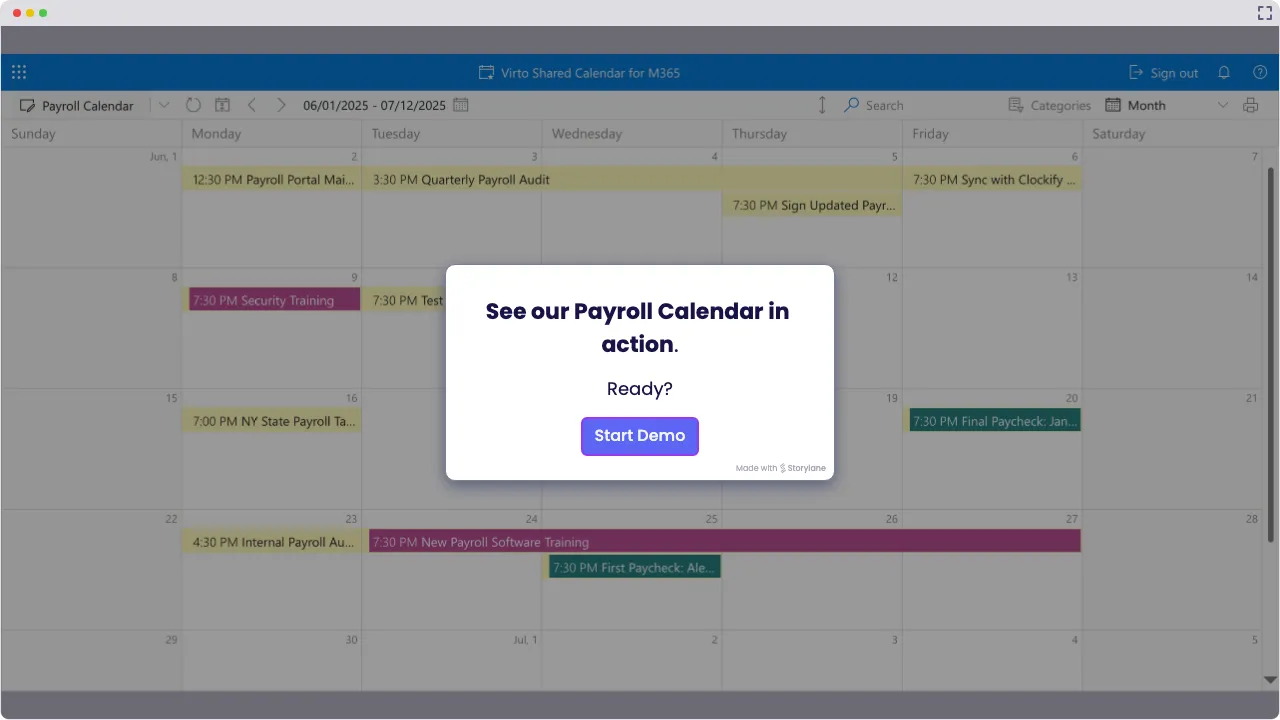
Export the entire year's DHRM payroll schedule directly into enterprise calendar systems like Microsoft Outlook or Google Workspace. Create a dedicated, color-coded calendar layer specifically for payroll milestones:
- Timesheet submission reminders (set for 48 hours prior to the hard deadline).
- Leave accrual update dates.
- Direct deposit paydays.
When these dates live natively in an employee's daily schedule alongside project deadlines and meetings, the element of surprise is eliminated. Proactive visibility allows staff to manage their time and administrative duties without abrupt interruptions.
3. Streamline Leave Submissions with Payroll Milestones
Accrual calculations and leave balances are among the most common sources of employee confusion and HR inquiry. Employees frequently submit leave requests without knowing whether they have accrued sufficient paid time off (PTO) for a specific pay period, leading to rejected requests and payroll adjustments.
Link the leave-request workflow directly to the DHRM payroll calendar milestones:
- Tie Deadlines Together: Require that all leave requests for a given pay cycle be approved by the same timestamp that timesheets lock.
- Automate Reminders: Set automated notifications that remind staff to check their leave balances two weeks before the cutoff date.
By synchronizing leave management with the rhythm of the pay cycle, employees gain clarity on their available time off, reducing administrative disputes and keeping morale high.
4. Transparent Communication Loops
Productivity plummets when employees experience financial uncertainty. Holidays, bank closures, and leap years frequently disrupt standard DHRM pay schedules, causing paydays to shift by a day or two. If these shifts are not communicated well in advance, employees who live paycheck-to-paycheck experience heightened anxiety.
Proactive communication turns a potential crisis into a non-event:
- Automated Bulletins: Send brief, automated team chat reminders (via Slack or Microsoft Teams) one week prior to any altered pay schedule caused by holidays.
- The "Why" Factor: Clearly explain how holiday schedules impact processing times so employees understand that adjustments are routine compliance measures, not errors.
When staff trust that their compensation is secure and predictable, their mental energy remains dedicated to their core responsibilities.
Measuring the Impact on Your Organization
Optimizing your DHRM payroll calendar isn't just about making life easier for HR personnel; it is a holistic strategy to protect focus time across the entire workforce. By reducing administrative friction, eliminating redundant emails about pay dates, and aligning operational workflows with financial cycles, organizations foster a calmer, more predictable work environment.
Start small by auditing your current calendar distribution methods, shifting static dates into dynamic team calendars, and adjusting soft deadlines to protect employee focus. Over time, these minor adjustments compound into a measurable boost in daily workplace productivity.