Emergency PhET Gas Simulation Help Now
Emergency PhET Gas Simulation Help Now

If you have a physics or chemistry assignment due in a few hours and you are staring blankly at moving particles, you are not alone. Many students search for emergency PhET gas simulation help now when trying to figure out how temperature affects pressure or why volume changes when particles collide. The University of Colorado Boulder's Gas Properties simulation is an incredible tool for visualizing the invisible behavior of gases, but it can be frustrating to interpret while racing a deadline.
This guide provides a rapid-fire walkthrough of the simulation's core mechanics, the fundamental gas laws at play, and step-by-step troubleshooting for common lab questions. Whether you are dealing with constant volume, controlled temperature, or mixing heavy and light species, you will find the answers you need right here.
Understanding the Simulation Interface
Before changing variables, it helps to know what every button and gauge on the screen actually does. When you first launch the simulation, you will typically use the 'Intro' or 'Properties' tab.
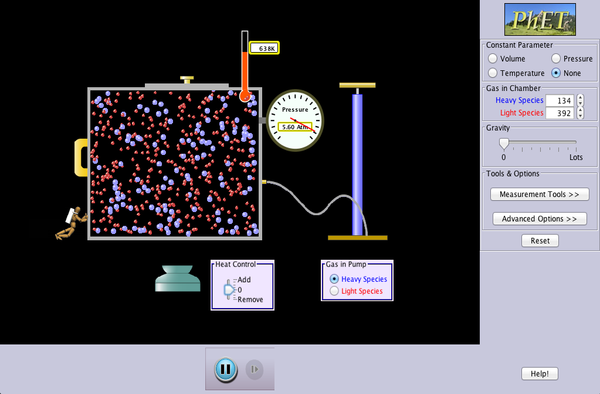
- The Pump: Click and drag the pump handle to inject gas particles into the chamber.
- Pressure Gauge: Measures the force exerted by particle collisions against the walls of the container in units of atmospheres (atm) or kilopascals (kPa).
- Temperature Slider: Controls the thermal energy of the system, measured in Kelvin (K). Adding heat makes particles move faster.
- Container Width Tool: Allows you to expand or compress the box to change the volume.
- Hold Constant Box: Located on the right side, this feature lets you lock one variable (like Temperature or Pressure) while you change another.
Core Gas Laws in Action
The PhET simulation is essentially a visual playground for the Ideal Gas Law ($PV = nRT$). To answer your lab questions correctly, you need to understand how these variables interact with one another in real-time.
Boyle's Law: Pressure and Volume
Boyle's Law states that pressure and volume are inversely proportional at a constant temperature. If you decrease the volume by pushing the wall of the container inward, the particles have less space to move. They collide with the walls much more frequently, causing the pressure to spike dramatically.
Lab Tip: If your assignment asks what happens to pressure when volume is halved, look at the gauge: the pressure should double.
Gay-Lussac's Law: Temperature and Pressure
Video: PhET Gas Law Inquiry Lab Tutorial

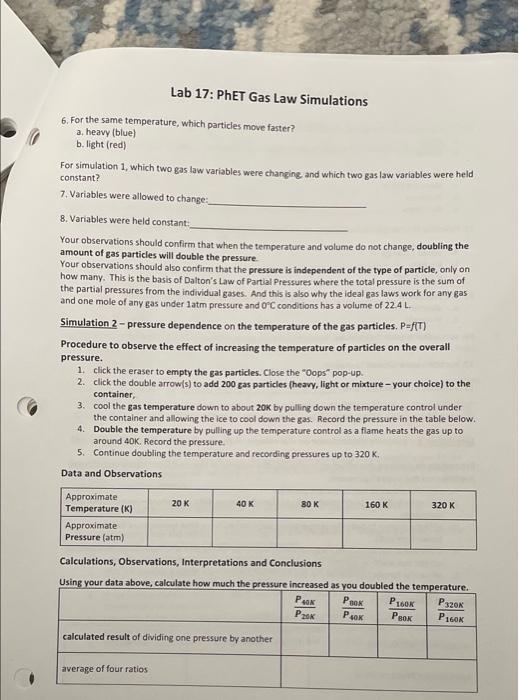
Temperature and pressure share a direct relationship. When you heat up the gas using the heat control at the bottom, the kinetic energy of the particles increases. They zoom around faster and slam into the walls harder and more often, driving the pressure up.
Charles's Law: Volume and Temperature
If you select the 'Width' option with 'Pressure' held constant (using the 'Hold Constant' panel), heating the gas forces the container to expand. The particles need more room to maintain the same pressure level as their speed increases.
Step-by-Step Troubleshooting for Common Lab Tasks
If your worksheet or online quiz is asking specific experimental questions, use this quick checklist to find the right adjustments inside the simulation.
- Reset the simulation: Always hit the yellow reset button in the bottom right corner before starting a new data trial to clear out leftover particles.
- Add a set number of particles: Use the injection pump for 'Heavy Species' (blue circles) or 'Light Species' (red circles) until the particle counter reaches your target number (e.g., 100 particles).
- Observe kinetic energy: Check the 'Particle Mass' and notice how heavy particles move noticeably slower than light particles at the exact same temperature. Lighter particles exert less force per collision because of their lower mass, even though their average speed is higher.
- Record steady-state values: Because particles bounce around randomly, the pressure gauge bounces slightly. Wait for the needle to stabilize around an average value before writing down your data points.
Frequently Asked Questions
Why is my pressure dropping to zero?
If you removed all the particles using the removal tool or expanded the volume infinitely, there are no particles colliding with the walls. Inject more gas to restore pressure readings.
How do I convert Celsius to Kelvin for calculations?
The simulation uses Kelvin. To convert any Celsius temperature from your lab manual into Kelvin, simply add $273.15$.
By breaking down the interface, focusing on particle motion, and applying basic gas laws, you can complete your assignment with confidence and master the concepts behind the PhET gas simulation.