EQTrader Explained: Platform Features, Setup, and Tips
In fast-moving financial markets, the interface you choose directly dictates your execution speed, analytical depth, and overall risk control. EQTrader has gained traction among retail and institutional traders seeking an efficient, multi-asset trading environment tailored for technical precision and streamlined market access. Whether you are actively scalping equities, managing swing positions across indices, or balancing diverse asset classes, understanding how this platform operates is crucial for optimizing your workflow.

This guide breaks down the core architecture of the platform, its key tools, how it compares to legacy software, and actionable steps to configure it for disciplined trading.
Core Capabilities of the EQTrader Platform
Modern traders demand more than just basic buy and sell buttons. A professional workspace must combine high-speed data feeds with deep liquidity routing and flexible charting. Here is an overview of the foundational features that define the platform.
1. Multi-Asset Execution and Liquidity
While originally focused around equities and CFDs, modern implementations allow users to monitor and trade multiple financial instruments simultaneously. By aggregating quotes from multiple liquidity providers, the platform reduces spreads and minimizes execution slippage during volatile sessions, such as corporate earnings releases or major macroeconomic data drops.
2. Advanced Charting Engine
Technical analysts rely heavily on visual clarity. The built-in charting package supports dozens of timeframes, ranging from tick-level data for intra-day scalpers to weekly and monthly views for long-term position traders. Users have access to:
- Standard trend indicators (Moving Averages, Bollinger Bands, Ichimoku Clouds).
- Momentum oscillators (RSI, MACD, Stochastic).
- Customizable drawing tools including Fibonacci retracements, pitchforks, and multi-point trendlines.
- Multiple chart layouts to monitor correlated assets across different monitors.
3. Modular and Customizable Workspace
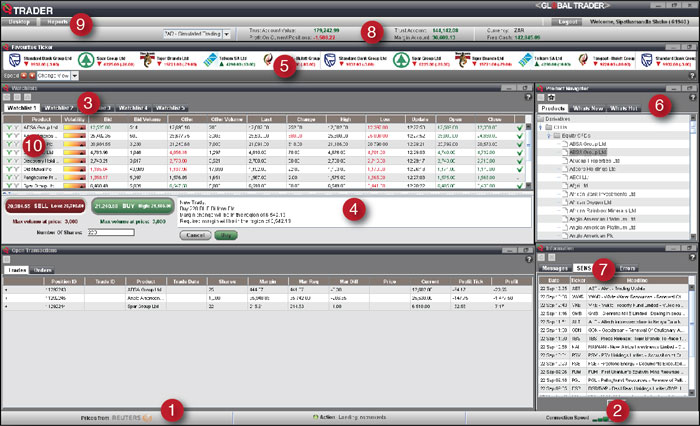
Screen real estate is vital. The interface allows users to dock, detach, and resize market watchlists, Depth of Market (DOM) windows, order books, and news feeds. This modularity means an equity momentum trader can prioritize Level 2 data and fast order tickets, while a macro swing trader can focus on multi-asset overview charts and economic calendars.
EQTrader vs. Traditional Platforms
Many traders start on widespread platforms like MetaTrader 4 (MT4) or MetaTrader 5 (MT5). While those systems have a deep ecosystem of third-party plugins, newer platforms like EQTrader focus heavily on user experience, modern browser technologies, and native direct-market-access (DMA) style workflows.
- User Interface and Accessibility: Traditional terminals often feature dense, 2000s-era desktop designs that require substantial manual configuration. EQTrader typically incorporates cleaner, responsive UI components that run smoothly across both desktop applications and modern web browsers without heavy system overhead.
- Asset-Specific Order Tickets: Legacy platforms were primarily engineered around forex lot sizes. In contrast, modern equity-focused terminals naturally handle share volumes, fractional shares, and customized limit-if-touched or trailing orders directly from the DOM or chart interface.
- Data Density: For stock traders, seeing the order book balance, transaction time-and-sales, and corporate event schedules side-by-side provides a distinct operational advantage over platforms that treat all assets as generic CFD pairs.
Step-by-Step: Setting Up Your Workspace
To extract the most value from the terminal without feeling overwhelmed by market noise, follow this structured setup procedure:
Video: Hot Trades Live - YMAT Stock - TCRT Stock - MASK Stock - XLAB Stock - AAME - SAFX - MEDS - FRGT -SPY
Step 1: Curate Your Watchlists

Avoid cluttering your primary view with hundreds of tickers. Segment your watchlists into focused themes, such as high-beta tech equities, benchmark indices (S&P 500, Nasdaq 100), and key commodities or currency pairs that influence equity direction. Take advantage of custom alerts to notify you when an asset hits a critical technical barrier.
Step 2: Calibrate One-Click and Chart Trading
When momentum surges, clicking through confirmation pop-ups can result in missed entries or unfavorable fills. Configure one-click trading with pre-defined risk defaults. For instance, you can set standard stop-loss and take-profit distances in ticks or monetary value so that every market entry automatically carries an exit bracket.
Step 3: Establish Multi-Timeframe Chart Layouts
A reliable setup involves linking your charts by symbol. When you click a ticker on your watchlist, your layout should instantly populate a higher-timeframe chart (e.g., Daily) for structural trend direction, an intermediate chart (e.g., 1-Hour) for key support/resistance levels, and an execution chart (e.g., 5-Minute) for precise timing.
Risk Management Best Practices
Platform efficiency means little if capital preservation is neglected. High-speed execution platforms make it easy to overtrade if strict rules are not embedded into your daily routine.
- Position Sizing Discipline: Never risk more than 1% to 2% of your total account equity on a single setup. Use the platform's order entry calculator to determine your exact share or contract size based on your technical invalidation level, rather than using arbitrary round numbers.
- Automate Stop-Loss Orders: Hard stops placed on the broker's server protect your capital against sudden connectivity outages or fast market spikes. Avoid relying solely on mental stops.
- Account for Market Liquidity: When trading smaller-cap equities or volatile opening bells, monitor the bid-ask spread closely. Wide spreads represent an immediate hidden transaction cost that can erode your edge.
Who Should Use This Platform?
Different trading styles demand different operational strengths:
Day Traders and Scalpers: Benefit the most from low-latency order routing, intuitive hotkeys, and direct-chart execution. The ability to enter and exit within seconds without navigating complex nested menus is critical.
Swing Traders: Appreciate the extensive technical drawing sets, multi-monitor support, and integrated news feeds. Setting alerts based on price levels or indicator crossovers allows swing traders to manage portfolios without remaining glued to the screen all day.
Systematic Traders: Those who utilize algorithmic logic or automated alerts will appreciate clear execution logs, transparent trade histories, and predictable API or webhook integrations depending on broker implementation.
Final Thoughts
Mastering any trading software requires deliberate practice before committing significant capital. If your broker provides a simulated or paper trading environment for EQTrader, spend adequate time executing mock trades, configuring custom indicators, and testing emergency exit protocols. By aligning a disciplined trading methodology with an optimized workspace, you position yourself to navigate volatile markets with confidence and clarity.