Expert Tips for Printing 1099 Forms Correctly
Tax season brings a mountain of paperwork, and for business owners and accountants, getting information returns right is critical. If you work with independent contractors, freelancers, or service providers, filing the correct documentation prevents costly IRS penalties and processing delays. While many businesses have transitioned to e-filing, physical paper filing remains a necessity for many employers and copy recipients. Mastering expert tips for printing 1099 forms correctly ensures your submissions pass automated IRS scanners without a hitch.

Why 1099 Printing Precision Matters
The IRS uses high-speed optical character recognition (OCR) scanners to process paper 1099 forms. These machines read specific coordinates on the page. If your text is misaligned, smudged, or printed on the wrong type of paper, the scanner may reject the form. Rejection often leads to manual processing fees, or worse, notices of penalty for missing or illegible information. Taking the time to set up your printer correctly saves hours of administrative headaches later.
1. Use Official IRS-Approved Red-Ink Copy A Forms
One of the most common and costly mistakes businesses make is printing Copy A of the 1099-NEC or 1099-MISC on plain white paper.
- The Red Ink Rule: Copy A (the page submitted to the IRS) must be printed in a specific, drop-out red ink. Standard black-and-white printouts of Copy A will be automatically rejected by the IRS.
- Purchasing Forms: You must purchase official pre-printed red-ink forms from office supply stores, the IRS website (if ordering in bulk), or authorized software vendors.
- Other Copies: Copies B, C, and 2 (intended for the recipient, state tax agencies, and your records) can typically be printed on standard blank white paper using black ink.
2. Adjust Printer Settings and Alignment
Even if you are using official forms, a slight shift in your printer tray can throw off the alignment, causing text to bleed outside of the designated data boxes.
Run a Test Print First
Never print a batch of 1099s without running a test page. Place a blank sheet of paper over your official pre-printed 1099 form, run them through the printer together, and hold the pages up to a light source. This allows you to check whether the payee's name, TIN, and compensation amounts fall squarely inside the alignment boxes without wasting official forms.
Check Scaling and Paper Size

Ensure your printer settings are adjusted to 100% scale. Many default printer drivers have a "Fit to Page" or "Shrink to Fit" setting enabled. This automatically shrinks the document slightly, which ruins the precise coordinates required by IRS OCR scanners. Set your paper size strictly to standard Letter (8.5 x 11 inches).
3. Use the Correct Font and Ink Type
The IRS mandates specific typography standards to ensure human and machine readability.
- Font Choice: Use a standard, non-decorative font such as Courier, Helvetica, or Times New Roman.
- Font Size: Keep the font size between 10 and 12 points. Avoid bolding or italicizing data entries, as this can confuse the scanning software.
- Ink Technology: If you use an inkjet printer, ensure the ink is completely dry before stacking the forms to prevent smudging. Laser printers are generally preferred for tax forms because the toner fuses permanently to the paper and resists smearing.
4. Double-Check Data Placement and Formatting
Before hitting print, review your data entry to ensure information maps correctly to the form fields.
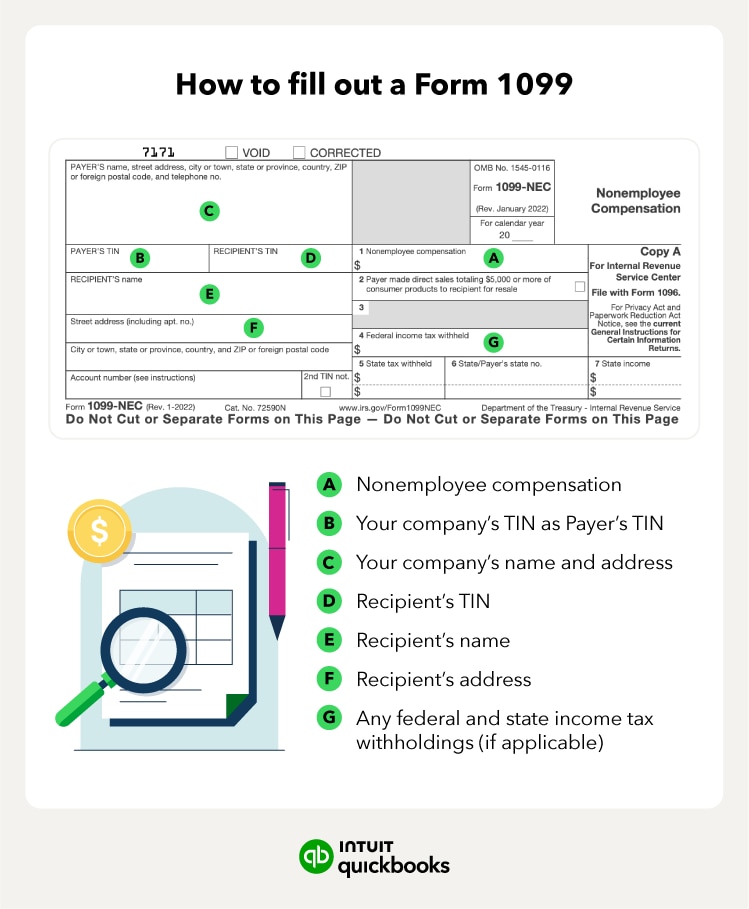
- TIN Matching: Verify that the recipient's Taxpayer Identification Number (Social Security Number or Employer Identification Number) matches IRS records.
- No Dollar Signs: Do not include dollar signs ($), commas, or decimals unless the software automatically formats them into the designated cent boxes. Type clean numbers to prevent scanner misreads.
- Address Lines: Keep street addresses concise. If a suite or apartment number is too long, abbreviate it so it doesn't spill over into adjacent data boxes.
5. Know Your Deadlines and Distribution Rules
Printing correctly is only half the battle; timing is the other. The IRS has strict deadlines for distributing copies to recipients and filing with the government.
For Form 1099-NEC (Nonemployee Compensation), both the recipient copies and the IRS submission copies are generally due by January 31st. Failing to meet this deadline can result in tiered penalties ranging from $50 to over $300 per form, depending on how late the filing is.
Final Thoughts
Printing 1099 forms correctly requires attention to detail, the right materials, and careful printer calibration. By investing in official red-ink forms, running alignment tests, and adhering to IRS formatting rules, you can process your information returns smoothly and keep your business compliant.