FedEx Copying Services: Options, Costs & Guide
Whether you need a single passport duplicate, twenty copies of a legal brief, or several hundred multi-page color booklets for an upcoming conference, finding a reliable print center matters. Formerly known as FedEx Kinko's, FedEx Office remains one of the most accessible document reproduction providers in the United States. Utilizing fedex copying services allows individuals and businesses to produce high-grade hard copies quickly without investing in expensive commercial printers.

This guide explains how FedEx copying works, the difference between self-service and full-service printing, the available finishing options, and what you can expect to pay.
Overview of FedEx Copying Services
FedEx Office locations function as commercial print shops built into shipping centers. Their copying solutions accommodate standard business paperwork, technical drawings, marketing collateral, and personal records. Depending on your timeline and project complexity, you can handle your order through three distinct pathways:
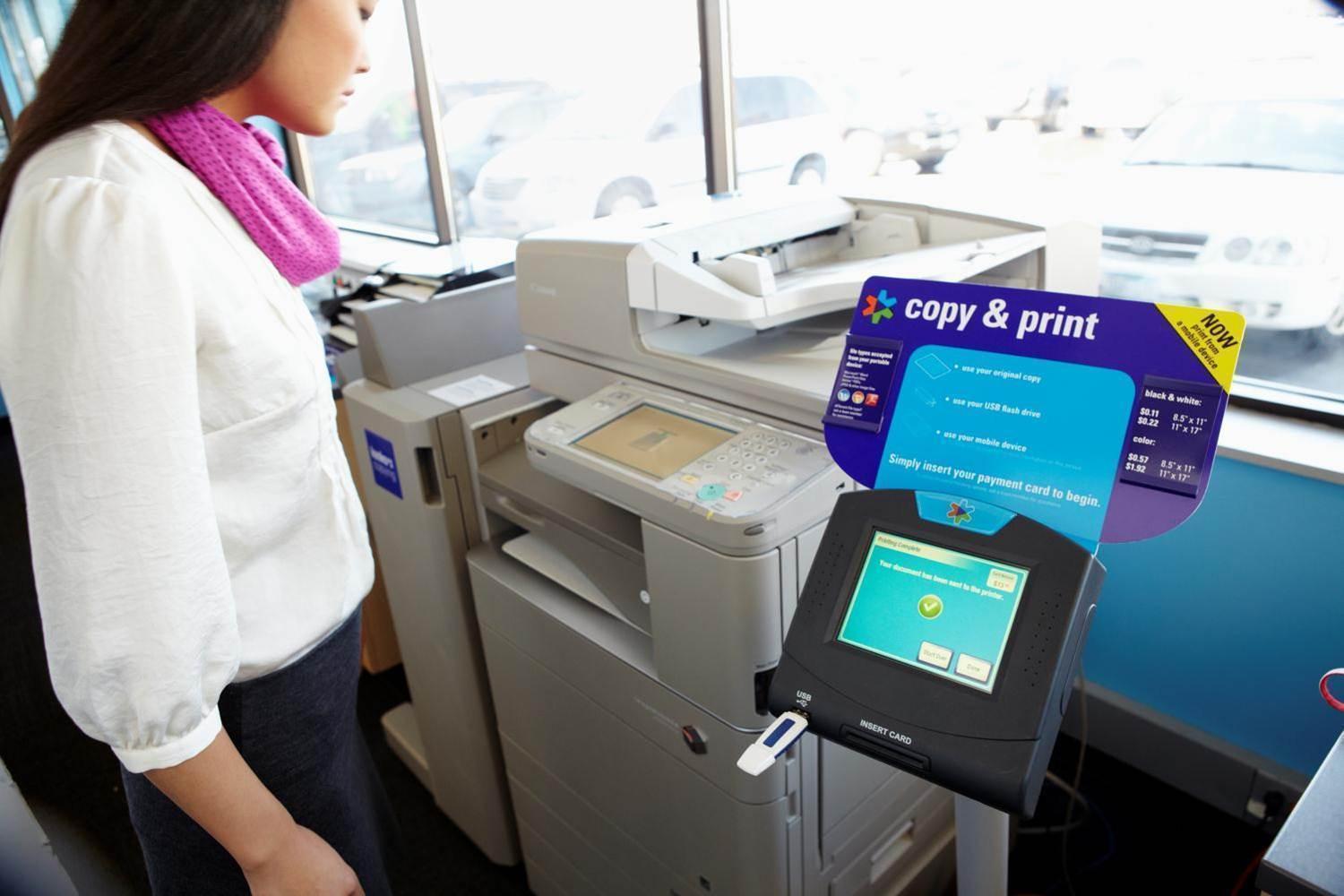
- Self-Service Copiers: Walk-in stations equipped with multi-function commercial copiers where you can scan physical documents, plug in a USB flash drive, or print directly from mobile devices and cloud accounts.
- Full-Service Counter: Team members handle your materials, which is ideal for large volumes, delicate originals, custom trimming, specialized paper weights, or projects requiring binding and lamination.
- FedEx Office Print Online: An online tool where you upload digital files (such as PDFs), specify your print settings, select a nearby store, and pick up your finished copies when ready (or have them shipped to your door).
Copying Formats, Paper Types, and Quality
When placing an order, understanding your specifications helps avoid unnecessary reprints. FedEx offers a wide range of paper stocks and sizes to fit various use cases.
Standard Document Sizes
FedEx copiers handle the industry-standard paper sizes for standard office use:
- Letter (8.5" x 11"): The default choice for resumes, legal paperwork, school assignments, and general correspondence.
- Legal (8.5" x 14"): Often used for real estate contracts, legal agreements, and corporate filings.
- Ledger / Tabloid (11" x 17"): Ideal for spreadsheets, financial records, newsletters, and small posters.
Paper Weights and Finishes
Beyond standard 20 lb bond paper (basic copy paper), FedEx provides upgraded stocks that lend durability and a polished appearance:
- 24 lb to 32 lb Laser Paper: Thicker and brighter than standard paper, preventing show-through on double-sided prints.
- Cardstock (65 lb to 110 lb): Heavyweight paper well-suited for report covers, table signs, invitations, and promotional flyers.
- Glossy and Matte Coated Stocks: Designed to make color photographs and promotional graphics look sharp and vibrant.
- Pastel and Bright Colored Papers: Useful for notices, flyers, and eye-catching announcements.
Black-and-White vs. Full-Color Copying
Black-and-white copies rely on monochrome laser toner, making them the fastest and most economical choice for text-heavy documents. Full-color copies use high-resolution CMYK digital printing presses that faithfully reproduce charts, presentation slides, photos, and branded graphics.
How to Use FedEx Copying Services Step-by-Step
Video: Creating a shipment label using FedEx Ship Manager™ at fedex.com in the Compact View

If you have never printed or copied at a FedEx Office, the workflow is straightforward whether you walk into a store or place the order remotely.
1. Using the In-Store Self-Service Kiosks
The self-service area is designed for speed. When you arrive:
- Swipe a payment card (credit, debit, or a prepaid FedEx Office card) at the kiosk payment terminal to open a session.
- Select your input source: place your physical original on the flatbed scanner/document feeder, insert a USB drive, or follow the screen instructions to print via email or cloud storage (Google Drive, Dropbox, Box).
- Select your copy preferences on the touchscreen (number of copies, single- or double-sided, color or black-and-white, and paper tray).
- Review the pricing preview, press "Start," and collect your finished pages and your card receipt.
2. Working with the Full-Service Counter
For complex orders, bring your files or originals to the service desk. A staff member will review the originals, help you choose suitable paper stocks, configure margin adjustments, and set up finishing work. You will receive an exact quote and an estimated pickup time before the job begins.
3. Ordering Online for In-Store Pickup
To skip waiting in line, visit the FedEx Office website and navigate to document printing:
- Upload your document in PDF format (PDF ensures your fonts and margins remain intact).
- Customize options including paper type, orientation, binding, and quantity.
- Choose your target store location. Most routine print-and-copy jobs submitted online are ready within a few hours.
Professional Finishing and Binding Add-Ons
One major advantage of commercial copying over desktop printing is the access to professional bindery equipment. You can transform loose pages into presentation-ready documents with several post-print services:
- Binding: Choose from plastic comb binding, continuous coil/spiral binding, or thermal tape binding. Clear protective covers and vinyl backings are standard additions for manuals and client proposals.
- Lamination: Protect IDs, reference sheets, menus, and safety signs against moisture and tearing with pouches ranging from thin, flexible laminates to heavy-duty protective plastics.
- Folding: High-speed machine folding for bi-fold programs, tri-fold brochures, and Z-folds.
- Stapling and Hole-Punching: Automated single- or double-corner stapling, booklet saddle-stitching, and two- or three-hole punching for placement directly into ring binders.
- Precision Cutting: Industrial guillotine cutters can trim multiple sheets down to custom dimensions, bleed cuts, or postcard sizes.
Understanding FedEx Copying Costs
Copying costs vary based on color selection, paper type, print volume, and regional market rates. While you should verify current store pricing before placing large runs, the following price expectations are typical:
- Standard B&W Copies (8.5" x 11"): Generally range from $0.15 to $0.25 per single-sided page. Double-sided printing usually counts as two clicks but costs less than two individual sheets of paper.
- Standard Color Copies (8.5" x 11"): Typically run between $0.59 and $0.89 per single-sided page.
- Specialty Paper Upgrades: Adding heavy cardstock or specialty finishes typically adds $0.10 to $0.50 per sheet to the base copy rate.
- Binding Services: Standard coil or comb binding generally costs between $4.00 and $8.00 per book, depending on thickness and cover materials.
- Volume Discounts: High-volume jobs (frequently starting at 100 or 500 pages) qualify for tiered discounts, bringing down the per-unit cost significantly.
Tips for Getting Clean, Error-Free Copies
To avoid misprints, unexpected layout shifts, and wasted time, keep these practical tips in mind:
- Save as a Flattened PDF: If printing digital files, avoid sending raw Word (.docx) or PowerPoint (.pptx) files. Font substitutions and shifting margins frequently occur across different machines. A standard PDF locks your design in place.
- Prepare Physical Originals: Remove all staples, paper clips, sticky notes, and tape before feeding multi-page documents into automated feeders to avoid paper jams or equipment damage.
- Keep Safe Margins: Standard copiers cannot print edge-to-edge; they leave a thin non-printable border (roughly 0.2 inches) around the page. Keep text and essential artwork well inside the page edges unless you are ordering oversized prints trimmed to full bleed.
- Run a Test Copy First: When producing high-volume runs at a self-service machine, print a single copy first to inspect color fidelity, orientation, and readability before executing the entire print run.