Find a Free ATM for Navy Federal Credit Union
Navigating Navy Federal ATM Access
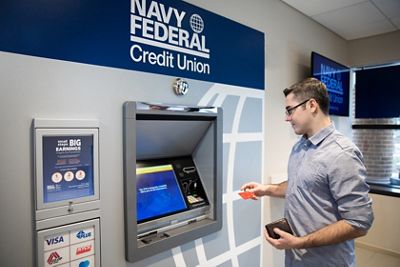
Finding a free ATM for Navy Federal members is remarkably easy once you know where to look. As one of the largest credit unions in the United States, Navy Federal Credit Union provides its members with extensive access to cash without charging out-of-network fees. However, because credit unions do not operate massive standalone brick-and-mortar storefronts everywhere, they rely on cooperative networks and retail partnerships to keep your banking convenient and cost-effective.
Whether you are traveling across the country or just running errands in your local neighborhood, withdrawing cash shouldn't cost you a dime. This guide breaks down the exact networks, partnerships, and tools you can use to secure fee-free cash withdrawals on the go.
Navy Federal Branches and On-Site ATMs
The most straightforward place to find a free ATM for Navy Federal is directly at a credit union branch. Most physical Navy Federal locations feature drive-up or walk-up ATMs that are completely free to use for members.
Using a credit union-owned machine guarantees that you will not face surcharges or operator fees. Furthermore, these ATMs often allow you to deposit cash and checks, check your balances, and transfer funds between your Navy Federal checking and savings accounts without visiting a teller inside.
Partner ATM Networks: CO-OP and Allpoint
If you live far from a physical Navy Federal branch, you can still access your money for free. Navy Federal participates in major cooperative ATM networks, most notably the CO-OP Financial Services network and select Allpoint locations.
These partnerships give members access to nearly 30,000 surcharge-free ATMs nationwide. You can typically find these machines inside popular retail locations, gas stations, convenience stores, and credit unions.
How to Spot a CO-OP or Allpoint ATM
When searching for a machine, look for the official logos displayed on the physical terminal or digital screen:
- CO-OP Network Logo: Usually features a distinctive blue and green design with the word "CO-OP."
- Allpoint Logo: Typically displayed in blue and orange lettering.
If you see these logos on an ATM screen, you can safely insert your Navy Federal debit card knowing you won't be hit with operator fees.
Retail Partners: Getting Cash Back at Registers
Another clever way to bypass ATM fees altogether is by utilizing cash-back options at retail checkout counters. Many major supermarkets, pharmacies, and big-box retailers allow Navy Federal debit cardholders to receive cash back when making a purchase.
Common retailers that offer cash back include:
- Walmart
- Target
- Walgreens and CVS
- Major regional grocery store chains
When the card reader prompts you to enter your PIN during checkout, simply select the cash-back option and choose the desired amount. As long as you make a purchase (even a small one, like a pack of gum), most stores do not charge a fee for this service, making it a reliable alternative to standalone ATMs.
Using the Navy Federal Mobile App to Find ATMs
The absolute best tool for locating a fee-free machine in real time is the official Navy Federal Credit Union mobile app. Instead of guessing whether a local machine is part of a partner network, you can let the app do the heavy lifting.
- Open the Navy Federal mobile app on your smartphone or tablet.
- Log in using your secure credentials or biometrics.
- Navigate to the "Locations" or "Find ATM" tab in the menu.
- Enable location services to view the closest surcharge-free ATMs relative to your current GPS coordinates.
The app clearly distinguishes between Navy Federal branches, CO-OP network ATMs, and retail partner locations, ensuring you never accidentally pull up to an out-of-network machine that charges high fees.
Avoiding Out-of-Network Fees
What happens if you use an out-of-network ATM that does not partner with Navy Federal? While Navy Federal does not charge its own domestic fee for using a non-network ATM on the first few transactions (depending on your specific account tier), the owner of the ATM almost certainly will.
These operator fees typically range from $3.00 to $5.00 per transaction. Over time, these small charges add up significantly. To protect your hard-earned money:
- Always check the ATM screen for a warning message about operator surcharges before confirming your withdrawal.
- Plan ahead by withdrawing larger amounts less frequently rather than making multiple small withdrawals.
- Rely on digital payments and credit cards when traveling in areas with limited fee-free ATM access.
Summary: Getting Cash Without Extra Costs
Managing your money efficiently means keeping it out of the hands of ATM operators. By leveraging Navy Federal's physical branches, the massive CO-OP network, in-store cash-back options, and the mobile locator app, you can easily find a free ATM for Navy Federal wherever life takes you. A little planning goes a long way in keeping your cash accessible and your checking account fee-free.