Fix: $.ajax is not a function Error in jQuery
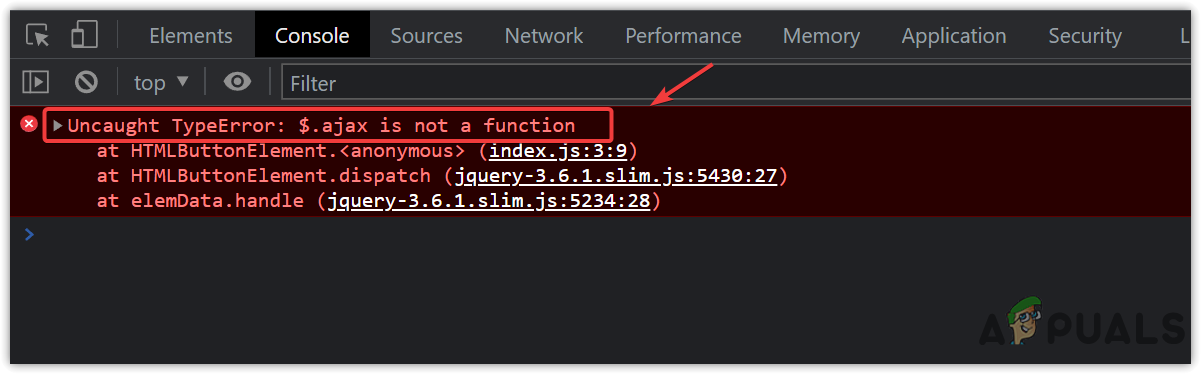
Few things disrupt front-end development faster than a broken asynchronous request. If your browser console displays Uncaught TypeError: $.ajax is not a function or a similar variation, you are dealing with a classic jQuery integration problem. This error means JavaScript can see your jQuery object (or your selector), but it cannot find the .ajax() method attached to it.

Fortunately, this issue is rarely caused by complex architectural bugs. In almost every case, it stems from how jQuery was imported, which distribution build you included, or the syntax used to trigger the call. Below, we break down the root causes and provide tested solutions to get your HTTP requests working again.
How to Fix the "ajax is not a function" Error
To eliminate this error, inspect your code against the five common scenarios below. In over 80% of cases, the first cause is the culprit.
1. You Are Using the jQuery "Slim" Build
The most frequent reason for this error is loading jQuery's "slim" package instead of the full library. Many popular frameworks, templates, and tutorials (including Bootstrap starter kits) default to the slim distribution to reduce bundle size.
However, the jQuery slim build explicitly strips out two major modules: Effects (animations) and Ajax. If you include the slim script, $.ajax literally does not exist.
Check your HTML <head> or footer script tags. If your source URL looks like this:
<!-- INCORRECT: Slim build does not include AJAX -->
<script src="https://code.jquery.com/jquery-3.7.1.slim.min.js"></script>
Replace it with the standard, full build:
<!-- CORRECT: Full production build includes $.ajax -->
<script src="https://code.jquery.com/jquery-3.7.1.min.js"></script>
Save the file, clear your browser cache, and refresh. If the build was the issue, your request will immediately start working.
2. Calling .ajax() on a DOM Element Instead of the jQuery Object
Another common mistake happens when developers confuse utility methods with instance methods. The ajax() function is a static utility attached directly to the global jQuery object ($ or jQuery). It is not a method on individual DOM selections.
Consider this erroneous code:
// INCORRECT: Calling .ajax() on a jQuery element selection
$('#contact-form').ajax({
    url: '/submit',
    method: 'POST'
});
Because a selected element collection does not inherit the ajax method, JavaScript throws $('#contact-form').ajax is not a function.
To fix this, call $.ajax() directly and pass your form data inside the configuration object:
// CORRECT: Call $.ajax directly
$.ajax({
    url: '/submit',
    method: 'POST',
    data: $('#contact-form').serialize(),
    success: function(response) {
        console.log('Success:', response);
    }
});
3. Incorrect Script Loading Order
Browsers execute scripts synchronously in the order they appear unless marked with defer or async. If your custom JavaScript file attempts to call $.ajax() before the jQuery library has been fetched and parsed, the execution fails.

Look at your document layout:
<!-- INCORRECT: Custom script runs before jQuery exists -->
<script src="/js/app.js"></script>
<script src="https://code.jquery.com/jquery-3.7.1.min.js"></script>
Always ensure the core jQuery library is loaded first:
<!-- CORRECT: Dependencies load first -->
<script src="https://code.jquery.com/jquery-3.7.1.min.js"></script>
<script src="/js/app.js"></script>
Additionally, wrap your application logic inside a document-ready handler so that the DOM and all resources are ready before executing requests:
$(document).ready(function() {
    $.ajax({
        url: 'https://api.example.com/data',
        type: 'GET',
        success: function(res) {
            console.log(res);
        }
    });
});
4. Multiple jQuery Versions or Library Conflicts ($ Overwritten)
If your project imports multiple third-party libraries (such as Prototype.js, MooTools, or WordPress plugins), another script may claim the global $ variable after jQuery loads. When this happens, $ points to a different library that lacks the ajax method.
To verify if $ is overwritten, run this check in your browser developer console:
console.log($.fn ? $.fn.jquery : 'Not jQuery');If it returns Not jQuery or undefined, use jQuery instead of $, or use an Immediately Invoked Function Expression (IIFE) to safely alias the dollar sign:
// Safe wrapper: maps the global jQuery object to $
(function($) {
    $.ajax({
        url: '/api/endpoint',
        method: 'GET'
    });
})(jQuery);
In WordPress environments, jQuery loads in noConflict() mode by default. You must either use jQuery.ajax(...) or wrap your scripts in an IIFE as shown above.
5. jQuery Failed to Load (CDN Down or Blocked)
If you load jQuery from an external Content Delivery Network (CDN) and the user has a network filter, ad blocker, or flaky connection, the CDN request may return an error or time out. In that scenario, $ might fallback to an empty stub or fail entirely.
To safeguard your application against CDN failures, implement a local fallback:
<script src="https://code.jquery.com/jquery-3.7.1.min.js"></script>
<script>
    // If CDN fails, load local copy
    window.jQuery || document.write('<script src="/js/vendor/jquery.min.js"><\/script>');
</script>
Quick Debugging Checklist
When you encounter this error in production or local development, walk through these quick diagnostic steps in Chrome DevTools or Firefox Developer Tools:
- Check the Network Tab: Filter by "JS" and ensure
jquery.min.jsreturns a200 OKstatus code. - Inspect the Filename: Look for the word
slimin the URL or file path. If it containsslim, replace it immediately. - Test in Console: Open the Console tab and type
typeof jQuery.ajax. If it returns"undefined", you are using the slim build or an incomplete bundle. If it returns"function", your script execution order or scoping is at fault.
Consider Modern Alternative: Native Fetch API
If you are maintaining an older codebase, fixing the jQuery import is the fastest route. However, for modern applications, you no longer need a 30KB+ library just to make an HTTP request. Modern browsers have built-in support for the standard fetch() API.
Here is how a standard $.ajax call compares to native JavaScript:
// Modern Native Fetch Replacement
fetch('/api/user', {
    method: 'POST',
    headers: {
        'Content-Type': 'application/json'
    },
    body: JSON.stringify({ name: 'Alex' })
})
.then(response => {
    if (!response.ok) {
        throw new Error('Network response was not ok');
    }
    return response.json();
})
.then(data => console.log(data))
.catch(error => console.error('Fetch error:', error));
Switching to fetch removes the external dependency entirely, eliminating version conflicts and ensuring your network requests work in any browser without third-party scripts.