Fix OPatch Failed with Error Code 255 in Oracle
Applying a Release Update (RU), Patch Set Update (PSU), or one-off interim patch is standard maintenance for any Oracle Database Administrator. However, few things disrupt scheduled maintenance windows faster than an abrupt exit message stating that opatch failed with error code 255. Because exit code 255 is a general catch-all indicating that an underlying process or Java invocation terminated unexpectedly, identifying the exact trigger requires looking beyond the command-line console.

This troubleshooting guide explains why this error occurs, where to locate the detailed log traces, and how to resolve the root causes so you can complete your patching safely.
Understanding Error Code 255 in OPatch
OPatch is essentially a Java-based orchestration utility wrapped in shell scripts (Linux/UNIX) or batch scripts (Windows). When you run opatch apply, opatch lsinventory, or opatch rollback, the wrapper script establishes the environment, points to the Java runtime engine inside $ORACLE_HOME/jdk, and executes the core patching classes.
When the shell returns code 255, it means the Java Virtual Machine (JVM) or a spawned child process exited abnormally without returning a specific internal OPatch error code. Common culprits include:
- Permission discrepancies in the Central Inventory or
$ORACLE_HOME - Corrupt or locked inventory files
- An outdated OPatch utility version incompatible with the patch
- Java Virtual Machine OutOfMemory (OOM) errors
- Missing environment variables or incorrect JDK pointers
- The
/tmpdirectory being mounted with thenoexecflag or running out of disk space
First Step: Locate and Read the OPatch Logs
Never guess the solution before reviewing the logs. The terminal screen prints only a high-level summary. The exact stack trace is written to your logging directory.
Locate the latest log file generated during the failure:
cd $ORACLE_HOME/cfgtoollogs/opatch
ls -lrt
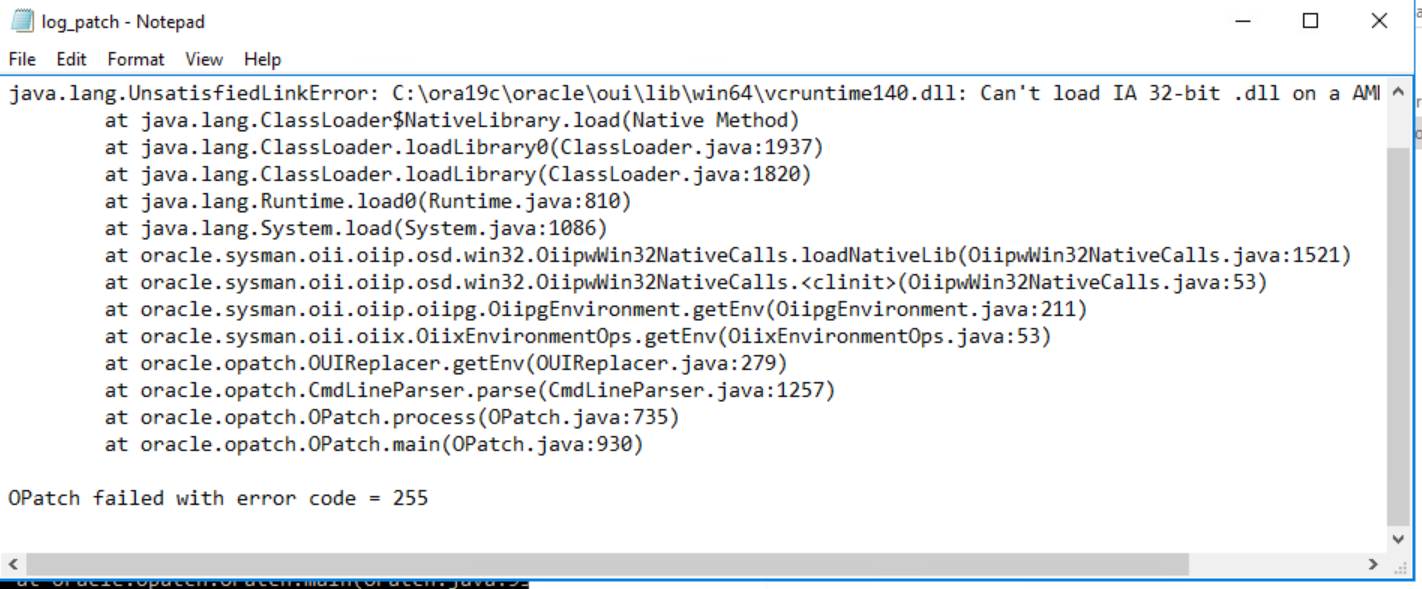
Open the most recent file matching opatch<timestamp>_1.log or review the rollback/apply subdirectories. Look specifically for entries marked SEVERE, Exception in thread "main", or Java HotSpot(TM) Server VM warning.
Troubleshooting OPatch Failed with Error Code 255: Core Causes
Once you inspect the log file, match the findings against the primary failure scenarios outlined below.
1. Outdated OPatch Version
Oracle frequently updates the OPatch utility to support new patch formats, cryptographic algorithms, and database releases. Using an old version of OPatch bundled with an older base release to apply a modern Release Update often leads to class definition errors or process crashes that throw exit code 255.
Resolution:
- Check your current OPatch version:
$ORACLE_HOME/OPatch/opatch version - Download the latest OPatch release from My Oracle Support (MOS) by searching for Patch 6880880 for your database release and platform.
- Back up the existing OPatch directory:
mv $ORACLE_HOME/OPatch $ORACLE_HOME/OPatch_old - Unzip the newly downloaded patch directly into
$ORACLE_HOME:unzip p6880880_<version>_<platform>.zip -d $ORACLE_HOME - Verify the new version and retry the patching operation.
2. Central Inventory Issues and Lock Files
OPatch reads and updates the Oracle Central Inventory (oraInventory). If another user or background process has locked the inventory, or if the permissions on oraInventory were inadvertently modified by running commands as root, OPatch crashes.
Resolution:

- Check pointer location: Inspect
/etc/oraInst.loc(or/var/opt/oracle/oraInst.locon Solaris) to verify the path to the central inventory and ensure thedba_groupmatches the group running OPatch. - Verify permissions: Ensure the
oracleuser owns the directory recursively:chown -R oracle:oinstall /u01/app/oraInventory chmod -R 770 /u01/app/oraInventory - Clear stale locks: If a previous session terminated abnormally, check for lock files inside:
Remove stale lock files only if no other Oracle installer or patching sessions are running.$ORACLE_HOME/.patch_storage/ /u01/app/oraInventory/locks/
3. Java Heap Constraints (OutOfMemoryError)
On systems with complex environments, massive inventories, or hundreds of previously applied one-off patches, the default memory allocated to OPatch's JVM might not suffice. When the JVM hits an OutOfMemoryError: Java heap space, the shell wrapper terminates with exit code 255.
Resolution:
Temporarily override the Java heap limit before invoking OPatch by passing memory flags through the environment variable:
export OPATCH_PLATFORM_OPTIONS="-J-Xms512m -J-Xmx2048m"Alternatively, invoke the memory adjustment directly in the command call:
$ORACLE_HOME/OPatch/opatch apply -J-Xms512m -J-Xmx2048m4. Restrictive /tmp Directory Settings
By default, OPatch extracts scripts and executes temporary binaries in /tmp. If /tmp is mounted with the noexec option for security compliance, Linux blocks binary execution from that partition, producing an immediate exit code 255 without an obvious internal failure message.
Resolution:
- Verify how
/tmpis mounted:
If you seemount | grep /tmpnoexecin the mount flags, redirect the temporary storage used by OPatch. - Create an alternative temporary directory where the Oracle user has read, write, and execute permissions:
mkdir -p /u01/app/oracle/tmp chmod 775 /u01/app/oracle/tmp - Set the temporary environment variables prior to running OPatch:
export TMP=/u01/app/oracle/tmp
export TEMP=/u01/app/oracle/tmp
export TMPDIR=/u01/app/oracle/tmp
5. Stale Active Processes and Shared Libraries
If database instances, listeners, Enterprise Manager agents, or distributed transaction monitors are still using binaries inside $ORACLE_HOME, file replacement fails. While OPatch typically warns of active processes, locked shared memory segments or hung processes can cause the operation to fail instantly.
Resolution:
Verify that all relevant services running from the target Oracle Home are stopped:
ps -ef | grep $ORACLE_HOME
fuser -k $ORACLE_HOME/bin/oracle
Confirm that no lingering client sessions remain connected before re-attempting patch deployment.
Preventive Checklist for Seamless Patching
To avoid unexpected halts during critical deployment windows, incorporate the following checks into your routine:
- Execute a prerequisite check: Always run
opatch prereq CheckConflictAgainstOHWithDetail -ph ./before taking databases offline. - Run an inventory verification: Execute
opatch lsinventoryprior to applying any patch to confirm the inventory structure is intact and readable. - Always verify the user identity: Run OPatch exclusively as the software owner (typically
oracle), never asroot. - Back up the environment: Take an offline backup of both
$ORACLE_HOMEandoraInventoryprior to large updates to facilitate quick rollback if a failure occurs.
By checking the dedicated logs in $ORACLE_HOME/cfgtoollogs/opatch/, updating the OPatch utility, and verifying directory permissions and memory availability, you can quickly diagnose error code 255 and restore smooth database operations.