Free Access Codes for Cengage: Real Options & Scams
College course materials have never been more expensive, and digital homework platforms like MindTap, WebAssign, OWLv2, and SAM only add to the pressure. Because these platforms tie homework grades and quizzes directly to proprietary software, many students turn to search engines looking for free access codes for cengage to complete assignments without blowing their semester budget. However, navigating the web for free access comes with serious risks and a lot of misinformation.

Before you waste hours clicking on suspicious links or download tools that compromise your device, it helps to understand how Cengage licensing actually operates—and the legitimate strategies you can use to secure access for free or at a steep discount.
The Truth About Free Access Codes for Cengage
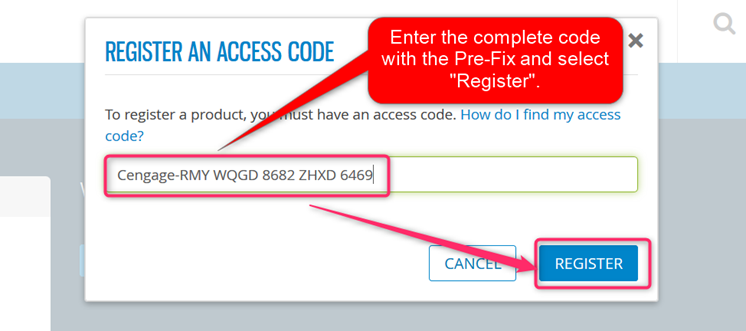
The short answer to whether you can find a universal, working access code on a public forum or generator site is no. Cengage codes are single-use, cryptographically generated alphanumeric strings (typically 14 to 16 characters). When an access code is redeemed, it is permanently bound to a specific student account and course roster on Cengage's secure authentication servers.
Unlike offline software that relies on static product keys, Cengage platforms require live server synchronization. Once a code is redeemed by one student, it cannot be transferred, shared, or used again. This architecture makes public lists of "working access codes" on Reddit, YouTube description boxes, or paste sites obsolete within minutes—if they were ever real in the first place.
Legitimate Ways to Get Free or Low-Cost Cengage Access
While unauthorized code generators are bogus, you do not necessarily have to pay full price out of pocket on the first day of class. There are several verified avenues to secure free temporary access, institutional funding, or discounted access.
1. Utilize the Official Cengage Grace Period (Free Trial)
Every student enrolled in a Cengage course is entitled to a complimentary trial period, commonly called the "grace period." Cengage provides this to ensure no student falls behind on assignments during the add/drop week while waiting for financial aid disbursements or course schedule changes.
- Duration: Usually lasts 7 to 14 calendar days from the course start date (exact duration depends on your institution's agreement and term length).
- Access Level: Complete access. You get the full eTextbook, interactive quizzes, automated homework grading, and study tools.
- Data Preservation: Any homework, tests, or notes submitted during the trial remain stored in your instructor's gradebook. When you eventually enter a paid code or subscription, your work carries over seamlessly.
To activate it, simply register for your course via your school's Learning Management System (Canvas, Blackboard, Moodle, or D2L) or through Cengage.com using your instructor's Course Key. When prompted for payment or an access code, select "Temporary Access" or "Start Free Trial."
2. Check for "Inclusive Access" or "First Day" Billing
Before purchasing anything out of pocket, double-check your course syllabus and your college student account balance. Many universities have partnered with publishers through programs called Inclusive Access or First Day Programs.
Under these programs, the university automatically negotiates a wholesale rate with Cengage and adds the course fee directly to your tuition bill. If your class uses Inclusive Access, you do not need an external access code at all; access is automatically unlocked the moment you sign in through your campus portal. Buying a standalone code online in this scenario results in paying twice.
3. Request Hardship Vouchers from Your Instructor
Publishers assign higher-education sales representatives to every college campus. These representatives routinely provide professors and department chairs with a small number of "desk copies" and complimentary hardship access codes to distribute to students experiencing severe financial strain.
If you cannot afford access, attend your professor's office hours during the first week. Explain your situation respectfully and ask if the department has any emergency access codes or book waivers available from the publisher. Many instructors will gladly contact their Cengage representative on your behalf.
4. Tap Campus Emergency Funds and Book Grants
Most community colleges and universities operate student emergency relief funds, equity grants, or student government association (SGA) textbook vouchers. These grants are specifically designated to cover course-required digital courseware. Check with your campus Financial Aid office, Dean of Students, or campus basic needs center to see if you qualify for an immediate micro-grant to cover digital platform access.
Why You Must Avoid "Code Generator" Websites
If you search for access codes on search engines or video platforms, you will encounter dozens of websites claiming to have "Cengage Access Code Generators" or "Free MindTap Key Cracks." These sites are entirely fraudulent and present significant risks:
- Survey Scams and Adware: Most of these sites force you to complete endless "human verification" surveys or download mobile games to unlock a code. The site owners earn affiliate commissions, while the revealed code is always fake or expired.
- Malware and Info-Stealers: Downloading executable files (.exe, .zip, or mobile profiles) promising free codes frequently infects your system with trojans, keyloggers, and browser hijackers designed to steal banking and campus credentials.
- Stolen Credit Card Schemes: Third-party marketplaces or individuals on messaging apps offering codes at 80% off are often using stolen credit card numbers to buy codes from the Cengage store. When the real cardholder files a chargeback, Cengage permanently revokes the access code and locks your student account mid-semester.
- Academic Honor Code Violations: Attempting to bypass courseware authentication can be flagged by Cengage's fraud detection team and reported directly to your college registrar, leading to disciplinary action.
Cost-Saving Strategies If You Must Buy Access
If your grace period expires and no hardship funding is available, you can still minimize your expenses by understanding Cengage's pricing structure:
- Evaluate Cengage Unlimited: If you are taking more than one class that uses Cengage products (for example, Accounting, Psychology, and Calculus), do not buy individual platform codes. A single Cengage Unlimited subscription covers every Cengage product across all your courses for one flat fee ($129.99 for four months as of standard retail pricing).
- Purchase Directly Through the Portal: Avoid unauthorized third-party resellers on auction sites. Purchasing directly inside your campus Canvas or Blackboard module ensures you get the exact version your instructor configured without risk of buying an outdated or region-locked edition.
- Borrow Physical Reserves for Reading: If your instructor uses Cengage purely for textbook reading rather than automated online homework, ask your campus library if they hold physical copies on two-hour course reserve. You can read and study for free without buying the digital portal.
Frequently Asked Questions
Can I reuse an access code from a previous semester?
No. Access codes are single-use tokens. Once activated by an account, they cannot be transferred to a new student or carried over to a different course section.
What happens to my assignments when the free trial expires?
Your work is saved. You will simply be locked behind a payment paywall when attempting to access the platform. As soon as you purchase access or apply an approved code, your access resumes right where you left off with all prior scores intact.
Do used textbooks come with valid Cengage access codes?
Almost never. If you buy a used physical textbook, the scratch-off code card inside has virtually always been redeemed by the previous owner. Unless the seller explicitly guarantees an un-scratched, sealed access card, expect to buy the digital access separately.
Final Thoughts
While the urge to locate free access codes for Cengage is completely understandable given high tuition costs, shortcuts through third-party generator websites will only lead to wasted time, malware, or academic penalties. Take advantage of the official grace period on day one, consult your instructor and financial aid office for hardship options, and explore Cengage Unlimited if you are juggling multiple courses.


