Free LDS Ward Find Hack for College Students
Navigating Church Life on a College Budget and Schedule

Heading off to college is an exciting milestone, but transitioning to a new city and a new congregation can feel overwhelming. Whether you are moving into a dorm across the country or commuting to a local university, finding your spiritual home is a top priority. For Latter-day Saint students, plugging into the right Young Single Adult (YSA) ward or family ward provides an instant network of friends, free Sunday dinners, and spiritual grounding.
However, sorting through boundary maps and outdated directory pages can take up precious study time. That is where a smart, free LDS ward find hack for college comes in handy. Instead of digging through confusing geographic boundaries or guessing which bishopric covers your specific apartment complex, you can use built-in ecclesiastical tools to locate your exact unit in seconds.
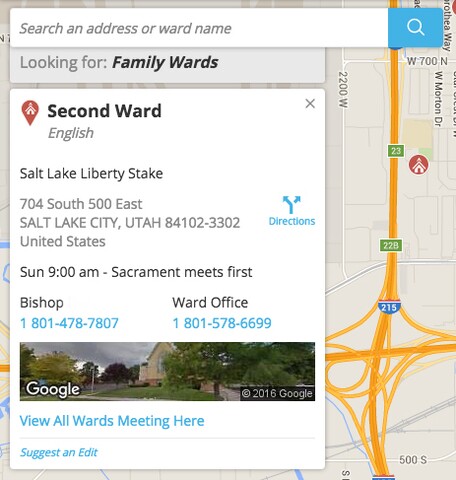
The Official Directory Method: More Than Just a Map
Many students make the mistake of using standard search engines to find local meetinghouses. While Google Maps will show you where the nearest chapel building is located, it will not tell you which specific ward or branch holds meetings there, nor will it clarify whether that building hosts a student ward, a YSA ward, or a traditional family ward.
The most reliable, streamlined approach relies on official Church resources that are completely free to use. By leveraging your Church Account credentials, you can bypass the guesswork entirely.
Step-by-Step Guide to Using the Meetinghouse Locator
The official Meetinghouse Locator tool is the gold standard for finding your assigned congregation. Here is how to maximize it using our favorite student-friendly approach:
- Step 1: Navigate to the official Church website or open the Tools app on your smartphone.
- Step 2: Enter your exact college term address—including your dorm name, building number, and zip code. If you are living off-campus, use your exact apartment lease address rather than the campus center.
- Step 3: Filter your search results by selecting "Young Single Adult" if you fall into the YSA demographic (typically ages 18-30). This ensures you see student-specific wards rather than just geographic family wards.
- Step 4: Review the meeting times, bishop's name, and contact information. Many listings will also include the address of the Institute of Religion building, which is often tied to local student units.
The Ultimate Free LDS Ward Find Hack for College Students
While the standard locator tool works well, there is an even faster shortcut for students who move frequently between semesters or sign short-term leases near campus. We call this the free LDS ward find hack for college convenience.
Instead of manually typing in every new address when you move into a dorm or student apartment complex, utilize the Member Tools App auto-sync feature combined with your move-records process:
- Log into the Member Tools App: Download the free app on iOS or Android and sign in using your Church Account (the same login you use for your temple recommend and donations).
- Check the "Directory" Tab: Once your records are updated to your new address, your new home ward will automatically populate at the top of your household and organization lists.
- Use the Stake Map Feature: If your records have not officially transferred yet, open the app's map function. It uses your phone's GPS coordinates to pinpoint your exact location on a digital boundary map. By zooming in on your apartment building, you can see the precise colored boundary line for your ward and tap inside it to view the bishopric's contact details instantly.
Why GPS-Based Boundary Mapping Beats Guessing
College towns are notorious for complex ward boundaries. Two apartment buildings sitting right next to each other across the street might belong to completely different stakes or wards. Using the GPS map view within the mobile app eliminates human error. It prevents you from showing up to the wrong sacrament meeting or contacting the wrong bishop when you need to submit a church service endorsement or call-housing paperwork.
Connecting Beyond Sunday: Finding the Institute Building
Finding your ward is only half the battle. To truly thrive socially and academically during your college years, you need to plug into the local Latter-day Saint Institute of Religion program.
Most campus wards are heavily intertwined with Institute activities. As a bonus tip alongside your ward search, use the Institute locator to find the closest building to your classes. Institute buildings typically feature:
- Quiet study areas with reliable Wi-Fi and printing stations between classes.
- Free or low-cost lunches and social events.
- Mid-week religion classes that fit around busy lecture schedules.
- Friendly faculty and staff who can help you verify your local ward assignment if you are experiencing administrative delays.
Pro Tips for a Smooth College Ward Transition
Once you successfully locate your student ward using these digital tools, a few proactive steps will make your integration seamless:
Reach out before your first Sunday. Do not wait until you walk through the chapel doors to introduce yourself. Look up the Relief Society President or Elders Quorum President via the directory app and send a quick text message. Let them know you are new to campus and ask where students usually sit or if there is a ride-sharing group.
Update your records early. You do not need to wait until the semester starts to initiate a record move. You can submit a record move request directly through your online profile, which automatically flags your name for the local bishopric so they can welcome you before classes even begin.
By combining official digital boundary maps with the mobile directory tools, you can skip the stress of searching and get straight to building your new college community.