Get Your Colorado Refund in Days Not Weeks
Why Taxpayers Are Waiting for State Refunds

Waiting for money that rightfully belongs to you can put a serious dent in your household budgeting. While federal tax returns often drag on for weeks or even months due to complex audits and backlog, state returns generally move faster. However, many residents still face frustrating delays simply due to minor filing errors or outdated submission methods. If you want to get your Colorado refund in days not weeks, you need to understand how the Colorado Department of Revenue (CDOR) processes returns and what steps you can take to jump to the front of the line.
The state of Colorado has streamlined its digital infrastructure significantly over the last few years. By moving away from traditional paper filing and embracing automated security checks, the CDOR can issue electronic refunds in a remarkably short window—provided you meet specific criteria. Here is your roadmap to securing your money as quickly as possible.
Step 1: Ditch Paper and File Electronically
The single biggest bottleneck in the tax system is paper. When you mail a physical tax return, a CDOR employee has to manually open the envelope, review the documents, and data-entry your figures into their system. This process introduces human error and adds weeks—sometimes months—to your wait time.
To speed things up, you must e-file. Electronic filing transmits your tax data securely and instantly to state computers. You have two main options for e-filing in Colorado:
- Commercial Tax Software: Popular programs like TurboTax, H&R Block, and FreeTaxUSA allow you to file both your federal and Colorado state returns simultaneously. These programs automatically check for math errors and populate the correct Colorado tax forms.
- Revenue Online: Colorado's official taxpayer portal allows eligible residents to file their state income taxes directly for free. It is a secure, government-backed platform designed to process returns efficiently.
Step 2: Choose Direct Deposit Over Paper Checks
Once your return is processed, the method you choose to receive your funds plays a massive role in how fast cash hits your account. Choosing a physical paper check means waiting for the CDOR to print the check, mail it through the United States Postal Service, and waiting for your bank to clear it.
Instead, always opt for direct deposit. When you enter your routing and account numbers accurately:
- The CDOR approves your refund.
- An electronic funds transfer (EFT) is initiated.
- The money lands directly in your bank account, usually within 2 to 4 business days after approval.
Pro Tip: Double-check your routing and account numbers before hitting submit. A single transposed digit will cause the bank to reject the deposit, forcing the state to issue a paper check instead and delaying your money by weeks.
How to Get Your Colorado Refund in Days Not Weeks
Achieving the ultimate goal of getting your cash in hand within a few days requires a combination of early preparation, flawless data entry, and utilizing the right state tools. Here is the ultimate checklist to ensure your return sails through the approval process without triggering manual reviews.
Video: When will I get my refund?
Verify All Personal Information

Simple clerical errors are the primary reason tax returns get pulled for manual review. Before submitting your return, carefully review:
- Social Security numbers for yourself, your spouse, and any dependents.
- Correct spelling of names as they appear on social security cards.
- Current mailing address and contact information.
A mismatch in Social Security numbers will instantly halt your refund processing while the state investigates potential identity theft or clerical mistakes.
Reconcile Your Income Documents
Ensure that every W-2, 1099, and other income document you received matches what you report on your Colorado tax return. The CDOR cross-references state returns with employer reports. If your numbers do not match up, your return will be flagged for discrepancy verification, instantly destroying any chance of a rapid turnaround.
File Early and Accurately
The rush at the end of tax season causes system congestion. Filing early—ideally in late January or February—means fewer returns are in the processing queue. The CDOR processes early electronic submissions on a rolling basis, meaning you get priority attention before the massive April rush.
How to Track Your Colorado Refund
Once your return is successfully submitted and accepted, you do not have to guess where your money is. The state provides a dedicated tracking tool to keep you informed every step of the way.
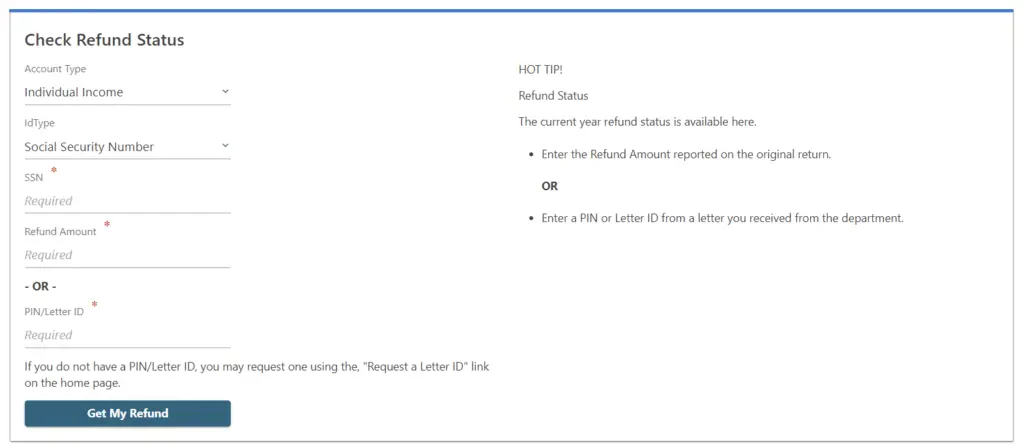
You can check the status of your refund by visiting the Colorado Department of Revenue's Revenue Online portal or using their automated 'Where's My Refund?' tool. To check your status, you will need:
- Your Social Security Number (SSN) or Individual Taxpayer Identification Number (ITIN).
- The exact refund amount expected as shown on your state tax return.
- Your tax year filing status.
Keep in mind that the tracking tool typically updates once every 24 hours, usually overnight. If you filed electronically and chose direct deposit, you will typically see your status change from 'Received' to 'Approved' within a few business days.
Conclusion
Getting your state tax money does not have to be a multi-week exercise in patience. By taking advantage of modern technology, filing your taxes electronically, opting for direct deposit, and meticulously checking your paperwork for errors, you can drastically accelerate your timeline. Follow these best practices this tax season, and you will easily get your Colorado refund in days not weeks.