Good Earth LED Strip Lights: Buyer's Guide
Linear accent lighting can completely redefine a living space, but finding fixtures that balance reliability, light quality, and reasonable pricing is surprisingly tough. While bargain-bin imports flood online marketplaces, good earth led strip lights have established themselves as a dependable, hardware-store mainstay. Known primarily for practical under-cabinet and utility fixtures, Good Earth Lighting brings an electrician-friendly mindset to flexible tape lights.

Whether you want to illuminate dark kitchen countertops, wash a ceiling cove with warm ambient glow, or add dynamic RGB accents behind an entertainment center, selecting the right model and mounting it properly makes all the difference. This guide breaks down what these strip lights offer, where they excel, and how to get the most out of your installation.
What Sets Good Earth LED Strip Lights Apart?
Unlike bare-bones hobby strips, Good Earth builds tape lighting intended for real residential applications. Most homeowners encounter their kits at major home improvement retailers, pre-packaged with the necessary drivers, connectors, and mounting accessories.
- Balanced Color Rendering: Cheap LEDs often emit a sickly, greenish hue or harsh cool glare. Good Earth focuses on higher Color Rendering Index (CRI) chips—typically 80 to 90 CRI—meaning your food, cabinetry, and paint look natural rather than washed out.
- Commercial-Grade Power Supplies: Strip longevity depends entirely on power stability. Good Earth bundles ETL-listed, stable drivers that protect the diodes against minor household voltage fluctuations.
- Modular Expansion: Many of their systems are designed to link end-to-end, allowing you to run continuous illumination without soldering your own lead wires.
Core Product Varieties
1. Tunable White & CCT Selectable Strips
For kitchens and home offices, color-tuning strips are the most practical choice. These strips feature alternating diodes that let you toggle between warm white (around 2700K) for relaxed evening dining and cool daylight (up to 5000K) for high-focus food prep or detailed tasks.
2. Smart Wi-Fi & RGB Options
If you prefer voice activation and colorful scenes, Good Earth offers smart variants compatible with Amazon Alexa, Google Assistant, and their proprietary app (often built on the reliable Tuya/Smart Life backbone). These allow you to set automated schedules, dim the lights smoothly without wall dimmer switches, and sync colors to media or daily routines.
3. Plug-In vs. Direct-Wire Kits
Most DIY kits come standard with a low-voltage wall adapter you plug into an existing outlet. However, Good Earth also accommodates clean, wire-free renovations by offering junction boxes compatible with standard 120V household lines, letting you power your under-cabinet tape directly from a dedicated wall switch.
Installing Good Earth LED Strip Lights: A Practical Guide
Proper installation separates a professional-looking installation from tape that sags and unsticks after two weeks. Follow this step-by-step approach to guarantee a clean, lasting hold.
Video: Good Earth Lighting - Indoor/Outdoor Smart LED Wi-Fi Strip Light Installation
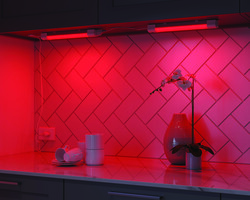
- Clean the Surface Thoroughly: The pre-applied adhesive requires an immaculate surface. Wipe down the underside of your cabinets or shelves with isopropyl alcohol (rubbing alcohol) to remove kitchen grease, dust, and wood treatment oils. Avoid household spray cleaners, as they leave behind a slick residue that ruins adhesion.
- Dry-Fit and Measure: Before peeling the backing, route the tape along your planned path. Identify where your power source sits. Note the designated cut marks—usually indicated by small copper pads with scissor icons spaced every 2 to 4 inches. Never cut the tape anywhere other than these marked solder pads.
- Navigate Corners Carefully: Do not fold or pinch the flexible circuit board at hard 90-degree angles, as this can sever the microscopic copper traces inside. Instead, use Good Earth’s corner jumper cables or make a loose loop (a "service loop") that tucks discreetly out of sight.
- Stick with Firm Pressure: Peel the backing tape 6 to 12 inches at a time, pressing down firmly along the center of the strip with your thumb. Work methodically from the power input toward the end of the run.
- Secure the Driver: Secure the power brick and excess power cord using the included screw-mount cable clips. Allowing the heavy power wire to dangle unsupported puts tension on the strip connector, leading to intermittent power connections over time.
Maximizing Visual Quality: The Case for Diffuser Channels
While Good Earth strip lights can be mounted bare against the underside of a cabinet, glossy countertops (such as polished granite, quartz, or marble) present a visual challenge. Bare diodes will reflect on shiny surfaces as harsh, visible dots—an effect designers call "hotspotting."
To eliminate this, consider pressing the strip into an aluminum channel with a frosted milky diffuser lens. The channel provides three distinct benefits:
- It blends the individual light points into a smooth, seamless bar of light.
- It acts as an aluminum heat sink, drawing heat away from the diodes and dramatically extending their lifespan.
- It completely hides the circuit board from view when looking up at the cabinets from a seated position.
Troubleshooting Common Problems
If your lighting behaves unexpectedly, these quick checks resolve the vast majority of issues:
The Strip Won't Turn On
Ensure the multi-pin connector connecting the power lead to the strip is seated firmly. LED tape requires specific polarity: look for a small "+" or arrow on the connector and ensure it aligns with the "+12V" or "+24V" mark on the strip. If plugged in backward, no current will flow.
Sections Past a Cut Mark Don't Light Up
If you used snap-on solderless connectors to join two pieces, the internal metal teeth may not have pierced through the protective coating or made contact with the copper pads. Unclip the connector, ensure the tape is cut perfectly straight across the copper line, reposition it, and clamp it down tightly with pliers.
The Remote Control or Smart App Is Unresponsive
For RF remotes, verify the plastic battery insulator tab has been completely removed. For Wi-Fi models, remember that almost all smart strip controllers require a 2.4 GHz Wi-Fi band during initial pairing. Temporarily disable the 5 GHz band on your home router if the setup wizard fails to find the device.
Final Verdict
Good Earth LED strip lights bridge the gap between flimsy online novelty strips and overpriced luxury architectural lighting. They provide reliable power delivery, straightforward installation accessories, and high-quality light temperatures suitable for daily task work. For homeowners seeking a dependable, weekend-friendly upgrade for kitchens, closets, or media rooms, they remain a top-tier choice.


