How to File and Check an Entergy Power Outage Report
Experiencing a blackout can disrupt your daily routine, compromise food safety, and create safety concerns for your family. If you live in an area serviced by Entergy—spanning parts of Arkansas, Louisiana, Mississippi, and Texas—knowing how to quickly submit an Entergy power outage report is essential. Prompt reporting ensures that utility crews are aware of the issue and can dispatch repair teams to your neighborhood as fast as possible.

This guide walks you through the steps to report an outage, how to check restoration updates, and what safety precautions you should take while waiting for the lights to come back on.
Ways to Submit an Entergy Power Outage Report
Entergy provides multiple channels for customers to report lost power. Choosing the right method depends on your current internet access and mobile device battery life. Here are the most efficient ways to notify the company of an outage:
1. Use the Entergy App
If you have mobile data access, downloading and using the Entergy app is often the fastest route. The app allows you to register your account, view your local outage map, and submit a detailed report with just a few taps. It also sends push notifications regarding estimated restoration times directly to your smartphone.
2. Report Online via the Website
You can use a computer, tablet, or smartphone browser to visit the official Entergy website. Navigate to their outage map and reporting portal. You will typically need to log in with your account credentials or enter your registered phone number and service address to pinpont your exact location.
3. Call Customer Service or Text
If your internet service is down, traditional phone methods are your best option:
- Phone: Call Entergy’s automated outage reporting line at 1-800-9OUTAGE (1-800-968-8243). Follow the automated prompts to report your outage by phone.
- Text Messaging: If you are registered for Entergy’s text service, you can simply text "OUT" to 36834 to log your outage instantly. (Note: You must have your mobile number previously linked to your utility account for this to work).
How to Check Restoration Status
Once you have submitted your report, you naturally want to know when power will be restored. Entergy offers a few real-time tracking tools to keep you informed:

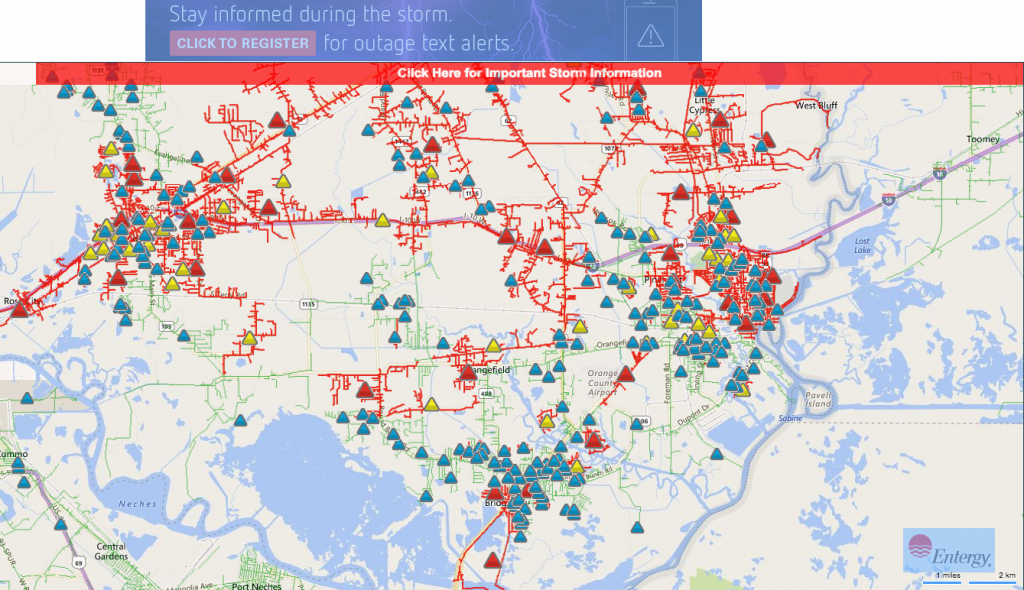
- The View Outages Map: Entergy hosts a live, interactive map on their website that displays active outages, the number of customers affected, and crews assigned. It updates continuously as repairs progress.
- Outage Alerts: By opting into SMS or email alerts during the reporting process, Entergy will proactively update you when crews are dispatched and when estimated restoration times change.
Keep in mind that estimated restoration times (ETRs) are initial approximations based on early assessments. During major storms or widespread grid damage, ETRs may change as crews uncover more complex infrastructure issues in the field.
What Happens Behind the Scenes After You Report
Understanding how utility companies prioritize repairs can help manage expectations during large-scale outages. Entergy follows a systematic restoration process designed to restore power safely and to the greatest number of people in the shortest amount of time:
- Critical Facilities: First priority is given to essential public health and safety facilities, such as hospitals, police stations, water treatment plants, and communication towers.
- Transmission Lines: High-voltage transmission lines and substations are repaired next. These feed power to entire sub-grids and neighborhoods. If these are down, local neighborhoods cannot receive electricity.
- Distribution Circuits: Once major feeders are operational, crews work on primary distribution lines that serve local neighborhoods and commercial areas.
- Service Lines: Finally, crews repair individual service lines running from the pole directly to single homes or businesses.
Crucial Safety Tips During a Power Outage
Safety should always be your top priority while waiting for power to be restored. Follow these expert guidelines to protect yourself, your family, and utility workers:
Stay Away from Downed Lines
Always assume that any downed power line is live and extremely dangerous. Never touch, drive over, or attempt to move a fallen wire. Keep children and pets far away and immediately report downed lines to Entergy or local emergency services.
Use Generators Safely
If you are using a portable gasoline or diesel generator, operate it strictly outdoors in a well-ventilated area—at least 20 feet away from doors, windows, and vents to prevent deadly carbon monoxide poisoning. Never plug a portable generator directly into your home's wall outlets (backfeeding), as this can electrocute utility linemen working on external lines.
Protect Appliances and Electronics
Unplug sensitive electronic equipment, such as computers, televisions, and smart home hubs, to protect them from potential power surges when electricity is suddenly restored. Leave one light switch in the 'on' position so you will know immediately when power comes back.
By following these steps, you can efficiently submit your Entergy power outage report, stay informed on restoration progress, and keep your household safe until regular service resumes.