How to Use BrickSeek Target Inventory in 2024
Mastering BrickSeek Target Inventory Tracking

If you love hunting for deep discounts, clearance finds, and hard-to-find items, you have likely heard of inventory checker tools. Among them, BrickSeek has long been a go-to platform for savvy shoppers. When utilized correctly, monitoring BrickSeek Target inventory can give you a massive edge, helping you locate clearance items before they hit the shelves or sell out entirely.
However, retail inventory tracking has evolved significantly. Target and other major box stores have updated their internal systems, making third-party inventory tools behave differently than they did a few years ago. This guide will walk you through how BrickSeek works with Target stores, how to interpret the data, and the best practices for scoring a deal.
Understanding How BrickSeek Works with Target
BrickSeek does not have a direct, official partnership with Target. Instead, the platform aggregates publicly available data from retail websites and APIs. When you search for a product on BrickSeek, it queries the retailer's backend stock numbers for specific zip codes.
For Target specifically, inventory is tracked down to the individual store level. This is crucial because a Target location across town might have dozens of a clearance item in the backroom, while your closest location is completely sold out. BrickSeek helps bridge the gap by letting you scan multiple zip codes in a single search.
Key Terms You Will See
When searching for items, you will encounter a few standard labels and metrics:
- In Stock / Limited Stock / Out of Stock: General indicators of availability.
- Quantities: Specific numbers reported by the system (though these are not always 100% accurate in real-time).
- MSRP vs. In-Store Price: The manufacturer's suggested retail price compared to what the local store is charging.
How to Look Up Target Items on BrickSeek
Using the platform to check stock levels requires a few specific identifiers. Target items can be tracked using numbers found directly on the Target app or website.
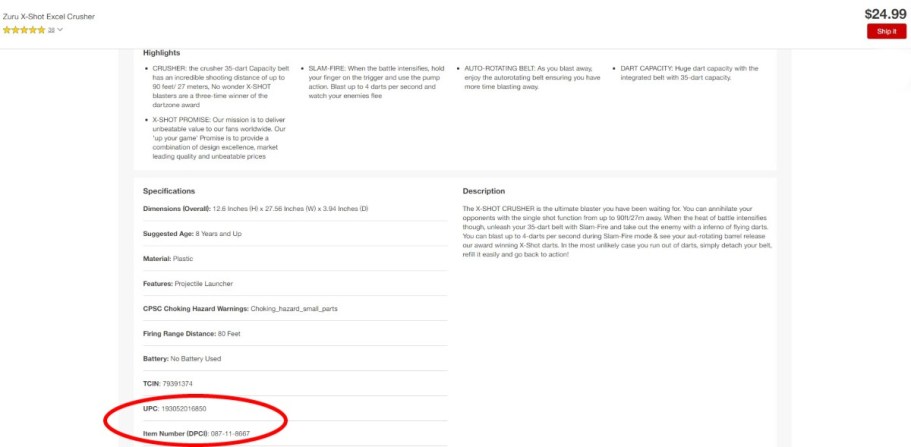
- Find the DPCI or UPC: Target uses a unique 9-digit code called a DPCI (Department, Class, Item) for every product. You can also use the 12-digit UPC barcode found on the product packaging.
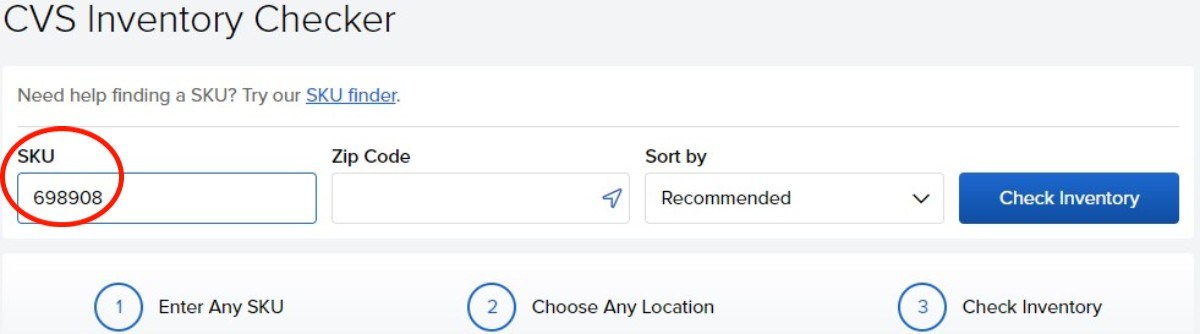
- Enter the Code on BrickSeek: Navigate to the inventory checker tool on BrickSeek, paste the DPCI or UPC into the search bar, and enter your target zip code.
- Review Store Results: BrickSeek will display a list of stores within your specified radius, showing estimated stock quantities and pricing for each location.
Limitations and Common Pitfalls to Keep in Mind
While tracking BrickSeek Target inventory is a powerful tool, it is not infallible. Retail inventory is fluid, and understanding the limitations will save you from wasted trips.
The "Phantom Stock" Problem

One of the most common frustrations shoppers face is "phantom stock." This happens when BrickSeek reports that a store has five units of an item, but when you arrive, an employee cannot find them. This usually occurs because:
- The items are high-theft and kept locked up or at the customer service desk.
- The inventory count includes items that were recently stolen, damaged, or misplaced in the backroom.
- The merchandise is sitting on a pallet high up in the stockroom and hasn't been unpacked yet.
Pricing Discrepancies
Target clearance prices can vary wildly from one store to another based on how long the item has been sitting on the shelf. BrickSeek pulls pricing data, but local markdowns happen independently at the store manager's discretion. Always verify the price using a price scanner in the store or the official Target app before heading to the register.
Pro Tips for Successful Target Clearance Shopping
Combining BrickSeek data with smart shopping habits yields the best results. Use these strategies to maximize your savings.
1. Use the Target App in Tandem
Never rely solely on a third-party tool. Use the official Target app to scan barcodes while you are walking the aisles. The Target app will show you if an item is on clearance at *that specific store*, and it often updates faster for active price drops than external databases.
2. Know Target’s Markdown Schedule
Target departments follow a general markdown cycle. While schedules can vary by location and store volume, certain days of the week are traditionally designated for clearance markdowns across specific departments like toys, electronics, apparel, and home goods. Shopping shortly after these markdown cycles gives you the first pick of newly discounted inventory.
3. Be Polite to Store Employees
If BrickSeek says an item is in stock in the backroom, remember that employees are busy managing thousands of products. Show them the DPCI on your phone, politely ask if they might have a moment to check the stockroom, and accept their answer gracefully if they cannot locate the item. Store staff are much more likely to help a polite customer than someone demanding items based on a third-party website.
Final Thoughts
Checking Target inventory through BrickSeek remains one of the best ways to find hidden clearance deals, track down hard-to-find toys, and save money on everyday purchases. By understanding how to read the data, acknowledging the limitations of retail stock numbers, and combining your search with the official Target app, you can turn everyday shopping into a successful treasure hunt.