Is Frontier Down? How to Use Down Detector Frontier
Understanding Frontier Outages and Service Disruptions

Internet service interruptions are frustrating, whether you are working from home, streaming a movie, or trying to manage smart home devices. When your connection drops unexpectedly, your first question is usually whether the issue is isolated to your home or part of a larger network failure. This is where checking a down detector for Frontier becomes essential.
Frontier Communications provides fiber-optic and DSL internet, digital television, and phone services across multiple states. Like any major telecom provider, they experience scheduled maintenance, equipment failures, severe weather impacts, and fiber cuts. Knowing how to quickly verify if Frontier is experiencing widespread issues saves you time and prevents unnecessary troubleshooting steps.
How to Use Down Detector Frontier Services
When you suspect an outage, third-party outage tracking platforms are often faster at reporting real-time user experiences than the official provider support channels. Here is how to effectively check the status of your connection:
1. Check Real-Time Outage Maps
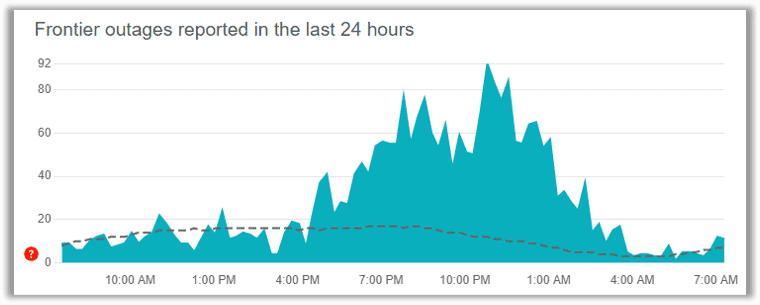
Crowdsourced outage platforms monitor user-submitted problem reports and social media complaints to detect spikes in service interruptions. When you look up Frontier on these trackers, you will typically see:
- A live graph showing the volume of problem reports over the last 24 hours.
- A geographic heat map highlighting regions with the highest concentration of complaints.
- A breakdown of specific reported issues, such as total blackout, landline problems, or slow fiber internet speeds.
2. Visit Official Frontier Support Channels
Video: Frontier Internet Down?Major Outage reports in WV & Ohio |Latest Update | Ohio internet outage

While third-party detectors give you immediate peer-confirmed data, you should also check official channels for authorized updates. Log into the MyFrontier mobile app using your cellular data to view account-specific outage notifications. Frontier often posts maintenance notices and localized outage alerts directly on their official support website and verified social media profiles.
Common Signs of a Frontier Outage
Before concluding that there is a major network failure in your neighborhood, observe the status indicator lights on your Frontier router, modem, or Optical Network Terminal (ONT). Knowing what these lights mean helps you differentiate between a local hardware glitch and a regional blackout:
- Blinking Red or Amber Internet Light: Usually indicates that the router is not receiving an internet signal from the outside line.
- No PON Light on the ONT (Fiber Users): If the Passive Optical Network light is off or flashing red, the fiber connection to your home has been disrupted.
- Power Outage: If your home has power but your networking equipment remains dark, check the power strip or verify if the ONT battery backup unit (if applicable) requires a reset.
Troubleshooting Steps While Waiting for Service Restoration
If the down detector indicates a widespread Frontier outage in your area, the only option is to wait for their field technicians to resolve the core network issue. However, if the outage map shows normal operations and the problem is isolated to your home, try the following troubleshooting steps:
- Perform a Power Cycle: Unplug the power cords from both your modem/ONT and your Wi-Fi router. Wait at least 60 seconds to allow the internal memory to clear completely. Plug the modem or ONT back in first, wait for the connection lights to stabilize, and then plug in your Wi-Fi router.
- Check Physical Cabling: Inspect all Ethernet cables, coaxial cables, and fiber patch cords connected to your networking gear. Ensure that no cables are loose, frayed, or accidentally disconnected.
- Test a Direct Wired Connection: Connect a laptop or desktop directly to your router using an Ethernet cable. If you have internet access via the wired connection but not over Wi-Fi, the issue lies within your wireless router settings rather than the Frontier service itself.
When to Contact Frontier Customer Support
If you have power-cycled your equipment, checked all physical connections, and confirmed that your neighborhood is not part of a broader outage reported on the tracker, it is time to contact Frontier support directly. Be prepared to provide your account number, confirm your billing address, and let the representative know which troubleshooting steps you have already completed. This helps them escalate your ticket to technical support or dispatch a technician to inspect your outside drop line.