Lenovo Long Battery Life: Best Laptops & Tips
When you spend your workday away from a desk, your laptop charger should be a backup, not a constant requirement. Lenovo has earned a strong reputation among business professionals, students, and digital nomads, but finding a Lenovo long battery life machine depends heavily on the processor, screen technology, and power configuration you choose.
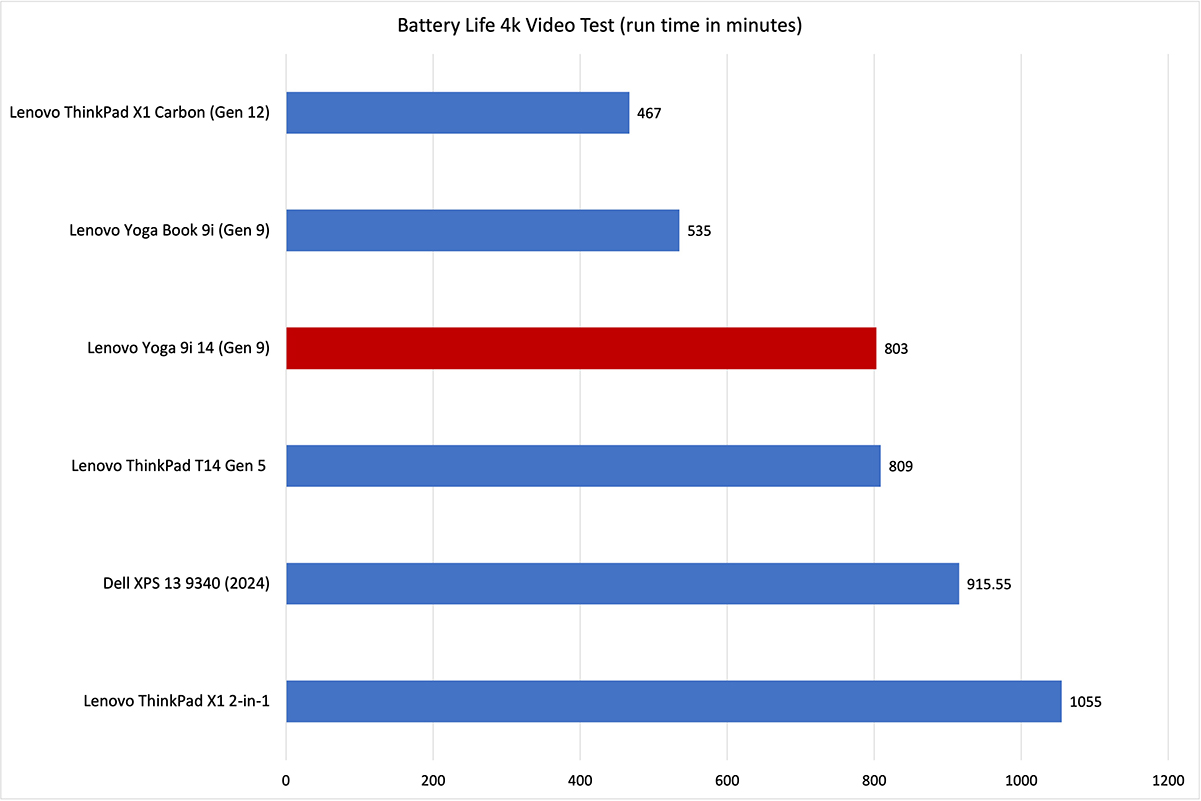
With the rise of ultra-efficient architectures—including Qualcomm Snapdragon X Elite chips, Intel Core Ultra (Series 2), and AMD Ryzen Zen 4/Zen 5 APUs—modern Lenovo laptops can routinely reach 14 to 20 hours of real-world productivity on a single charge. This guide covers the top Lenovo models for battery endurance, explains the hardware choices that make or break runtimes, and outlines practical settings to keep your machine running longer.
Top Lenovo Laptops for Battery Endurance
Lenovo covers multiple lines, ranging from enterprise-grade ThinkPads to creative Yoga 2-in-1s. The following models lead the pack in verified, real-world battery testing.
1. Lenovo ThinkPad T14s Gen 6 (Snapdragon)
The ThinkPad T14s has long been an enterprise staple, but the Gen 6 edition powered by the Qualcomm Snapdragon X Elite processor shifts battery expectations into a new tier. Paired with a 58Wh battery, this ARM-based machine delivers upwards of 18 to 22 hours of continuous web browsing and office productivity.
- Battery capacity: 58Wh
- Real-world run time: 17–21 hours
- Ideal for: Road warriors, business travelers, and field workers who need guaranteed multi-day light productivity without an outlet.
2. Lenovo Yoga Slim 7x
If you prefer a consumer-focused, slim ultrabook with premium audio and an exceptional display, the Yoga Slim 7x stands out. Despite featuring a vibrant 3K OLED display—traditionally a major battery drain—the extreme efficiency of the Snapdragon platform combined with a 70Wh battery allows this machine to last 14 to 16 hours during typical workflow sessions.
- Battery capacity: 70Wh
- Real-world run time: 13–16 hours
- Ideal for: Content writers, students, and remote workers who want a high-resolution display without sacrificing day-long longevity.
3. Lenovo ThinkPad X1 Carbon Gen 12 & Gen 13 Aura
The flagship ThinkPad X1 Carbon remains the gold standard for executive ultrabooks. Equipped with low-power Intel Core Ultra processors and Intel Arc graphics, these models balance x86 software compatibility with impressive endurance. Models equipped with low-power IPS displays easily achieve 12 to 14 hours of work, supported by a 57Wh battery and rapid-charge capabilities that can replenish 80% capacity in roughly 60 minutes.
- Battery capacity: 57Wh
- Real-world run time: 11–14 hours (IPS panel)
- Ideal for: Corporate power users who need legacy x86 software reliability, enterprise manageability, and light carry weight.
4. Lenovo IdeaPad Slim 5 (AMD)
Long battery life does not have to come with a premium price tag. The AMD Ryzen-powered IdeaPad Slim 5 pairs energy-efficient Zen 4 silicon with an optional 76Wh battery pack. Because the 1080p or 1200p IPS display draws minimal current, this budget-friendly machine can sustain 12 to 15 hours of streaming and document editing.
- Battery capacity: Up to 76Wh
- Real-world run time: 12–15 hours
- Ideal for: College students and budget-conscious professionals needing dependable all-day stamina.
Hardware Factors That Dictate Battery Life
A large battery capacity (measured in Watt-hours, or Wh) is only half the equation. The components you configure have a massive impact on your actual screen-on time:
- Display Resolution and Technology: A 4K or 3K display draws significantly more power than a standard Full HD (1920x1200) panel. While OLED screens offer superior contrast, they draw more energy when rendering bright white backgrounds (like documents or spreadsheets). Choosing a low-power, 400-nit IPS screen is the single most effective way to maximize runtime on x86 machines.
- Processor Architecture: ARM processors (Snapdragon X Elite) draw dramatically less power at idle and during light tasks than traditional x86 chips. If full-day unplugged productivity is your top metric, ARM platforms lead the category. For x86 setups, AMD U-series and Intel Lunar Lake chips provide the best performance-per-watt balance.
- Refresh Rate: High-refresh screens (90Hz or 120Hz) make animations smooth, but they cycle the panel up to twice as fast as standard 60Hz displays, shaving 10% to 20% off your total battery life.
How to Optimize Your Lenovo for Long Battery Life
Even an efficient laptop can run out of juice prematurely if background tasks run unchecked. Use these built-in software tools to achieve consistent Lenovo long battery life day in and day out.
1. Use Lenovo Vantage Thermal Modes
Lenovo preinstalls the Lenovo Vantage (or Commercial Vantage) utility on all modern devices. Pressing Fn + Q toggles your thermal and power profile on the fly:
- Battery Saver / Quiet Mode: Limits processor peak boost frequencies, lowers fan noise, and drops power draw significantly without making office tasks feel sluggish.
- Intelligent Cooling: Uses sensor data to balance performance and power automatically based on lap or desk placement.
2. Switch to Dynamic or 60Hz Refresh Rate
If your model includes a 90Hz or 120Hz display, use the shortcut Fn + R to switch directly between dynamic/high refresh rates and a fixed 60Hz. Switching down to 60Hz when you are working on spreadsheets, reading articles, or replying to emails immediately reduces display power consumption.
3. Enable Battery Saver in Windows 11
Set Windows Battery Saver to activate automatically at 30% rather than the default 20%. This profile limits background synchronizations, dims display brightness slightly, and enforces lower clock states on the CPU.
4. Manage Startup Items and Edge Efficiency Mode
Background tasks are silent battery killers. Open Windows Task Manager, navigate to the Startup Apps tab, and disable auto-start for communication tools, game launchers, and cloud sync utilities you do not need immediately upon boot. Additionally, turning on "Efficiency Mode" in web browsers like Microsoft Edge or Google Chrome puts inactive tabs to sleep, preventing runaway CPU usage.
Protecting Long-Term Battery Health
A battery that lasts 15 hours today will not help you three years from now if the chemical cells degrade through poor charging habits. Lithium-ion packs degrade fastest when kept at 100% capacity under high thermal stress.
To maintain peak capacity over the life of your device:
- Open Lenovo Vantage.
- Navigate to Device > Power settings.
- Turn on Conservation Mode (or Battery Charge Threshold).
This stops charging once the battery reaches 75% to 80%, which drastically reduces chemical wear if you frequently use your laptop connected to an external monitor or desk dock. Switch it back to 100% Rapid Charge mode only when you know you have an upcoming flight or long off-grid travel day.
Final Verdict: Which Lenovo Should You Pick?
If maximum runtime is your non-negotiable metric, choose the Lenovo ThinkPad T14s Gen 6 or Yoga Slim 7x with Snapdragon silicon. They set modern endurance records, easily surpassing 15 hours of active use. For users requiring legacy corporate software stacks, a ThinkPad X1 Carbon or ThinkPad T14 configured with an energy-efficient AMD processor and a low-power 400-nit IPS screen delivers the best combination of broad software support, typing ergonomics, and true all-day stamina.