Mastering Eval in Splunk: Commands & Examples
When working with machine data, your raw logs rarely match the exact format you need for reporting and analysis. Whether you need to calculate response times, normalize user names, or create conditional flags, mastering eval in Splunk is an essential skill for any administrator or analyst. The eval command allows you to calculate new fields, convert data types, and manipulate strings dynamically within your Search Processing Language (SPL) queries.
Understanding the Eval Command
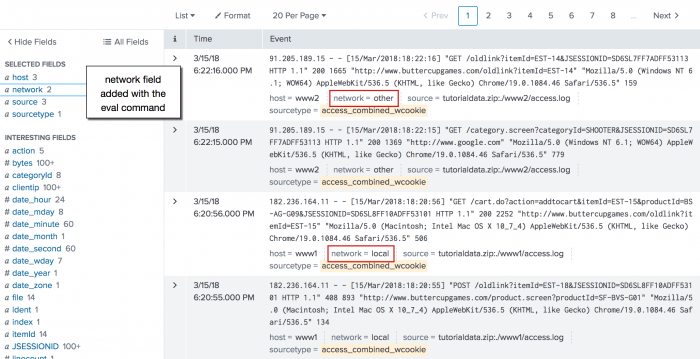
At its core, the eval command evaluates a mathematical, boolean, or string expression and assigns the result to a new or existing field. Unlike search-time field extractions defined in configuration files, eval happens on-the-fly during the search pipeline.
The basic syntax follows a straightforward pattern:
| eval new_field = expressionYou can chain multiple eval commands together in a single pipeline or combine them into a single command using commas, provided they depend on previously available fields.
Common Use Cases and SPL Examples
The versatility of eval makes it one of the most frequently used commands in Splunk. Below are the most common scenarios you will encounter in day-to-day log analysis.
1. Mathematical Calculations
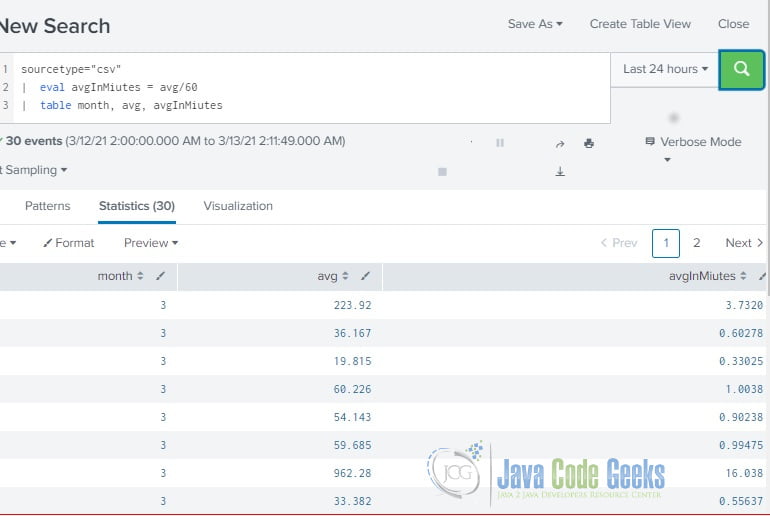
Log files often store metrics in raw, unreadable units—such as response time in milliseconds or file sizes in bytes. You can use eval to convert these into more digestible formats.
index=web status=200
| eval response_time_sec = duration / 1000
| stats average(response_time_sec) as avg_sec by uri
In this example, the raw field duration (measured in milliseconds) is divided by 1000 to create a new field, response_time_sec, which is then used in a statistical aggregation.
2. String Manipulation
Data normalization is critical when correlating logs from different sources. You can use string functions within eval to format text, combine fields, or extract specific substrings.
Video: Splunk Eval Command
- Concatenation: Combine a first name and last name into a single full name using the period operator.
| eval fullname = firstname . " " . lastname - Case Conversion: Normalize username fields to lowercase to prevent capitalization mismatches from skewing your search results.
| eval user = lower(user)
3. Conditional Logic with If and Case
Often, you need to categorize data based on specific thresholds. The if() and case() functions let you inject conditional logic into your searches.
The if() function takes a boolean expression, a true result, and a false result:
| eval traffic_type = if(bytes > 1048576, "Large", "Normal")For more than two conditions, the case() function acts like a traditional switch-case statement, evaluating arguments sequentially until it finds a true match:
| eval risk_level = case(
    status == 500, "Critical",
    status >= 400, "Warning",
    status < 400, "Low"
)
Working with Data Types in Eval
Splunk treats fields as either strings or numbers depending on their origin, which can sometimes cause unexpected results in your evaluations. Understanding data types helps you avoid common pitfalls.
Type Conversion Functions
If Splunk treats a numerical field as a string (preventing you from performing mathematical operations), you can explicitly convert it using conversion functions:
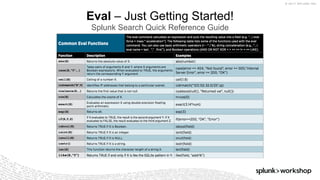
tostring(X): Converts a numerical value $X$ into a string. Often used for formatting numbers with commas or displaying time durations.tonumber(X): Converts a string value $X$ into a numerical value so you can perform math or statistical analysis on it.
Best Practices for Performance
Because eval processes data on-the-fly during a search, inefficient queries can slow down your dashboards and reports. Keep these best practices in mind to optimize your SPL:
- Filter early: Always narrow down your dataset using time ranges, indexes, and search terms before applying heavy
evalfunctions. - Combine evaluations: Instead of writing multiple consecutive
evalcommands, combine them using commas where possible to reduce processing overhead. - Use search-time extractions when appropriate: If a calculated field is needed globally across many dashboards, consider defining it in props.conf and transforms.conf rather than calculating it via
evalin every single search.
Conclusion
The eval command is a powerhouse in Splunk, bridging the gap between raw log ingestion and actionable business or security insights. By practicing basic math, string manipulation, and conditional statements like case() and if(), you can drastically improve the quality and clarity of your data analysis.