Mastering na.rm in R: How to Handle Missing Values
Introduction to Missing Values in R
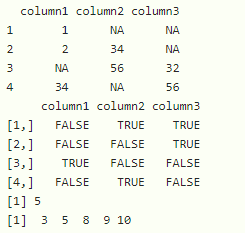
When working with real-world datasets in R, encountering missing data is practically guaranteed. Represented as NA (Not Available), these missing values can completely disrupt your data analysis pipeline. If you try to calculate the mean, sum, or standard deviation of a numeric vector that contains even a single NA, R will return NA by default as a safety precaution.
To solve this common frustration, R provides a built-in argument across many of its core statistical functions: na.rm in R. This powerful little argument tells R to explicitly remove missing values before performing the calculation, allowing you to get accurate results without manually filtering your entire dataset first.
What Does na.rm Stand For?
The syntax na.rm stands for NA remove. When set to TRUE, it instructs the underlying function to strip out any NA entries from the vector or column before executing the mathematical operation. When left at its default value of FALSE, the function refuses to guess your intentions and outputs NA.
Understanding how and when to apply this argument is a fundamental skill for anyone working in data science, statistics, or general data manipulation using R.
Common Functions That Use na.rm
Many of R's base arithmetic and summary functions accept the na.rm argument. Here are the most frequently used ones:
mean(x, na.rm = TRUE): Calculates the average while ignoring missing values.sum(x, na.rm = TRUE): Adds up all numerical values, skippingNAs.sd(x, na.rm = TRUE): Computes the standard deviation withoutNAinterference.var(x, na.rm = TRUE): Finds the variance of the data.min(x, na.rm = TRUE)andmax(x, na.rm = TRUE): Find the minimum and maximum values.median(x, na.rm = TRUE): Determines the middle value of the dataset.
Practical Examples of Using na.rm in R
Let's look at a few concrete examples to see how na.rm works in practice. Imagine we have a numeric vector representing daily sales figures, but some days failed to record data, resulting in NA values.
Example 1: Calculating the Mean with NAs
# Create a sample vector with missing values
sales <- c(120, 150, NA, 200, 130, NA, 160)

# Attempting to find the mean without na.rm
mean(sales)
# Output: NA

# Using na.rm = TRUE
mean(sales, na.rm = TRUE)
# Output: 152
In the first attempt, R encounters the NA values and halts execution, returning NA. In the second attempt, passing na.rm = TRUE tells R to calculate the mean using only the five valid numbers: 120, 150, 200, 130, and 160.
Example 2: Finding the Sum and Extrema

The same logic applies when you need totals or ranges. If you want to know the total revenue generated from the same vector, you can use the sum() function:
# Calculate total sales ignoring missing data
sum(sales, na.rm = TRUE)
# Output: 760

# Find the maximum single day sale
max(sales, na.rm = TRUE)
# Output: 200
How na.rm Behaves with Different Data Types
It is important to know that na.rm behaves differently depending on the function and data structure you are using.
Vectors vs. Data Frames
Base R summary functions like mean() or sum() expect a atomic vector. If you pass an entire data frame directly to mean(my_dataframe, na.rm = TRUE), R will often throw a warning or an error because some columns might contain character or factor data rather than numbers.
To apply na.rm across a data frame or a tibble in the tidyverse, you typically use functions from packages like dplyr:
library(dplyr)

# Calculate mean of a specific column in a data frame
my_data %>%
  summarise(avg_sales = mean(sales, na.rm = TRUE))
Logical Vectors
Functions like any() and all() also support the na.rm argument. When evaluating logical conditions where data might be missing, setting na.rm = TRUE prevents NA from masking the true boolean outcome if valid data points provide a definitive answer.
Common Pitfalls and Best Practices
While na.rm = TRUE is a massive convenience, you should use it thoughtfully to avoid analytical errors.
- Don't hide data collection bugs: If a variable that should never be missing suddenly contains 90%
NAvalues, simply usingna.rm = TRUEwill let your code run, but your results will be based on a tiny, potentially biased sample. Always investigate why data is missing. - Be aware of sample size changes: When you drop
NAvalues dynamically in different calculations, your sample size ($n$) changes from function to function. Keep track of your observations using functions likesum(!is.na(x)). - Know alternative approaches: For more complex data cleaning workflows, functions like
na.omit()or tidyverse functions likedrop_na()can remove entire rows containing missing values before you begin analysis.
Conclusion
Handling missing data is an inevitable part of data analysis, and knowing how to properly utilize na.rm in R will save you countless hours of troubleshooting. By simply appending na.rm = TRUE to your summary and arithmetic functions, you can bypass missing values seamlessly and focus on extracting meaningful insights from your datasets.