MSI vs EXE: What's the Difference?
When downloading software for Windows, you will typically encounter two primary file extensions for installation: .msi and .exe. Understanding the fundamental differences between them, often summarized as the debate of msi和exe区别, is crucial for both everyday users and IT administrators. While both formats are used to install applications on your computer, they work in fundamentally different ways under the hood.

What is an EXE File?
An EXE (executable) file is a general-purpose program file that can run code directly on the Windows operating system. When you double-click an EXE file, it executes whatever instructions the developer programmed into it. This makes EXE files extremely versatile.
Because EXE files can contain virtually any code, the installation wizard you see when running an EXE file is entirely custom-built by the software developer. It could be a simple script, a complex graphical interface, or even a self-extracting archive that drops files into specific directories.
Key Characteristics of EXE Installers
- Custom Interfaces: Developers have complete creative freedom over how the installation looks and feels.
- Versatility: An EXE is not just an installer; it can be a game, a utility, a driver, or a standalone application.
- Variable Automation: Silent or unattended installations depend entirely on whether the developer built in specific command-line switches (e.g.,
/silentor/verysilent). - Lesser Standardisation: Because there is no strict template, troubleshooting a failed EXE installation often requires contacting the specific vendor or digging through custom error codes.
What is an MSI File?
An MSI (Microsoft Installer) file is a database file specifically designed for installing software through the Windows Installer service. Unlike an EXE, an MSI file is not a standalone program. Instead, it is a structured package that contains all the information about what files need to be copied, where registry keys should be altered, and what dependencies are required.
When you run an MSI file, Windows itself reads the database and handles the installation process using a standardized engine. This ensures a consistent experience across different applications built on the MSI format.
Key Characteristics of MSI Packages
- Standardized Interface: MSI installations generally follow a uniform Microsoft-designed wizard, keeping the user experience consistent.
- Built-in Uninstallation: Because Windows tracks every action through the Installer service, removing an MSI program is usually cleaner and more reliable.
- Enterprise Friendly: System administrators can easily deploy MSI packages across hundreds of computers simultaneously via Active Directory or Group Policy.
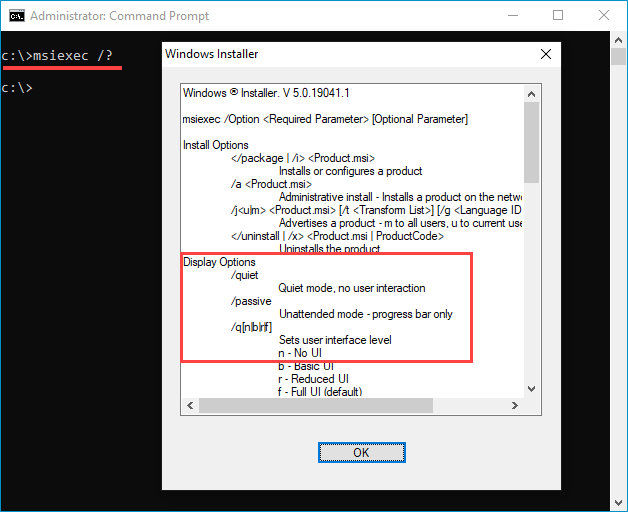
- Native Silent Installation: MSI files natively support standard command-line parameters for silent deployment (e.g.,
msiexec /i package.msi /qn).
Core Differences: MSI和EXE区别
To truly understand how these two formats compare, it helps to examine them across a few critical categories: execution, administrative control, customization, and safety.

1. Execution and Architecture
An EXE runs its own code. If an EXE installer fails midway, it relies on its own custom error-handling logic to roll back changes (if it has any built-in). An MSI package is managed entirely by the Windows Operating System via the msiexec.exe engine. If an installation fails, the Windows Installer service can automatically roll back the system to its exact pre-installation state.
2. Enterprise Deployment
If you are managing a network of computers in a corporate environment, MSI files are heavily favored. An IT administrator can push an MSI package to workstations silently in the background without user intervention. Doing the same with an EXE file requires knowing the exact, proprietary command-line switches created by that specific developer, which can change from one vendor to another.
3. Customization and Bundling
EXEs are great for complex software bundles. For instance, if a software package needs to install a specific version of the .NET Framework, C++ redistributable packages, and a driver before installing the main app, an EXE wrapper can manage all these sequential steps seamlessly. An MSI file, by contrast, is typically restricted to installing a single, self-contained application package.
Which One Should You Use?
For the average home user, the choice between MSI and EXE usually doesn't matter. You simply download what the developer provides, run the file, and click through the prompts. However, knowing the distinction helps when troubleshooting:
- Choose EXE if you are installing standard desktop applications, games, or software packages that require complex pre-requisite dependencies.
- Choose MSI if you are working in an enterprise IT environment, need to deploy software across multiple machines, or require reliable, clean uninstallations.
Conclusion
Both MSI and EXE formats serve vital roles in the Windows ecosystem. EXE files offer unmatched flexibility and customizability for developers, while MSI packages provide strict standardization, reliability, and powerful enterprise deployment tools. Understanding the differences between them allows both casual users and system administrators to manage software installations with confidence.