MyUPMC App: Everything You Need to Know
Managing your healthcare can often feel like a part-time job. Between scheduling specialist visits, keeping track of immunization records, and paying medical bills, it is easy to feel overwhelmed. Fortunately, digital health tools have transformed how patients interact with their medical providers. If you receive care through the University of Pittsburgh Medical Center network, the MyUPMC App: Everything You Need to Know in One Place is your ultimate guide to streamlining your medical life.
Whether you are a longtime patient or preparing for your very first visit at a UPMC facility, this comprehensive patient portal puts your health information directly in the palm of your hand. Below, we break down everything you need to know about downloading, navigating, and maximizing the features of this powerful mobile application.
What is the MyUPMC App?
The MyUPMC App is the official mobile application for the UPMC patient portal. Available for both iOS and Android devices, it connects you directly to your electronic health record (EHR). Instead of calling your doctor's office for every minor question or waiting for paper test results in the mail, the app acts as a secure, 24/7 hub for your medical data.
The platform is fully HIPAA-compliant, ensuring that your sensitive health data, Social Security number, and financial details remain strictly confidential. You can access it via your smartphone, tablet, or a standard web browser on your home computer.
Core Features of the App
The application offers a robust suite of tools designed to make healthcare navigation as seamless as possible. Here are the primary features you will use most often:
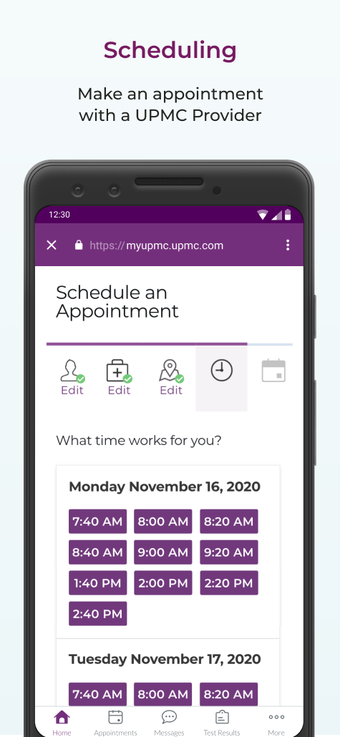
- Appointment Scheduling: Easily book routine appointments with primary care providers or select specialists without picking up the phone. You can also view upcoming visits and cancel or reschedule when plans change.
- Test Result Access: View lab work, imaging results, and pathology reports as soon as they are released by your clinical team, often before your follow-up appointment.
- Secure Messaging: Communicate directly with your care team for non-urgent medical questions, medication refill requests, or follow-up clarifications.
- Bill Pay: Review statements, set up payment plans, and securely pay your medical bills directly through your mobile device.
- Health Summaries: Keep track of your current medications, allergies, vaccination history, and vital signs in one centralized location.
How to Download and Set Up Your Account
Getting started with the portal takes just a few minutes. Follow these simple steps to set up your profile:
- Download the App: Go to the Apple App Store (for iOS devices) or the Google Play Store (for Android devices) and search for "MyUPMC." Download the official free application.
- Create an Account: Open the app and select the option to sign up. You will need to provide basic personal information, such as your full name, date of birth, and email address.
- Verify Your Identity: To protect your privacy, the app will ask security questions to match your profile against existing UPMC medical records. If you received an activation code from your doctor’s office during a recent visit, you can enter it here for instant matching.
- Set Up Biometric Login: For convenience and added security, enable Face ID or fingerprint login so you do not have to type your password every time you open the app.
Managing Family Health with Proxy Access
Video: MyUPMC App | UPMC
Healthcare management often extends beyond your own personal needs. Parents, legal guardians, and caregivers frequently need to oversee medical care for dependents or aging family members. The MyUPMC platform accommodates this through "proxy access."

Proxy Access for Children
Parents and legal guardians can link a child’s account to their own. For children under a certain age (typically under 12, though policies vary by state and clinic), parents have full visibility into appointments, test results, and messaging. As children grow into adolescence, privacy laws and UPMC policies may restrict full parental access, shifting some control directly to the teenager to encourage personal health responsibility.
Proxy Access for Adult Family Members
If you care for an aging parent or a spouse with a chronic condition, you can request proxy access to their account. Both parties must sign authorization forms to protect patient privacy, ensuring that vulnerable individuals maintain control over who views their confidential medical data.
Tips for Getting the Most Out of Your Experience
To ensure you have a smooth experience using the portal, keep these best practices in mind:
- Turn on Push Notifications: Enable notifications in your phone settings so you know instantly when a new test result is ready or when your doctor replies to a message.
- Use E-Visits When Appropriate: For minor ailments like seasonal allergies, sinus infections, or rashes, check if an asynchronous e-visit or video visit is available to save yourself a trip to urgent care.
- Keep Your App Updated: Regularly check your app store for updates. Developers frequently release patches that improve security, fix bugs, and introduce new user-friendly features.
Troubleshooting Common Issues
While the application is designed to be intuitive, you may occasionally run into technical hurdles. If you forget your password, use the automated "Forgot Password" link on the login screen to reset it via your registered email. If your medical records do not appear correctly or your account fails to link, contact the dedicated MyUPMC support line listed on their official website. Support representatives can manually verify your identity and merge or link your medical history properly.
Conclusion
Taking control of your wellness journey has never been easier thanks to modern health technology. By keeping your medical records, doctor communications, and billing details in a single digital ecosystem, the MyUPMC App eliminates unnecessary administrative friction. Download the app today, set up your profile, and experience a more connected, transparent way to manage your health.