Peachjar Data Breach: 10 Crucial Steps to Stay Safe
When a school communication platform like Peachjar suffers a security incident, it strikes a nerve for parents and guardians everywhere. Because these platforms manage sensitive data for schools, students, and families, a compromise can feel deeply personal. If you received a notification regarding the incident, knowing what to do next is critical. To help you navigate this situation, security specialists have outlined the 10 crucial steps after the Peachjar data breach to protect your household.

Understanding the Peachjar Data Breach
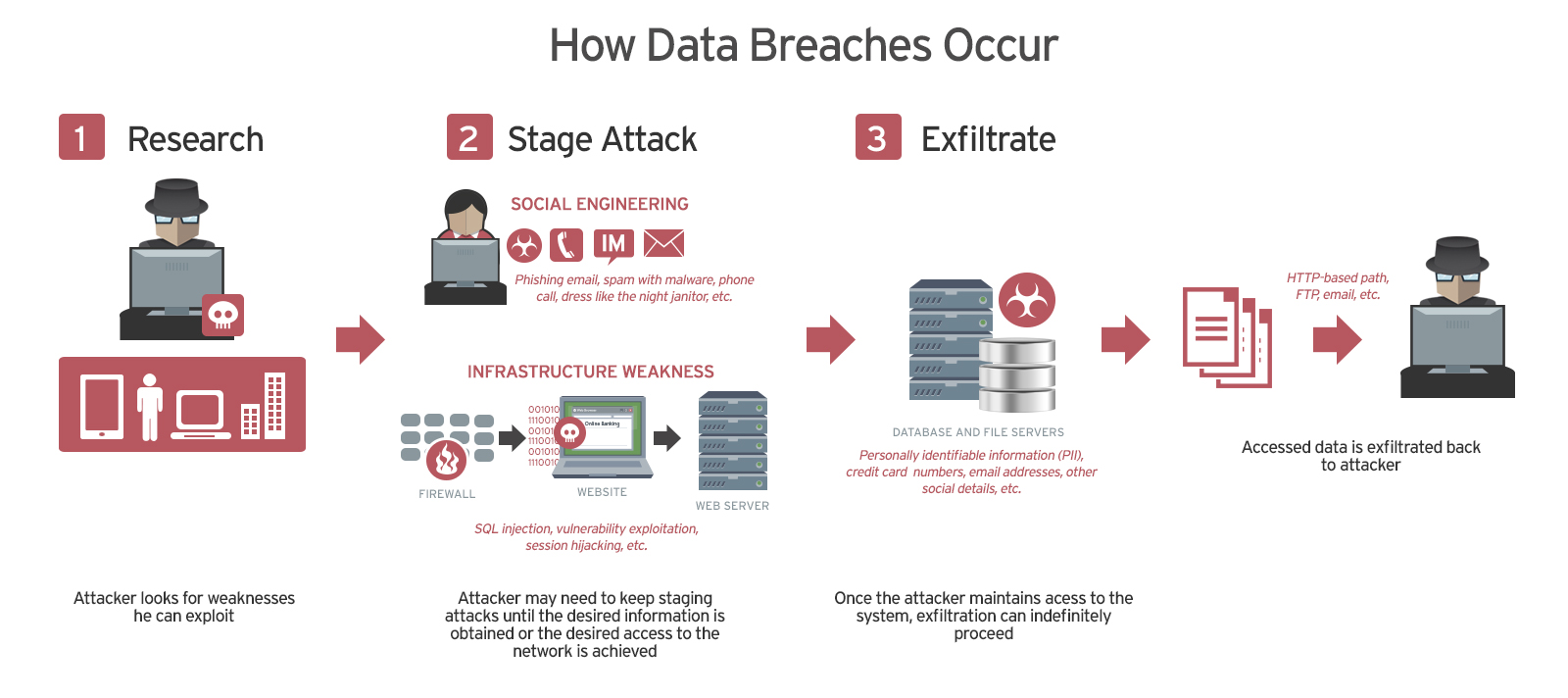
Before taking action, it helps to understand what happened. Peachjar is a digital flyer distribution service used by thousands of school districts across the United States. It houses user accounts, contact details, and sometimes administrative data. When unauthorized actors gain access to these systems, they often extract personal information to use in phishing campaigns, credential stuffing attacks, or identity theft. Acting quickly minimizes your exposure and secures your digital footprint.
10 Crucial Steps After the Peachjar Data Breach
1. Read the Official Breach Notification Carefully
Start by thoroughly reading the official notification letter or email sent by Peachjar or your school district. Look for specific details regarding what information of yours was exposed. Was it just an email address and password, or did it include phone numbers, home addresses, or other identifiers? Knowing the exact scope dictates your next moves.
2. Change Your Password Immediately
If your account was tied to the breach, change your password right away. If you used that same password on any other websites or apps, change those too. Cybercriminals routinely use automated tools to test leaked passwords across dozens of popular platforms—a tactic known as credential stuffing.
3. Enable Multi-Factor Authentication (MFA)
Wherever it is available, turn on multi-factor authentication. MFA adds a critical layer of defense by requiring a second form of verification—such as a code sent via text message or generated by an authenticator app—beyond just your password. Even if a hacker steals your password, they cannot access your account without that second factor.
4. Beware of Targeted Phishing Scams
Data breaches often lead to a spike in targeted phishing emails and text messages. Scammers may impersonate your school district, Peachjar, or tech support to trick you into clicking malicious links or handing over more information. Never click links in unsolicited messages claiming to be about the breach; instead, navigate to official websites directly.
5. Freeze Your Credit Reports
.png#keepProtocol)
If the incident exposed sensitive financial data or Social Security numbers, contact the three major credit bureaus—Equifax, Experian, and TransUnion—to place a security freeze on your credit reports. A credit freeze prevents lenders from opening new accounts in your name, effectively blocking financial identity theft.
6. Monitor Your Financial Accounts
Keep a close eye on your bank accounts, credit cards, and online payment services. Set up real-time transaction alerts for any activity, no matter how small. Catching unauthorized transactions early allows you to dispute charges and secure your finances before major damage is done.
7. Check If Your Data Appeared on the Dark Web
Use reputable dark web monitoring tools or identity theft protection services to check if your credentials have been openly traded or sold online. Many password managers and antivirus suites now include this feature as part of their standard subscription packages.
8. Update Your Security Questions
If your account profile included security questions and answers (such as your mother's maiden name, first pet, or high school), assume those answers were compromised. Update your security questions across other vital accounts to completely unique, fictional answers that cannot be guessed or researched online.
9. Consider Identity Theft Protection Services
Many organizations offer complimentary credit monitoring or identity theft protection services following a major breach. Take advantage of these offers if they apply to the Peachjar incident. These services actively scan public records, credit files, and black markets for misuse of your identity.
10. Educate Your Family About Digital Hygiene
Data breaches are a teachable moment for the whole household. Talk to your children and family members about the importance of unique passwords, avoiding suspicious links, and verifying who is asking for personal information online. Strong digital hygiene is your family's best long-term defense against future incidents.
Moving Forward with Confidence
While dealing with a digital security incident is undeniably stressful, taking prompt, methodical action neutralizes most of the risks. By following these expert-recommended steps after the Peachjar data breach, you can secure your accounts, protect your financial standing, and ensure your family remains safe in an increasingly connected digital landscape.