San Bernardino Superior Court Case Access: Full Guide
Finding public court documents in California’s largest geographic county does not require an in-person trip to the clerk’s window for every inquiry. Whether you are tracking a civil lawsuit, verifying a criminal background, checking a probate administration, or looking up a traffic citation, understanding how san bernardino superior court case access works will save you hours of administrative hassle. The court provides public records through an integrated online portal, on-site public access terminals, and standard mail-in request procedures.

Understanding the San Bernardino Court System
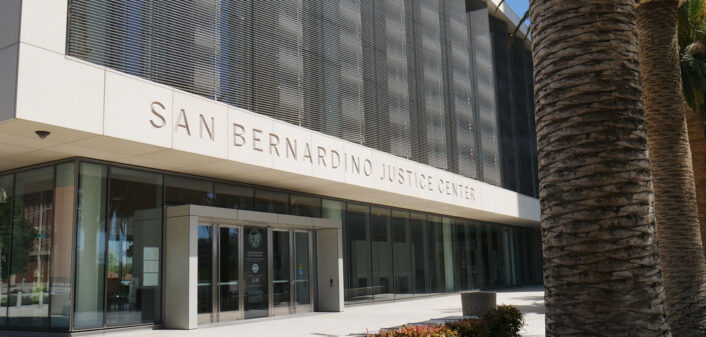
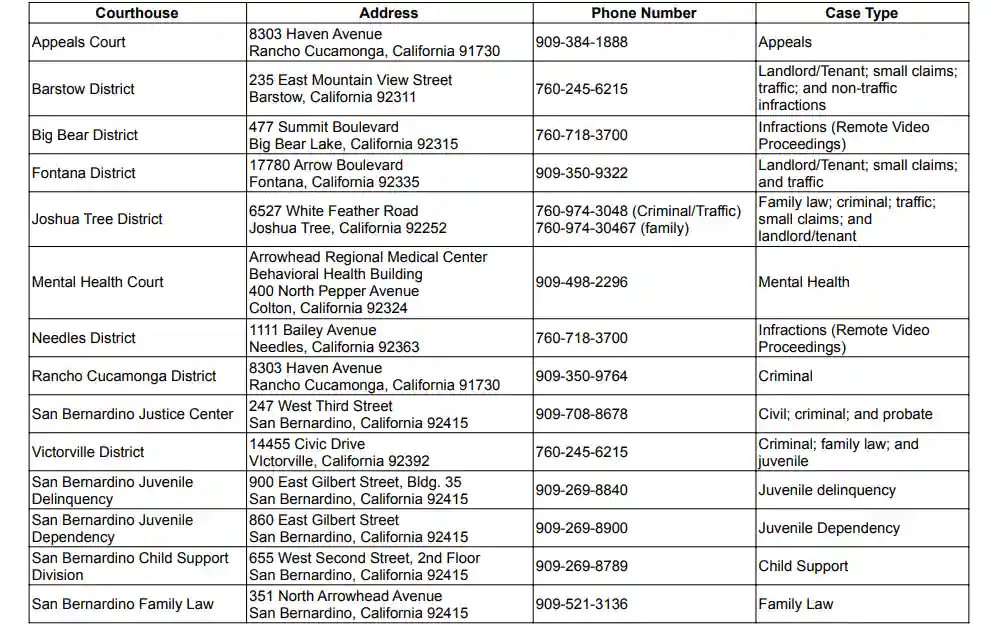
The Superior Court of California, County of San Bernardino, operates across multiple court districts serving cities from Rancho Cucamonga and Ontario to Victorville, Barstow, and Joshua Tree. Central administration and major civil and criminal matters often route through the San Bernardino Justice Center downtown, while specialized divisions handle juvenile, family law, probate, and traffic matters across branch courthouses.
Under the California Public Records Act and California Rules of Court (Rule 2.503), most court records are open to the public unless made confidential by statute or sealed by judicial order. The court maintains an electronic database that catalogs case filings, docket entries, hearing dates, and court dispositions across all these jurisdictions.
How to Use San Bernardino Superior Court Case Access Online
The primary tool for remote research is the court’s official OpenAccess portal. You do not need to register an account to perform basic index searches, although attorneys and frequent users often create accounts for document downloads and subscription services.
1. Searching by Case Number
Searching by case number is the fastest and most accurate method. San Bernardino case numbers typically follow standard prefix formats denoting the case type and year filed:
- CIVSB: Civil (Unlimited or Limited)
- FAMSB: Family Law (Divorce, Child Custody)
- FWV / FSB / FVI: Criminal felony and misdemeanor filings, often reflecting the originating courthouse district (e.g., West Valley, San Bernardino, Victorville)
- PROPS / PROSB: Probate, Guardianship, and Conservatorship
- TR: Traffic and Infractions
Enter the full case number, including hyphens or year indicators if prompted by the search form, to pull up the master registry of actions directly.
2. Searching by Party Name
If you lack a case number, you can search by individual or business entity name. For individual searches, enter the last name followed by the first name. When searching common names, narrow your parameters by selecting a case category (such as Civil or Criminal) or restricting the filing date range. Keep in mind that older records or historical cases may use maiden names or alternate spellings.
3. Calendar and Tentative Rulings Search
Attorneys and self-represented litigants can also review daily court calendars by judicial officer or courtroom number. In civil law and motion matters, tentative rulings are routinely posted to the court’s website by 3:00 PM on the court day preceding the scheduled hearing. Checking these rulings online is essential to decide whether you must appear in court to argue your motion.

What Information Can You View Online?
The level of detail accessible through online case access depends on California state privacy rules:
- Index and Register of Actions (Docket): Publicly viewable for almost all non-confidential cases. This lists filing dates, motion titles, party names, scheduled appearances, minute orders, and final judgments.
- Document Images: For civil, probate, and small claims matters, electronic copies of filed pleadings (complaints, answers, motions) can often be viewed or purchased directly through the portal.
- Criminal Dockets: You can see charges, plea entries, sentencing details, and probation terms. However, downloadable document images for criminal cases are frequently restricted from remote public viewing under California Rule of Court 2.503 to protect personal identifying information.
In-Person Records Access and Public Terminals
Not every file is digitized or downloadable over the internet. You must inspect records in person or order copies from the clerk if you require access to:
- Older case archives filed prior to the implementation of the court’s modern electronic case management system.
- Document images in criminal, family law, or traffic cases that are restricted from remote public download.
- Certified copies of divorce decrees, letters of administration, or expungement orders.
Every major San Bernardino branch courthouse features self-service public terminals located in the clerk’s office. These terminals allow visitors to review full case files without the convenience fees charged on commercial web portals. If a file is stored in off-site physical archives, you must submit a file retrieval request at the counter, which typically takes between three to five business days.
Fees, Copies, and Certified Documents
Basic index searches on the online portal are generally free. However, obtaining copies incurs standard statutory fees set by the California Government Code:
- Plain Copies: Usually $0.50 per page for standard paper copies. Digital downloads purchased through the portal involve nominal document-viewing fees.
- Certified Copies: Charged at $40.00 per document certification, plus the per-page copy fee. Certified records carry an official court seal and are required for legal, banking, immigration, or title transfer purposes.
- Exemplified Copies: Frequently needed for out-of-state legal enforcement; these require additional judicial signatures and carry higher statutory fees.
Fee waivers (Form FW-001) granted during active litigation apply to copy fees for parties to the case, but third-party record searchers must pay all associated administrative fees.
Confidential and Restricted Court Records
Certain records are completely shielded from public view by law. The San Bernardino Superior Court will not grant access to the following matters without a signed judge’s order:
- Juvenile Court Cases: All juvenile dependency (welfare) and juvenile justice (delinquency) proceedings are strictly confidential under California Welfare and Institutions Code Section 827.
- Adoption Records: Permanently sealed to protect the privacy of biological and adoptive families.
- Unlawful Detainer (Eviction) Filings: Under California Code of Civil Procedure Section 1161.2, eviction filings are automatically masked from public access for the first 60 days. They remain permanently sealed if the landlord does not prevail within that window.
- Sealed Records: Any civil or criminal record that a judge has expressly sealed due to trade secrets, proprietary financial information, or statutory diversion completions.
Tips for Resolving Common Search Problems
If your search yields no results on the public portal, try the following adjustments:
- Check for Name Variations: Search by last name only, or test variations of hyphenated, maternal, and paternal surnames, especially common in Southern California public indexes.
- Verify the County: Neighboring jurisdictions (Riverside, Los Angeles, and Orange County) often handle incidents that occurred close to county borders. Verify that the incident or filing actually originated in San Bernardino County.
- Contact the Correct Branch Clerk: A felony case originating in Victorville is managed under the Desert Mountain Division, while an eviction in Chino falls under the West Valley Division. Calling or visiting the specific division handling your case type will resolve record-routing delays faster than querying the central civil desk.