Sharp Microwave Carousel Parts: Replacement Guide
Understanding Your Sharp Microwave Carousel System

When your microwave stops spinning, heating unevenly becomes a daily annoyance. The carousel system inside your Sharp appliance relies on a few key components working together harmoniously. Understanding how these parts interact is the first step toward fixing any rotation issues.
Most Sharp countertop and over-the-range models use a standard three-part carousel assembly. If one of these elements breaks, wobbles, or seizes up, the entire rotation stops. Fortunately, finding and replacing faulty Sharp microwave carousel parts is usually a straightforward, affordable DIY fix that spares you the cost of a brand-new appliance.
The Three Main Sharp Microwave Carousel Parts
To troubleshoot a stationary glass tray, you need to inspect the three individual components that make up the carousel mechanism. Each plays a distinct role in keeping your food rotating for even cooking.
1. The Glass Tray (Turntable Plate)
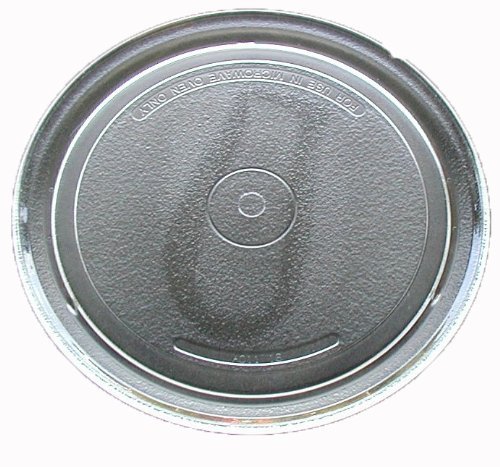
The glass tray is the most visible part of the carousel. It holds your dinner plates, bowls, and microwave-safe cookware. Over time, these heavy glass plates can chip, crack, or shatter completely due to thermal shock or accidental drops.
When shopping for a replacement Sharp glass tray, you cannot rely on guesswork. Microwaves come in various interior dimensions, typically ranging from 10 inches to over 16 inches in diameter. Measure the diameter of your old tray or check the inner cavity wall for your specific Sharp model number.
2. The Support Ring and Roller Wheels
Sitting directly beneath the glass tray is the carousel support ring, often called the roller guide or roller ring. This plastic or ceramic circle features three small wheels that allow the heavy glass plate to glide smoothly and evenly as it rotates.
Common issues with the support ring include:
- Melted or warped plastic due to localized overheating or food spills.
- Seized wheels clogged with grease, baked-on food debris, or soap residue.
- Cracked structural arms that cause the tray to tilt and jam against the microwave walls.
Cleaning the ring thoroughly with warm, soapy water often revives a sluggish tray. However, if the plastic is warped or cracked, replacement is necessary.
3. The Turntable Motor and Coupler
Hidden beneath the floor of the microwave cavity is the turntable motor. This small electric motor turns a plastic shaft (the coupler or hub) that pokes up through the floor and locks into the center underside of the glass tray.
If your glass tray and roller ring are in perfect condition, but the plate still refuses to turn, the issue likely lies with the motor or the coupler. Sometimes, the plastic coupler simply strips out its teeth and needs to be snapped off and replaced. Other times, the motor electrical winding fails, requiring more advanced disassembly to swap out.
How to Find the Correct Part Numbers for Your Sharp Microwave
Ordering the correct replacement components requires exact matching. Generic, one-size-fits-all microwave parts rarely fit properly and can cause further mechanical damage.
Locate Your Model Number
Every Sharp microwave features a silver or white rating label. On this sticker, you will find the exact model number (e.g., R-550YK, R-21LC, or SMC1139JW). This number is essential for cross-referencing parts diagrams.
You can typically find the model number sticker in one of these locations:
- Along the outer frame when you open the microwave door.
- On the back exterior metal panel of the appliance.
Use OEM Parts When Possible
Original Equipment Manufacturer (OEM) parts are designed specifically for your Sharp model. While aftermarket generic parts might save a couple of dollars, OEM glass trays ensure the exact weight distribution, thickness, and center-hub fitting required for safe, balanced rotation.
Step-by-Step Troubleshooting Guide
Before spending money on new hardware, run through a quick diagnostic routine to pinpoint the exact failure point.
The Plate Won't Turn At All
If the motor makes no sound and the plate stays completely still, check your control panel settings. Many Sharp models feature a "Turntable Off" or "Turntable On" button. Ensure you haven't accidentally disabled the rotation feature.
If the setting is correct, remove the glass tray and roller ring. Press the start button and watch the center shaft (coupler). Does it spin? If the shaft turns, your motor is fine, but your tray or support ring is slipping. If the shaft remains completely stationary while the microwave is running, the motor or its internal wiring has failed.
The Plate Jerks or Grinds
If the plate stutters, stops intermittently, or makes a loud grinding noise, remove the glass plate and inspect the track beneath it. Food buildup in the floor track or grease jammed inside the roller wheels is the most frequent culprit. Scrub the track and wheels thoroughly, dry them completely, and test again.
Tips for Maintaining Your Microwave Carousel
Extend the lifespan of your microwave components with simple, regular maintenance habits:
- Clean spills immediately: Prevent sugary or greasy foods from baking onto the roller wheels and floor track.
- Wash by hand: While many Sharp glass trays are dishwasher safe, washing them by hand prevents accidental drops against hard dishwasher tines.
- Don't overload the tray: Avoid placing excessively heavy or oversized cast-iron pans on the glass carousel, as excess weight strains the motor and warps the support ring.
By identifying the root cause and ordering the right replacement pieces, you can restore your Sharp microwave to full working order in no time.


