South Dakota Road Conditions 511: Your Traveler Guide
Navigating the Mount Rushmore State Safely

Driving across South Dakota offers breathtaking views, from the rolling prairies of the east to the rugged peaks of the Black Hills in the west. However, the state's vast geography and notoriously unpredictable weather—especially during long, harsh winters—can turn a pleasant road trip into a challenging journey. Whether you are commuting across I-90 or heading to Custer State Park, checking South Dakota road conditions 511 before you turn the ignition is essential for a safe trip.
The South Dakota Department of Transportation (SDDOT) operates the 511 traveler information system to keep motorists informed of closures, construction zones, accidents, and severe weather impacts. Understanding how to access and interpret these tools can save you time, prevent accidents, and keep you from getting stranded in remote areas.
Understanding South Dakota Road Conditions 511 Services
The 511 system is a free, comprehensive resource designed to provide up-to-the-minute updates on highway statuses across the state. There are several ways to access this critical information depending on whether you are planning a trip from your desktop or currently driving behind the wheel.
The SDDOT 511 Website
For trip planning, the official SDDOT 511 interactive map is the gold standard. It features a color-coded system that instantly shows you the state of major routes like Interstate 90, Interstate 29, and various U.S. and state highways. By visiting the website, you can view:
- Real-time traffic speeds and congestion.
- Active construction zones and planned detours.
- Location-specific weather advisories and wind warnings.
- Live streaming traffic camera footage.
Phone and Mobile App Access
If you are already on the road, looking at a computer or smartphone screen is dangerous and illegal in many instances. South Dakota allows you to dial 511 from any landline or mobile phone to reach an automated voice response system that provides updates for specific routes. For smartphone users, downloading the official SDDOT 511 mobile application allows you to receive push notifications for your favorite routes and view GPS-enabled maps.
Winter Driving and Road Condition Classifications
South Dakota winters bring heavy snowfall, ground blizzards, and black ice. The SDDOT uses specific terminology to report road conditions so drivers can make informed decisions about whether it is safe to travel.
Video: SD 511 County Road Updates
What the Color Codes Mean
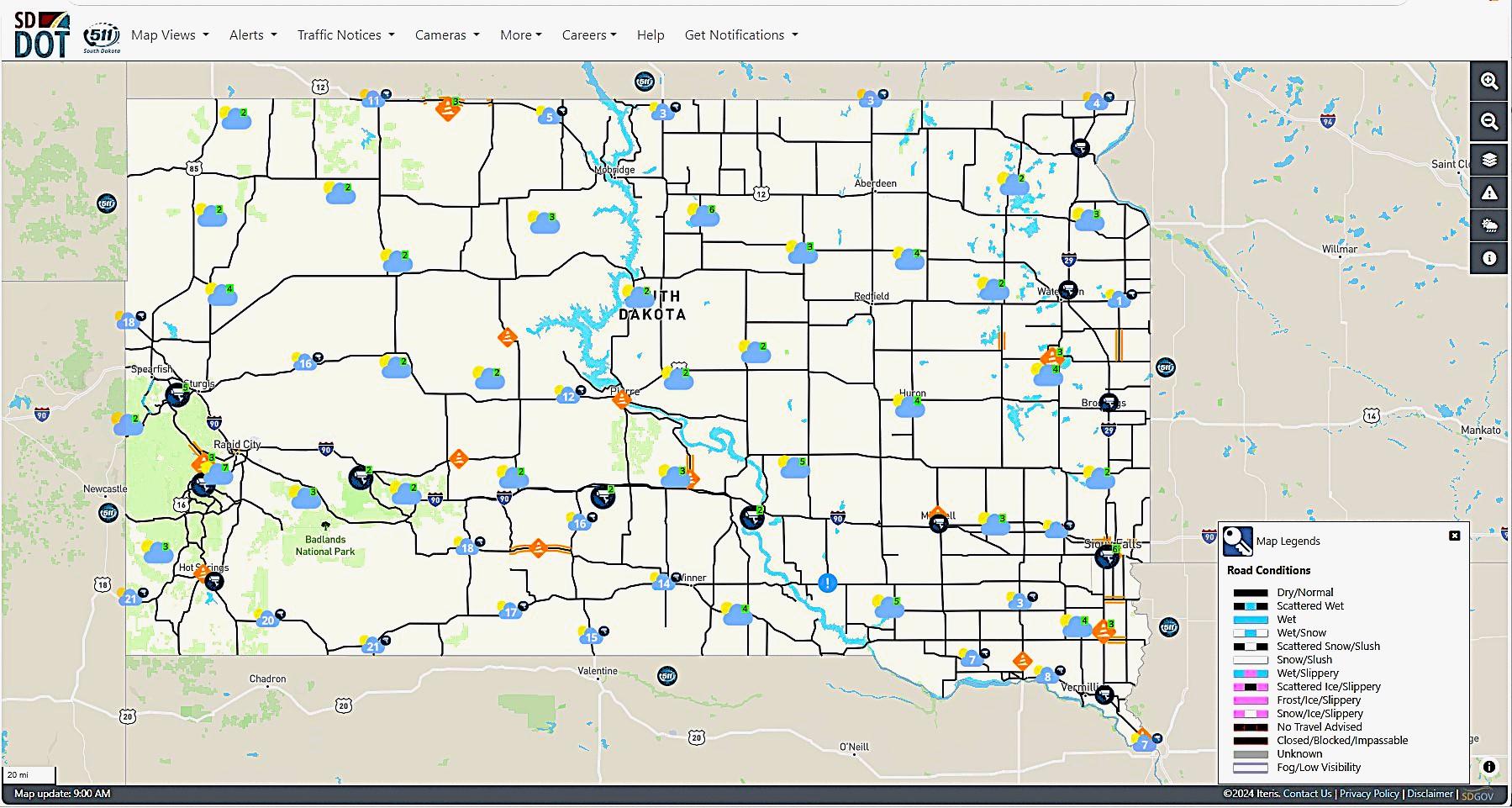
When you check South Dakota road conditions 511 maps, you will notice various colors assigned to different stretches of highway:
- Green (Normal): Roads are clear and dry with normal driving conditions.
- Blue (Wet/Frost): Pavement is wet or may have localized frost spots. Exercise normal caution.
- Yellow/Orange (Partly Covered): Sections of the road are covered with snow, slush, or ice. Reduce speed.
- Red (completely Covered/Hazardous): The entire roadway is covered with snow, ice, or slush. Travel is not recommended unless necessary.
- Purple (No Travel Advised): Visibility is near zero, or roads are impassable due to severe drifting, heavy snow, or ice. The state strongly urges drivers to stay off these routes.
- Black (Closed): The road is legally closed to all traffic due to severe weather, accidents, or blocked lanes. Driving past a road closed sign is dangerous and subject to fines.
No Travel Advised vs. Road Closed
It is important to understand the distinction between advisory statuses and legal closures. When a road is marked as "No Travel Advised," snowplows may be struggling to keep up, and visibility might be dangerously low. While you might not be ticketed immediately for venturing out, emergency responders may not be able to reach you if you slide off the road. A "Road Closed" designation, on the other hand, means the highway is officially shut down by law enforcement and the SDDOT.
Smart Tips for Driving in South Dakota
Checking the 511 system is only the first step in preparing for a safe journey through the state. Weather conditions can deteriorate rapidly, especially on the open plains where high winds cause severe ground blizzards.
Equip Your Vehicle
If you are traveling through South Dakota between October and April, your vehicle should always be winter-ready. Pack an emergency kit that includes:
- A sturdy ice scraper and snow brush.
- Jumper cables and a portable jump starter.
- A flashlight with extra batteries.
- Warm blankets, heavy coats, hats, and gloves.
- Non-perishable snacks and bottled water.
- A small shovel and a bag of sand or cat litter for traction.
Give Snowplows Room
During winter storms, SDDOT snowplows work around the clock to clear highways. Always stay a safe distance behind plows—at least 200 feet is recommended. Never attempt to pass a snowplow on the right, and remember that the road surface directly behind a plow is often much worse than the cleared path it leaves in its wake.
Conclusion
Whether you are a daily commuter or a cross-country traveler, staying informed is your best defense against unexpected delays and hazards. Make it a habit to check South Dakota road conditions 511 before every trip during the fall, winter, and spring seasons. By utilizing the official website, mobile app, and phone line, you can ensure a safer, smoother journey across the beautiful landscapes of South Dakota.


