State ID Number Pennsylvania: How to Find & Apply
Whether you are filling out an employment application, registering to vote, filing state taxes, or completing financial paperwork, having your official identification details on hand is critical. For non-drivers and drivers alike, understanding the official state id number pennsylvania issues through the Department of Transportation (PennDOT) ensures you can quickly verify your identity whenever state or federal agencies request it.

This guide explains what a Pennsylvania state ID number looks like, where to find it on your card, how to retrieve it if your card is missing, and how to obtain a new or replacement ID card through PennDOT.
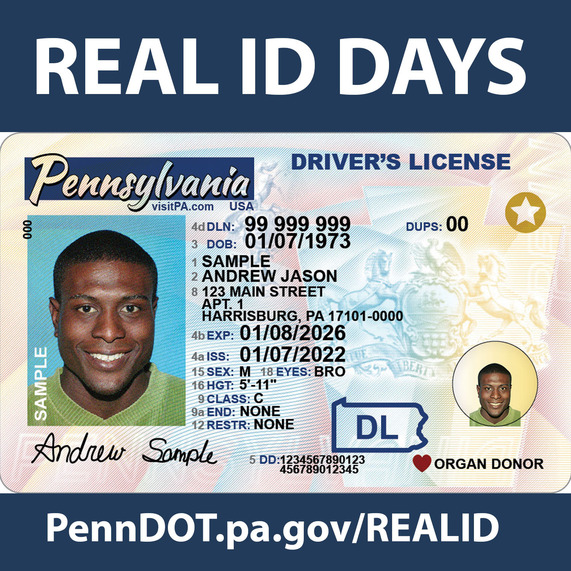
Understanding Your State ID Number in Pennsylvania: Format and Placement
In the Commonwealth of Pennsylvania, state identification cards and driver’s licenses are issued by PennDOT’s Driver and Vehicle Services. The identification number assigned to an individual serves as their unique record identifier across all state motor vehicle systems.
What Does the Number Look Like?
A Pennsylvania state ID number consists of exactly 8 digits. It is entirely numeric—there are no letters, hyphens, or special characters included in the actual record number, although online systems or physical forms may occasionally format it with spaces for readability.
It is important to note that if you previously held a Pennsylvania driver's license and surrendered it for a non-driver photo ID (or vice versa), PennDOT generally retains your original 8-digit customer number. Your identification number remains tied to your driving and vital records profile in the state’s database for life.
Where to Locate It on Your Physical Card
If you have your physical Pennsylvania Photo ID card or driver's license, locating your number is straightforward:
- Location: Look near the top center or upper-middle portion of the card, just below or beside your photograph.
- Label: The number is typically printed in blue or black ink and is labeled with the field indicator "DLN" (Driver's License Number) or "IDN" (Identification Number). On newer card designs, it may simply be preceded by the label "No." or "Number".
- Duplicate Card Indicator: If your card is a replacement, you may see a two-digit suffix separated from the 8-digit number (such as "01" or "02"), which designates the card issuance version, but your core ID number remains the first 8 digits.
How to Find Your Pennsylvania State ID Number Without Your Card
Losing your wallet or misplacing your ID card can be stressful, particularly when you need the number immediately to complete urgent paperwork. Because your ID number is sensitive personal data, PennDOT will not provide it over an unverified phone call or email. However, you can retrieve it using the following methods:
- Review Previous State Tax Returns: If you filed a Pennsylvania personal income tax return (Form PA-40) electronically or on paper, your state ID or driver's license number was likely required for identity verification during filing. Check your copies from recent tax years.
- Check Vehicle Registration or Title Documents: If you own a vehicle registered in Pennsylvania, your 8-digit PennDOT customer ID number is printed directly on your vehicle registration card and title documents.
- Inspect Past Employment or Rental Files: Employers, landlords, and loan officers routinely photocopy government-issued IDs during the onboarding or leasing process. Contacting your HR department or checking personal document archives may yield a photocopy of your card.
- Access Your PennDOT Driving Record Online: If you previously held driving privileges, you can log in to the official PennDOT Driver and Vehicle Services website. To purchase an unofficial copy of your record online, you will generally need your Social Security number, date of birth, and address; once accessed, your ID number will be visible on the record.
- Visit a PennDOT Driver License Center in Person: You can visit any physical PennDOT location with primary identification (such as an original birth certificate with a raised seal or an unexpired U.S. passport) and proof of residency. A customer service agent can pull up your record and issue a duplicate card.
How to Apply for an Initial Pennsylvania State ID Card
Any Pennsylvania resident who is at least 10 years old can apply for a Pennsylvania Photo Identification Card. The card serves as an official, government-issued proof of identity and age, though it carries no driving privileges.
Required Documentation

To establish your record and receive an ID number, you must present original, physical documents at a PennDOT Driver License Center. Photocopies are not accepted. You will need:
- Completed Application: Form DL-54A (Application for an Initial Photo Identification Card).
- Proof of Identity: An original U.S. birth certificate with a raised seal, a valid U.S. passport, a certificate of naturalization, or valid immigration documents demonstrating lawful status.
- Social Security Card: Your original, unlaminated Social Security card bearing your legal name.
- Two Proofs of Pennsylvania Residency: Acceptable items include current utility bills, lease agreements, tax statements, mortgage documents, or W-2 forms showing your physical street address (P.O. boxes are not accepted as proof of residence).
Steps to Complete the Application
- Download and Complete Form DL-54A: Fill out your personal details accurately, ensuring your name matches your proof documents exactly.
- Visit a License Center: Bring your documents and payment to a PennDOT Driver License Center. Most facilities accept debit/credit cards, checks, or money orders; cash is generally not accepted.
- Verify Information: The examiner will review your identity documents, verify your address, and enter your profile into the state database, which generates your unique 8-digit ID number.
- Have Your Photo Taken: Your signature and photograph will be captured digitally. In most cases, you will receive your card over the counter before leaving.
Standard PA State ID vs. REAL ID
When applying for or renewing your Pennsylvania state ID, you must choose between a standard identification card and a REAL ID-compliant card. Both options feature the same 8-digit identification number, but they differ in terms of federal acceptance.
- Standard State ID: Suitable for day-to-day identification within the state, including banking, purchasing age-restricted items, and in-person voting. It cannot be used to board domestic commercial flights or enter secure federal facilities once federal REAL ID enforcement begins.
- REAL ID: Marked with a gold star in the upper right corner. This card meets federal security standards established under the REAL ID Act. If you want to use your state ID to fly domestically or visit military bases, choosing a REAL ID is recommended.
Obtaining a REAL ID requires pre-verification of your documents. If you received your first Pennsylvania ID or driver’s license after September 2003, PennDOT may already have your required verification documents on file, allowing you to order a REAL ID online without visiting a center in person.
Replacing a Lost, Stolen, or Damaged ID
If your identification card is missing or illegible, you must request a duplicate card. To replace it:
- Online: If your photo and signature are current in PennDOT's system and no personal information has changed, visit the PennDOT online services portal, enter your known credentials, pay the duplicate card fee, and a new card will arrive by mail within 10 to 15 business days.
- By Mail: Complete Form DL-54B (Application for Change/Correction/Replacement of Non-Commercial Driver's License or Photo ID), attach a check or money order, and mail it to the address listed on the form.
- In Person: Visit a Driver License Center with valid proof of identity to obtain an immediate replacement.
Frequently Asked Questions
Can I hold both a Pennsylvania driver's license and a state ID card?
No. Under Pennsylvania law and federal guidelines, an individual may not hold both a valid driver's license and a state ID card simultaneously. If you obtain an ID card, you must surrender any driver's license you hold.
How long is a Pennsylvania state ID card valid?
A standard Pennsylvania photo ID card is valid for four years, expiring on the day after the cardholder's birth date. PennDOT automatically mails an application for renewal (Form DL-54R) approximately three months before the card expires.
Does changing my address change my state ID number?
No. When you move within Pennsylvania, state law requires you to update your address with PennDOT within 15 days. Updating your residential address updates your driving and ID record, but your 8-digit identification number remains identical.