Straight Talk Outage Map: How to Check Service Status
Understanding Straight Talk Service Disruptions

As one of the largest mobile virtual network operators (MVNOs) in the United States, Straight Talk Wireless provides affordable prepaid plans by leveraging the major network towers of Verizon, T-Mobile, and AT&T. While this setup offers broad coverage across the country, it also means that service quality depends entirely on the underlying host carrier in your specific area. When your phone suddenly loses bars or mobile data stops working, finding a reliable straight talk outage map is the fastest way to determine whether the issue is local, regional, or specific to your device.
Unlike major postpaid carriers that maintain their own dedicated towers, Straight Talk customers often experience varied performance depending on which network SIM card their phone utilizes. Knowing how to interpret service maps and troubleshoot basic connectivity problems can save you hours of frustration and unnecessary calls to customer support.
How to Check the Straight Talk Outage Map
Because Straight Talk is a subsidiary of Verizon (following Verizon's acquisition of TracFone Wireless), official network management heavily relies on Verizon's extensive infrastructure. However, because some legacy customers still run on AT&T or T-Mobile towers, checking a single proprietary outage map can sometimes be confusing. Here are the most effective methods to check for active service disruptions:
1. Third-Party Outage Trackers
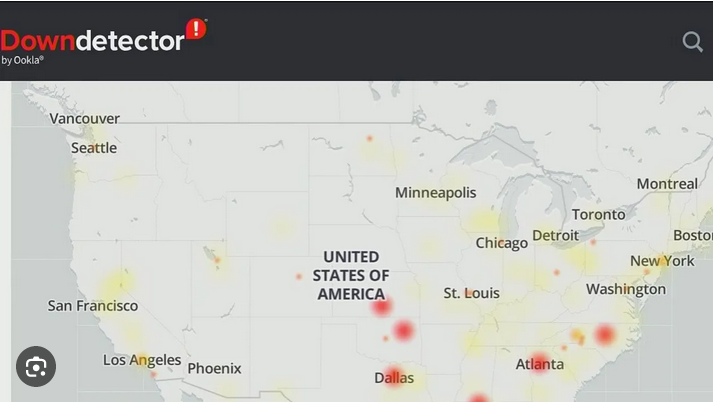
Straight Talk does not host a real-time, interactive, street-level outage map directly on its homepage. Instead, independent crowd-sourced platforms serve as the best alternatives for checking live network status. Websites like Downdetector aggregate user reports, spike charts, and live location maps to show if thousands of other users are experiencing sudden signal loss, dropped calls, or internet connection failures in your zip code.
2. Host Carrier Coverage and Status Tools
Since your Straight Talk service runs on one of the major three networks, you can often check the status of the underlying tower network directly:
Verizon Network Status: If your SIM card uses Verizon towers (which is standard for most modern Straight Talk activations), check the Verizon service status page for regional maintenance or outages.
AT&T and T-Mobile Maps: If you are on an older plan utilizing AT&T or T-Mobile towers, consult those specific carrier outage tools.
3. Official Straight Talk Support Channels
If you suspect an account-specific issue rather than a regional tower failure, logging into your online Straight Talk account or using the My Account mobile app is essential. The system will immediately notify you if your service has been suspended due to non-payment, data depletion, or an expired service plan.
Common Causes of Straight Talk Service Loss
Video: Is Straight Talk down, Straight Talk outage map

Before assuming there is a massive regional blackout shown on a straight talk outage map, it helps to rule out everyday technical glitches. Many temporary signal losses have nothing to do with tower maintenance or carrier failures.
APN Settings Misconfiguration
Access Point Name (APN) settings dictate how your phone connects to mobile data and handles text messaging (MMS). If you recently updated your phone’s operating system or switched your SIM card to a new device, your APN settings may have reverted or corrupted. Ensuring your APN matches the specific requirements of your host network is crucial for restoring data access.
Account Expiration and Auto-Refill Failures
Prepaid carriers operate on strict billing cycles. If your monthly service plan expired a few hours ago and an auto-refill payment failed due to an expired credit card, your voice, text, and data will be cut off instantly. Always double-check your expiration date in the official Straight Talk app before panicking over a tower outage.
SIM Card Damage or Poor Seating
Physical wear and tear can cause a SIM card to lose proper contact with your phone's internal reader. Powering down your device, removing the SIM tray, gently wiping the gold contacts, and reinserting it securely can often resolve mysterious "No Service" errors.
Step-by-Step Troubleshooting Guide
If you have verified that there are no widespread network outages reported in your area, walk through these troubleshooting steps to force your phone to reconnect to the nearest cell tower:
- Toggle Airplane Mode: Turn on Airplane Mode, wait 30 seconds, and turn it back off. This forces your phone to search for and establish a fresh connection with the closest available tower.
- Restart Your Device: A simple reboot clears temporary cache files and refreshes network protocols that may be causing connectivity loops.
- Perform a Network Reset: Go to your phone’s settings menu and select "Reset Network Settings." Note that this will erase saved Wi-Fi passwords and Bluetooth pairings, but it frequently fixes stubborn cellular bugs.
- Check for Carrier Updates: Go to your phone's system settings and check if a carrier settings update is available to download.
When to Contact Straight Talk Customer Service
If you checked crowd-sourced outage maps, confirmed your service plan is active, and exhausted all troubleshooting steps without regaining a signal, it is time to contact support. You can reach Straight Talk customer care by dialing 1-877-430-2355 from another working phone or by utilizing the live chat feature on their official website.
When speaking with a representative, be prepared to provide your phone number, device IMEI number, and SIM card serial number. Ask them specifically if there is any unscheduled tower maintenance happening in your zip code or if your device has been accidentally flagged on the network.
Conclusion
Dealing with sudden cellular blackouts is frustrating, but knowing where to look makes all the difference. By utilizing crowd-sourced status trackers, verifying your account status, and running through basic device resets, you can quickly identify whether you are dealing with a broad network outage or a simple phone glitch. Keep your plan active, your settings updated, and your phone restarted to minimize unexpected downtime.