Sync Bank.com/Amazon: Store Card Login Guide
If you hold an Amazon Store Card or Amazon Secured Card, managing your credit line online typically starts by searching for sync bank.com/amazon. Synchrony Bank issues and manages the dedicated store credit cards for Amazon, providing cardholders with a secure online portal to monitor transactions, redeem promotional financing, and pay monthly statements.

While navigating to your account is straightforward once you know where to look, users frequently encounter confusion regarding web redirects, card variations, and login credentials. This guide walks you through logging in, registering a new account, scheduling payments, and resolving common account management issues.
Understanding Your Amazon Card: Synchrony vs. Chase
Before attempting to log in, confirm which financial institution services your Amazon credit card. Amazon partners with two separate banks:
- Synchrony Bank: Issues the Amazon Store Card, the Amazon Prime Store Card, and the Amazon Secured Card. These cards do not carry a Visa or Mastercard logo and can only be used on Amazon.com and select affiliated merchants.
- JPMorgan Chase: Issues the Prime Visa and Amazon Visa credit cards. These are open-loop cards accepted anywhere Visa is taken.
If your card only displays the Amazon logo without a Visa emblem, your account is serviced by Synchrony Bank, and the portal accessed via sync bank.com/amazon is the correct destination.
How to Access Your Account via Sync Bank.com/Amazon
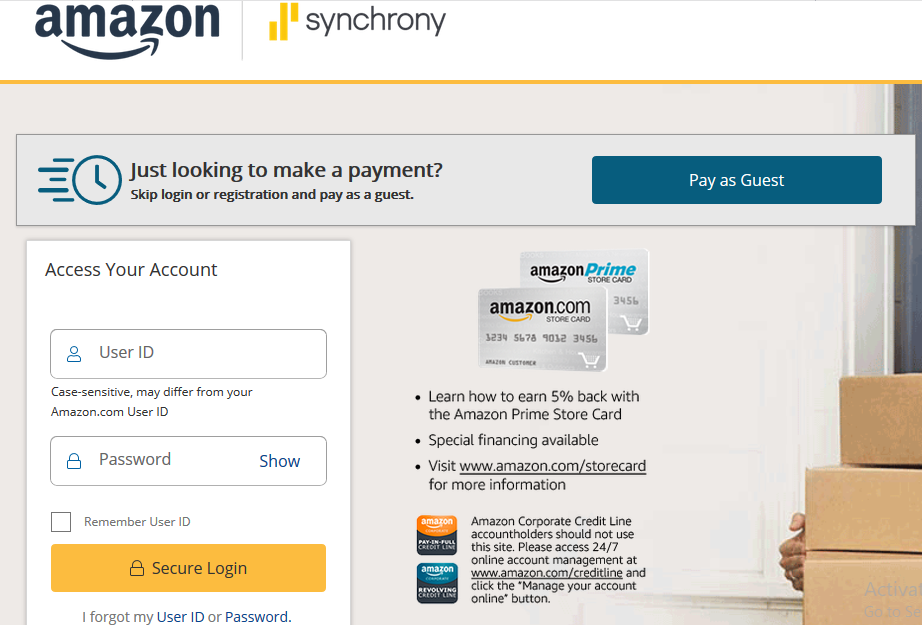
When you enter sync bank.com/amazon into your browser, Synchrony Bank automatically redirects you to its secure credit portal (typically hosted on amazon.syf.com). Follow these steps to access your dashboard:
- Open your web browser and navigate to the official portal at sync bank.com/amazon or directly at amazon.syf.com.
- Enter your User ID and Password in the designated login fields.
- If you are using a personal, secure device, check the “Remember User ID” box to streamline future visits. Never select this option on shared or public computers.
- Click Secure Login to enter your account overview page.
First-Time Registration Steps
If you recently received your card in the mail or were approved at Amazon checkout, you must register your card before you can log in through the portal. You cannot use your standard Amazon.com retail password to access Synchrony Bank.
- Visit the login page and click the Register button located beneath the login box.
- Enter your full 16-digit card number and your 5-digit billing ZIP code.
- Click Continue to verify your identity.
- Confirm the last four digits of your Social Security Number (SSN) or date of birth when prompted.
- Create a unique User ID and a strong password following Synchrony’s security standards.
- Set up security questions to safeguard against unauthorized access and complete the registration.
Managing Bill Payments and Autopay
Synchrony Bank provides several ways to pay your Amazon Store Card balance. Missing a payment can lead to late fees and damage your credit profile, so setting up an automated schedule is generally recommended.
1. Setting Up Autopay Online
Autopay guarantees your payment arrives on time each month. Once logged into your Synchrony dashboard, select the Payments tab and choose Enroll in Autopay. You can choose to pay the minimum payment due, the full statement balance, or a custom amount. You will need your bank’s routing number and your checking or savings account number.
2. One-Time Electronic Payments
If you prefer manual payments, go to the Make a Payment screen within your dashboard. Payments submitted before 11:59 PM Eastern Time are credited the same day, although the funds may take 24 to 48 hours to clear your personal bank account.
3. Paying Through Amazon.com

Amazon allows you to link your Synchrony Store Card account directly to your retail profile. Once linked, you can initiate a payment during the Amazon checkout process or under the “Your Payments” wallet screen without leaving Amazon.com.
4. Alternative Payment Channels
- By Phone: Call the automated system at 1-866-634-8379. Automated payments are free, though speaking with a representative to process an immediate payment may incur an expedited service fee.
- By Mail: Send a check or money order along with your statement remittance slip to:
Synchrony Bank / Amazon, P.O. Box 960013, Orlando, FL 32896-0013.
Understanding Promotional Financing and Cash Back
Managing your Amazon Store Card through Synchrony allows you to select how your rewards and promotions apply to large purchases. Eligible Amazon Prime members receive 5% cash back on most Amazon purchases as statement credits. However, on qualifying orders exceeding specific dollar thresholds, you can opt for promotional financing instead:
- Deferred Interest: If you finance a purchase over 6, 12, or 24 months, interest accrues from the purchase date but is waived entirely if the promotional balance is paid in full before the promotional period ends. Be cautious: if even one dollar remains when the period expires, all accrued interest is billed to your statement at standard APR.
- Equal Monthly Payments: Certain orders qualify for fixed monthly payments with 0% APR until paid off, eliminating the deferred-interest risk.
Check the “Promotional Purchases” tab within the Synchrony dashboard to track the exact expiration dates of any active deferred-interest offers.
Troubleshooting Common Login Issues
If you cannot access your account via sync bank.com/amazon, review these common causes and fixes:
Forgotten User ID or Password
Click the “I forgot my User ID or Password” link below the sign-in form. You must provide your card number, billing ZIP code, and the last four digits of your SSN to reset your credentials. A verification code will be sent to your registered email address or mobile phone.
Browser Cache and Redirect Loops
Occasionally, redirecting from external links to amazon.syf.com can cause infinite loading loops or session timeout errors. Clear your browser cache and cookies, disable aggressive ad-blockers, or open an incognito/private browsing window to load the page cleanly.
Locked Accounts
Entering the incorrect password repeatedly will trigger a temporary security lockout. While some lockouts expire automatically after two to twenty-four hours, you can immediately regain access by using the automated identity verification tool or calling customer support.
Synchrony Amazon Card Customer Support
If online troubleshooting fails, reach Synchrony Bank’s dedicated Amazon cardholder support line directly:
- Customer Service Phone: 1-866-634-8379 (Available 24/7 for automated inquiries)
- Online Chat: Available directly inside the account dashboard during standard business hours.
- Mailing Address: Synchrony Financial, P.O. Box 965015, Orlando, FL 32896.
By keeping your login credentials secure, monitoring statement cycles, and tracking promotional expiration dates, the sync bank.com/amazon portal offers everything you need to keep your account in good standing.