The Lowdown on Gusto Costs and Features
Running payroll is rarely the highlight of a small business owner's week. Tax calculations, multi-state compliance, direct deposits, and benefits administration consume hours that should be spent growing the business. Gusto entered the market to eliminate that friction with an intuitive, modern platform designed specifically for small and midsize teams. Before migrating your workforce to a new platform, you need the lowdown on Gusto costs and features to determine whether its capabilities justify the subscription price.

Below is a realistic, detail-oriented breakdown of Gusto’s pricing structure, primary capabilities across plan tiers, supplementary fees, and how it holds up against typical small business payroll demands.
Gusto Pricing Structure at a Glance
Gusto operates on a standard Software-as-a-Service (SaaS) monthly model, charging a flat monthly base fee plus a per-employee monthly charge. This scales your software expenses directly with headcount.
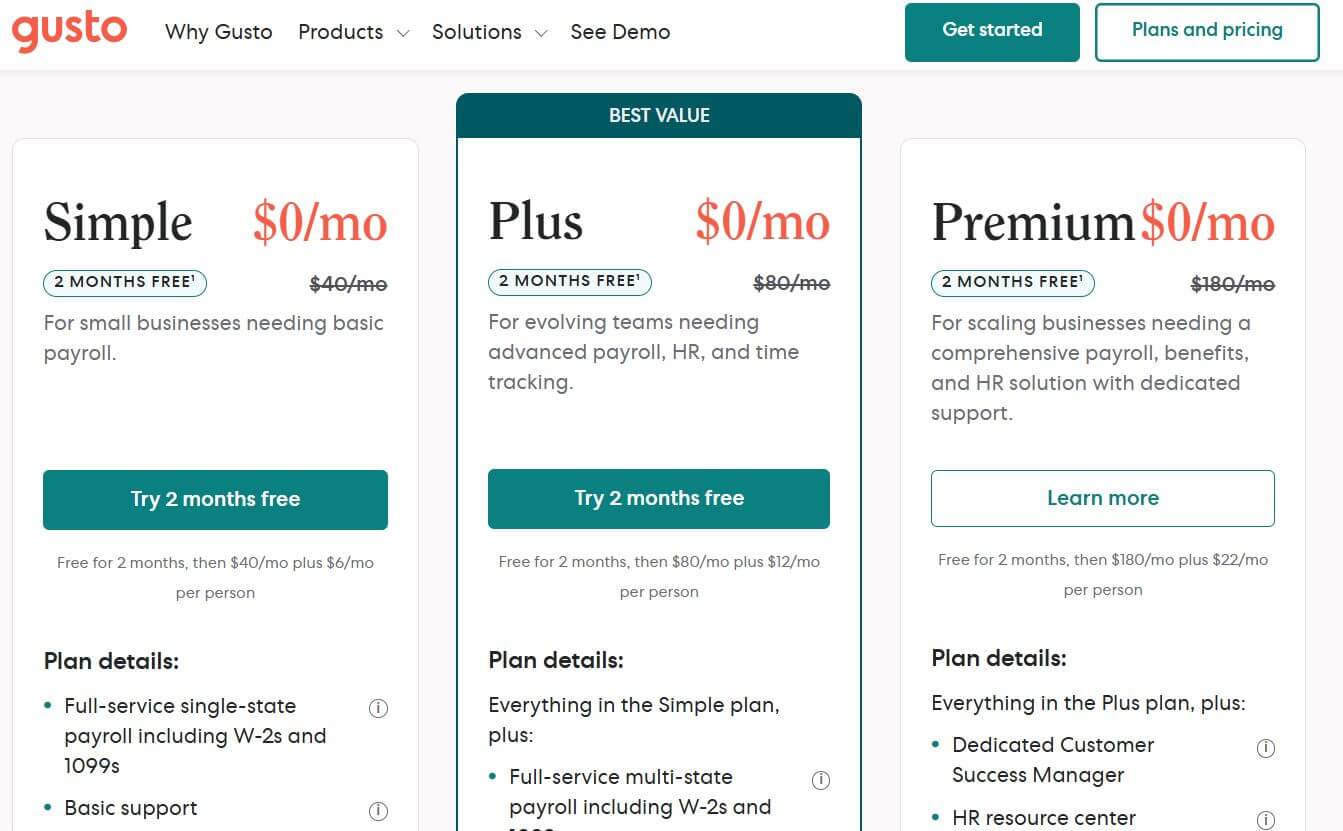
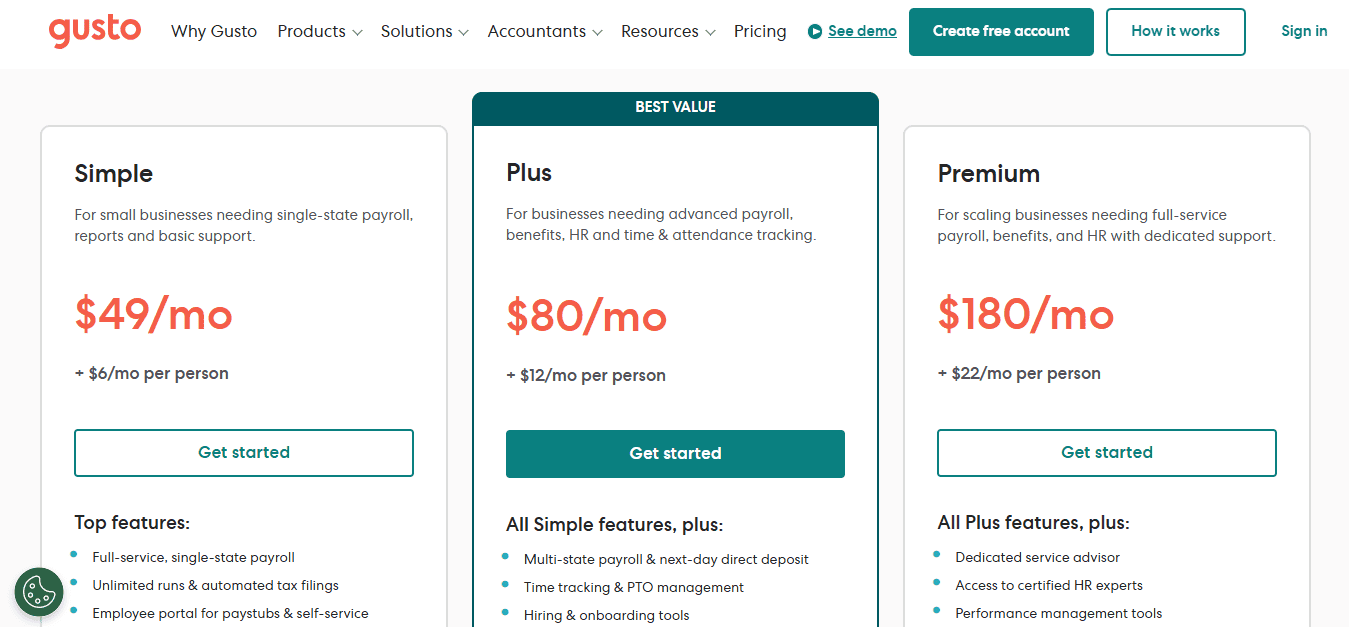
- Simple Plan: $40 per month base fee + $6 per employee per month.
- Plus Plan: $80 per month base fee + $12 per employee per month.
- Premium Plan: Custom pricing (quote-based, typically for larger or rapidly scaling companies).
- Contractor Only: $35 per month base fee + $6 per contractor per month (base fee is often waived for the first 6 months).
The Lowdown on Gusto Costs and Features by Plan
Each Gusto plan targets a different stage of organizational maturity. Understanding what each tier unlocks prevents you from paying for advanced management tools before you need them—or being caught without critical compliance tools.
1. The Simple Plan ($40 base + $6/worker/month)
The Simple plan is aimed at solo founders, micro-businesses, and small teams that need reliable, automated payroll without complicated HR workflows.
Key Features:
- Full-Service Multi-State Payroll: Automatic calculation, filing, and payment of local, state, and federal payroll taxes across all 50 states.
- Employee Self-Service: Workers receive lifetime access to their personal Gusto accounts to download W-2s, view paystubs, and manage direct deposit details.
- Basic Employee Onboarding: Digital document collection, basic self-onboarding forms, and new-hire reporting to state agencies.
- Basic Health Benefits Administration: Ability to connect health insurance plans provided through Gusto's brokerage network.
- Workers' Compensation Integration: Pay-as-you-go workers' comp integration through AP Intego to eliminate lump-sum annual estimates and audits.
Limitation: Direct deposit requires a 2-day turnaround for standard accounts, and advanced scheduling, time-off approvals, and contractor-only pay flexibility are limited.
2. The Plus Plan ($80 base + $12/worker/month)
The Plus plan is Gusto’s sweet spot for expanding businesses that need built-in time management, customized roles, and faster payment execution.
Key Features (includes everything in Simple, plus):
- Next-Day Direct Deposit: Payroll funds clear in employee accounts within 24 hours of submission, improving cash-flow flexibility.
- Built-in Time Tracking & PTO Management: Employees clock in/out via the web or mobile app, with tracked hours syncing directly into payroll runs.
- Project and Job Costing: Track hours worked against specific projects to monitor labor expenditures accurately.
- Custom Permissions: Assign granular administrative access to office managers, accountants, or department leads without granting full company-wide visibility.
- Hiring and Onboarding Tools: Applicant tracking features, customizable offer letters, and automated onboarding checklists.
Limitation: The cost jumps substantially from the Simple plan. For a 15-person company, the Plus tier costs $260/month compared to $130/month on the Simple tier.
3. The Premium Plan (Custom Pricing)
Designed for organizations with 25 to 100+ employees requiring direct access to human resources certified professionals and proactive compliance safeguards.
Key Features (includes everything in Plus, plus):
- Dedicated Support: Access to a designated customer success team and prioritized support queues.
- HR Resource Center: On-demand access to certified HR professionals for guidance on disciplinary policies, job descriptions, employee handbooks, and termination laws.
- Performance Management: Built-in review frameworks, self-evaluations, and manager feedback workflows.
- Waived Fees for Selected Add-ons: Specific fees for pre-tax account administration and compliance filings are folded into the tier's negotiated base rate.
4. The Contractor-Only Plan
If your entire workforce consists of 1099 independent contractors, Gusto provides a dedicated option costing $35/month plus $6 per contractor paid. It handles unlimited payments, generates and files 1099-NEC forms at year-end, and lets contractors manage their tax profiles directly.
Core Capabilities Across the Platform
Regardless of the plan you choose, several foundational features make Gusto one of the most reliable options in the payroll software market:
Automated Tax Filings and Compliance
Gusto handles Form 941 (Quarterly Federal Return), Form 940 (Annual Unemployment Return), and state unemployment filings automatically. If Gusto makes a calculation or submission error, they cover the resulting tax penalty, assuming accurate data was provided by the employer.
Gusto Wallet
Employees gain access to the Gusto Wallet mobile app, which offers personal finance tools, early access to earned wages (Cashout), automated savings goals, and digital debit accounts at no additional cost to the employer.
Accounting and Business Integrations
Gusto integrates smoothly with major bookkeeping engines like QuickBooks Online, Xero, and FreshBooks. Payroll entries map automatically to corresponding ledger accounts, saving hours of manual reconciliation every pay cycle. It also connects with POS and time-tracking systems such as Homebase, Deputy, When I Work, and TSheets.
Hidden Costs and Paid Add-Ons
While Gusto is generally transparent about pricing, businesses often require peripheral services that carry separate monthly or setup fees:
- 401(k) Retirement Plans: Integrated retirement programs (frequently powered through Guideline) generally carry an additional base fee around $39 to $80 per month plus $4 to $8 per participant per month.
- HSAs, FSAs, and Commuter Benefits: Managing Health Savings Accounts or Flexible Spending Accounts carries an administration fee, typically around $200 initial setup plus $4 per employee per month.
- State Tax Registration Services: If you hire employees in a state where your business is not registered, Gusto can handle the state withholding and unemployment account registrations for a one-time service fee (usually around $100–$150 per state).
- International Contractor Payments: Paying foreign contractors is supported in over 120 countries, but processing exchange rates and foreign disbursement fees apply depending on the destination currency.
Pros and Cons: Is Gusto Worth It?
To evaluate if the platform suits your operating budget, weigh these operational trade-offs:
Pros:
- Clean User Experience: The interface is exceptionally clean, cutting the learning curve for non-technical managers and non-accountants.
- Full-Service Multi-State Payroll: Multi-state payroll is supported on all plans, whereas competitors like QuickBooks Payroll charge surcharges per state.
- Automated Tax Resolution: Hands-off quarterly and end-of-year tax generation saves significant administrative overhead.
Cons:
- Significant Price Increase from Simple to Plus: Double the base fee and double the per-employee rate can be a steep jump for small businesses crossing into moderate growth.
- No Native Mobile App for Admins: While employees have Gusto Wallet, administrators must run payroll using mobile web browsers or desktop devices.
- Customer Support Inconsistencies: Standard tier users often report delays during high-volume periods (such as quarter-end or tax season) due to chat- or email-first routing.
The Bottom Line
Gusto stands out because it solves the core problem of payroll: taking compliance and tax filings completely off your desk. For early-stage companies and businesses with 2 to 50 employees, the Simple and Plus plans provide an excellent balance of usability, automation, and modern employee onboarding.
If your team requires sophisticated custom reporting, enterprise-grade shift scheduling across multiple enterprise hubs, or dedicated round-the-clock phone support, enterprise payroll solutions like ADP Workforce Now or Paychex Flex may be worth exploring. But for most modern small-to-medium businesses seeking an intuitive, fully automated payroll solution, Gusto remains one of the most reliable and transparent platforms available.