UC Davis Academic Schedule Explained
Navigating the UC Davis Academic Schedule

For incoming freshmen, transfer students, and even continuing scholars, **breaking down the complexities of the UC Davis academic schedule** is essential for a smooth undergraduate journey. Unlike many universities operating on a traditional semester calendar, UC Davis follows a fast-paced quarter system. This means your academic year is divided into three primary terms—Fall, Winter, and Spring—plus an optional Summer session.
Because each quarter lasts only 10 weeks, the pace is remarkably brisk. Midterms arrive just as you are settling into your classes, and finals come around before you know it. Understanding how the schedule works, when to register, and how to manage your time will keep you on track for timely graduation.
The Quarter System Framework
The UC Davis academic year kicks off in late September with the Fall Quarter and concludes in mid-June with the end of the Spring Quarter. Each instructional term spans 10 weeks, followed by a dedicated week of final examinations.
Fall, Winter, and Spring Quarters
Fall Quarter usually starts later in September, wraps up right before the winter holidays in December, and features a long Thanksgiving break. Winter Quarter begins in early January and runs through mid-March. Finally, Spring Quarter starts in late March or early April and ends in June. Summer sessions are condensed, offering accelerated courses across various split sessions ranging from three to six weeks.
Instruction vs. Examination Weeks
It is vital to distinguish between instruction weeks and finals week. Professors often pack heavy syllabi into the 10 weeks of lectures. Final exams take place during the 11th week of the term. You should avoid booking travel home before your official final exam schedule is confirmed, as exams can be scheduled right up to the final day of the term.
Key Phases of Class Registration
Registering for classes at UC Davis is not a single event; it is a multi-phased process that requires careful planning, checking prerequisite requirements, and monitoring seat availability.
Pass 1 and Pass 2 Registration
Video: Year End Review 2025

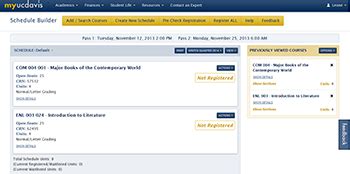
Registration is split into two primary appointment windows known as Pass 1 and Pass 2, managed through the Schedule Builder tool.
- Pass 1: This is your first and most crucial opportunity to secure seats in your major requirements and high-demand courses. During Pass 1, unit caps are strictly enforced (typically limited to 17 or 19 units depending on your college).
- Pass 2: Opening a few weeks after Pass 1, this phase allows you to add remaining classes, fill out your schedule with general education requirements, and adjust your units up to the maximum limit.
The Open Registration and Schedule Adjustment Period
Following Pass 2, an open registration period begins where unit caps are generally lifted. Once the quarter officially begins, you enter the Schedule Adjustment Period (often called the "phase of adds and drops"). During the first week or two of instruction, you can add or drop classes via Schedule Builder without penalty, giving you time to shop around for courses and evaluate syllabi.
Decoding Pass Times and Priority
Your registration pass time dictates the exact day and hour you can log into Schedule Builder to grab your classes. Getting an early pass time can mean the difference between getting into a required prerequisite or being waitlisted.
How Pass Times Are Assigned
Pass times are determined primarily by your earned class standing, which is calculated based on the total number of units you have completed, rather than the number of years you have attended university. Seniors register first, followed by juniors, sophomores, and finally freshmen. Within each class standing, priority is often given to student-athletes, registered student-veterans, and students with specific accommodations through the Student Disability Center (SDC).
Tips for Securing High-Demand Classes
- Always map out a primary schedule and at least two backup schedules before your pass time opens.
- Check the Course Catalog well in advance to ensure you have cleared all required prerequisites.
- Monitor the CRN (Course Reference Number) and section availability using Schedule Builder.
- If a class is full, add yourself to the waitlist immediately if one is offered.
Important Deadlines to Remember
Missing a deadline on the UC Davis academic calendar can result in dropped classes, late fees, or permanent marks on your transcript. Mark these critical milestones on your personal calendar every quarter:
- Fee Payment Deadline: Usually occurring a few weeks before instruction begins, failing to pay tuition or secure financial aid deferment can lead to your entire schedule being dropped.
- Last Day to Add Classes: Typically at the end of the second week of instruction. After this, you need special permission numbers.
- Pass/No Pass Grading Deadline: Generally falls around the midpoint of the quarter (Week 6), allowing you to change your grading basis for elective courses.
- Last Day to Drop Classes: Usually at the end of the 6th or 8th week, depending on the college, though a "W" (Withdrawal) grade will appear on your transcript.
Final Thoughts on Managing Your Time
The intensity of the UC Davis academic schedule rewards proactive planning. By keeping a close eye on your registration pass times, respecting quarterly deadlines, and utilizing tools like Schedule Builder and OASIS, you can avoid unnecessary stress. Treat every 10-week term as a sprint, stay organized, and do not hesitate to consult your academic advisor when mapping out your path to graduation.