Verify Colorado Business Licenses Online Easily
How to Verify Colorado Business Licenses and More
Whether you are entering into a new partnership, hiring a local contractor, or conducting market research, taking the time to learn how to verify Colorado business licenses and more is a critical step. Verifying a business ensures that the entity is legally authorized to operate within the state, helping you avoid fraudulent scams, unvetted vendors, and regulatory penalties.
In Colorado, the primary repository for business registrations is the Secretary of State (SOS) office. Fortunately, their online database makes the verification process transparent and accessible to the public. In this guide, we will walk you through the exact steps to check a business license, what details you can uncover, and why this due diligence matters for consumers and business owners alike.
The Official Verification Portal: Colorado Secretary of State
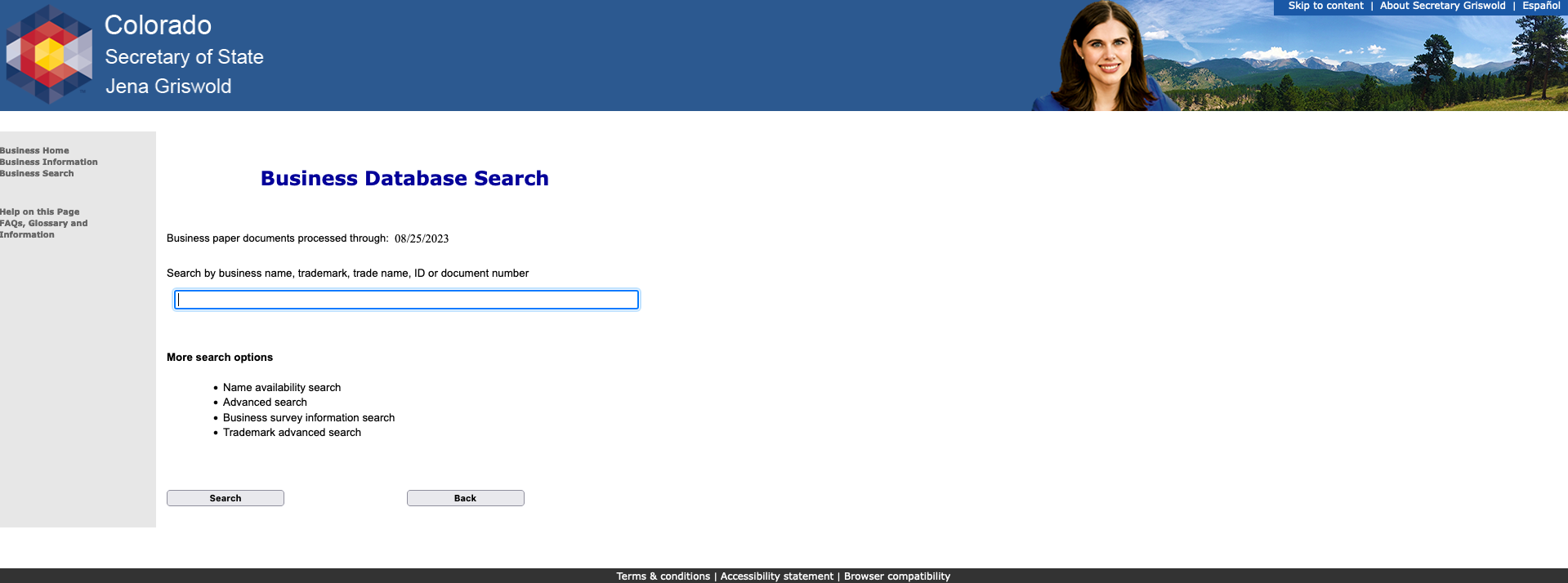
The Colorado Secretary of State operates an online platform known as the CCFilings system (Colorado Business Search). This database houses records for corporations, limited liability companies (LLCs), limited partnerships, and trade names operating within the Centennial State.
Using this portal, you can look up virtually any registered entity for free. It serves as your primary tool for confirming a company's legal existence, current standing, and registered agent information.
Step-by-Step Guide to Searching the Database
- Navigate to the Official Website: Go to the Colorado Secretary of State business search page. Make sure you are using the official .gov website to protect your data.
- Enter Search Criteria: You can search by the exact business name, keyword, or the 11-digit identification number (ID number) assigned by the state. If you know the exact name, typing it into the primary search bar is usually the fastest method.
- Review the Search Results: The system will generate a list of matching entities. Look closely at suffixes like LLC, Inc., or LP to ensure you are selecting the correct company.
- Click on the Business Record: Select the specific entity name to open its detailed summary page.
Understanding Business Status and What It Means
Once you access a company’s profile on the Colorado SOS website, you will see a designated status. This status tells you whether the business is currently authorized to conduct operations. Common statuses include:
- Good Standing: The business has filed all required periodic reports and paid necessary fees. This is the green light indicating full compliance.
- Delinquent: The entity missed a filing deadline or failed to pay annual fees. While they may still operate, delinquency is a warning sign of administrative neglect.
- Dissolved / Expired: The business has officially closed its doors or its registration term has lapsed. It is no longer legally permitted to conduct business under that name.
Checking this status is vital. Entering into a contract with a dissolved or delinquent entity can expose you to unnecessary legal and financial risks.
Beyond the Basics: What Else Can You Discover?
The Secretary of State database offers much more than just a simple active or inactive status. When you inspect a company profile, you gain access to a wealth of public records that provide a complete picture of the enterprise.
Registered Agent Information
Every legitimate business in Colorado must maintain a registered agent with a physical address in the state. This person or entity is designated to receive official legal notices and government correspondence. Having this information ensures you know who to contact if legal service or formal communication is ever required.
Video: Colorado Business License - What You need to get started #license #Colorado

Principal Office Address
You can view the primary physical address where the business conducts its operations. If a contractor lists a P.O. Box or an out-of-state address while claiming to be locally operated, the SOS record will clarify their true setup.
Document History and Filings
The platform provides access to a complete history of filed documents. You can view and even download original Articles of Organization, periodic reports, name changes, and statements of conversion. Reviewing these documents helps confirm the longevity and stability of the enterprise.
Checking Professional and Industry-Specific Licenses
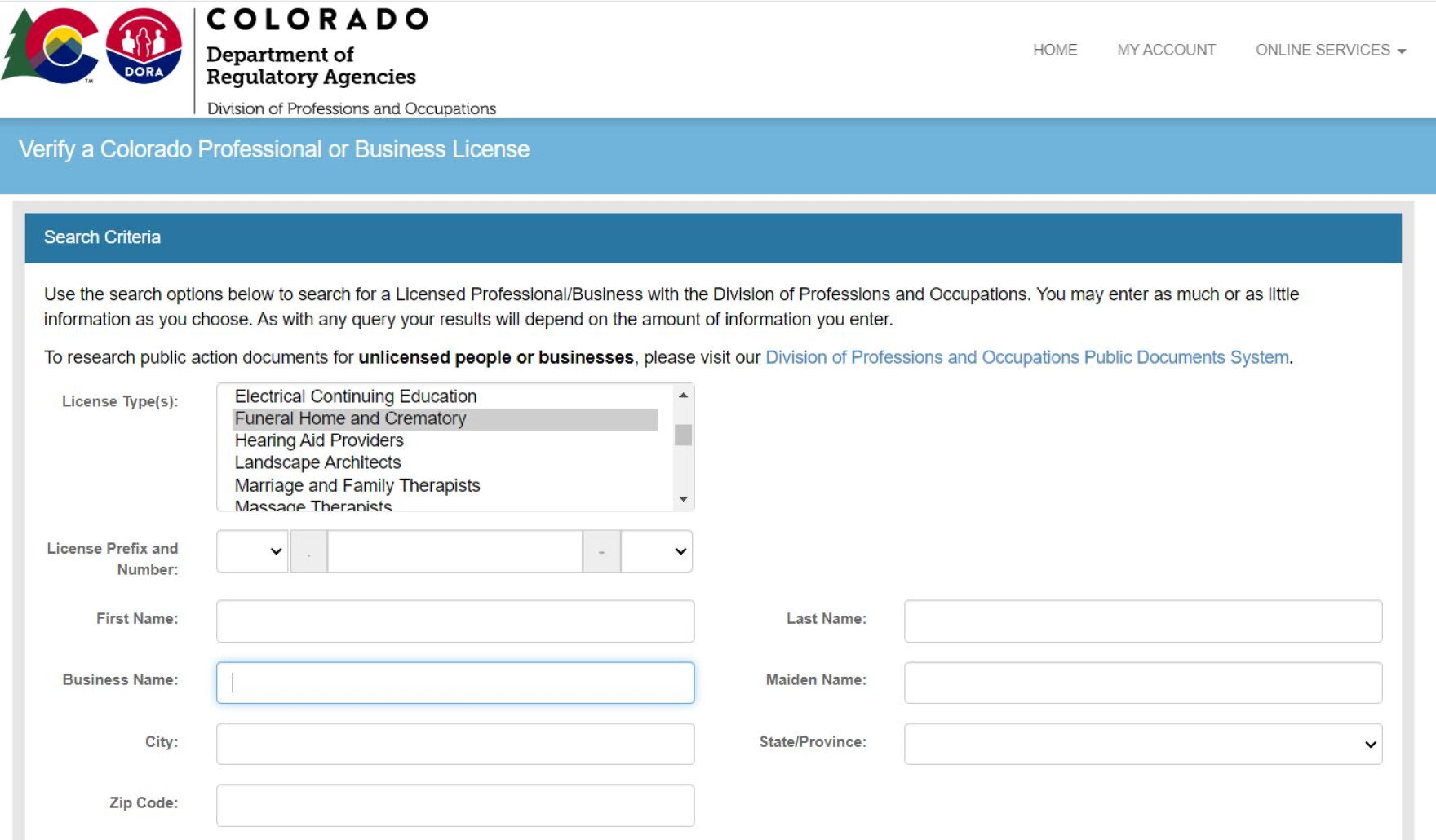
While the Secretary of State handles general business registration, certain industries require specific professional licenses issued by the Colorado Department of Regulatory Agencies (DORA). If you are hiring professionals such as electricians, plumbers, real estate agents, nurses, or accountants, the standard SOS check is only half the battle.
To verify these specialized credentials, you must use the DORA license verification tool. This ensures that the individual practitioner has the necessary training, background checks, and active licensure to perform specialized work legally.
Common Industries Requiring DORA Oversight
Best Practices for Business Due Diligence
Verifying registrations and licenses should become a standard protocol in your personal and professional life. Follow these best practices to protect your interests:
Always verify before you pay. Never issue a large deposit or sign a long-term contract without first confirming that the business is in Good Standing. Additionally, cross-reference the name on the invoice or website with the exact legal name registered with the state. Unregistered entities operating under informal trade names without a proper filing may be operating illegally.
Finally, keep records of your searches. If you are entering into a commercial agreement, screenshot or save the Secretary of State status page for your audit trail. This demonstrates that you performed reasonable due diligence prior to engagement.
Conclusion
Knowing how to verify Colorado business licenses and more empowers you to make informed decisions, safeguard your finances, and support legitimate local enterprises. By utilizing the Colorado Secretary of State database and checking DORA for professional credentials, you can instantly separate reputable businesses from fraudulent operators. Make verification your first line of defense in every business transaction.