Will UPS Create a Shipping Label for Me?
If you need to send a package or return an online purchase but do not own a printer, you are not alone. When faced with a blank cardboard box, many shippers ask: will UPS create a shipping label for me? The straightforward answer is yes. UPS offers several convenient ways to generate, print, and attach shipping labels on your behalf, whether you are shipping personal items or processing an eCommerce return.
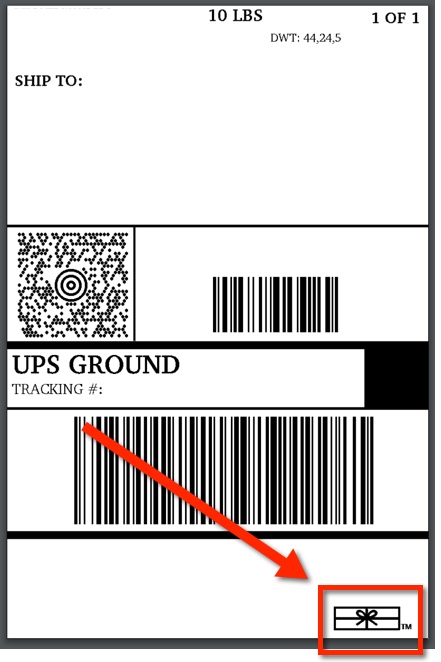
However, the exact process and whether you will pay an extra fee depend on the type of UPS facility you visit and how your shipment is arranged. Here is a comprehensive breakdown of how UPS handles label creation, what services are available, and what you need to prepare before you go.
How UPS Creates Shipping Labels at The UPS Store
The easiest and most common place to have a label created for you is at a franchised The UPS Store location. Unlike automated drop boxes or third-party drop-off spots, The UPS Store is staffed by associates who handle shipping logistics from start to finish.
Depending on your situation, there are three main ways an associate can create your label:
1. Creating a Label from Scratch
If you are shipping a gift, sending documents, or selling an item independently, you do not need to prepare anything online beforehand. Simply bring your items to the counter and provide:
- The recipient’s full name, street address, and phone number.
- Your return address and contact details.
- Your desired delivery speed (e.g., UPS Ground, 2nd Day Air, Next Day Air).
- Any declared value or signature requirements.
The associate enters this information into the shipping terminal, weighs and measures your parcel, prints a professional thermal adhesive label, and affixes it directly to your box. You pay for the shipping postage on the spot.
2. Scanning a Mobile Return QR Code
If you are returning merchandise from retailers such as Amazon, Shein, Temu, or Nordstrom, you rarely need a physical label. Most merchant returns generate a digital barcode or QR code saved to your smartphone.
When you present this code at The UPS Store, the employee scans your phone screen. Their system instantly pulls up the prepaid return information, prints the official tracking label, and links it to your return. In many cases (such as Amazon "No Box, No Label" returns), you do not even need to tape or pack the item yourself.
3. Printing a Pre-Purchased PDF Label
If you purchased postage online via an eCommerce platform (like eBay, Etsy, or Pirate Ship) and saved the label as a PDF, you can have The UPS Store print it. Most stores provide a dedicated guest email address or an in-store printing kiosk where you can forward the document. The associate prints it, cuts it to size, and tapes it to your parcel.
Will UPS Create a Shipping Label for Me Without a Printer at Home?
Yes. If you prefer to set up your shipment online to lock in discounted commercial rates or save time at the counter, you do not need a home printer. UPS offers a digital feature called UPS Print and Mobile Codes.

When setting up a shipment on UPS.com or through the UPS mobile app, choose the option to print at a UPS location instead of printing the label immediately. The system generates a barcode/QR code on your smartphone. Take that digital code to any participating The UPS Store or UPS Customer Center, let the counter agent scan it, and they will print your label free of additional printing charges.
Can UPS Drivers Bring a Label to Your Door?
If you cannot leave your home or office, you can arrange for UPS to bring the label directly to you. This service is typically accessed through two methods:
UPS On-Call Pickup (UPS 1 Pickup Attempt Label)
When you schedule a pickup through the UPS website or by phone, you can request that the driver bring a pre-printed shipping label. With this option, the driver arrives at your address with the label in hand, inspects your secured package, applies the label, and takes the parcel into the delivery network.
Merchant Return Services
Some companies offer premium return services where they request a pickup on your behalf. In this scenario, the company coordinates with UPS to dispatch a driver with a printed return label. You simply hand the packaged item to the driver.
Note: UPS charges an additional convenience fee for on-call residential pickups unless your merchant covers the pickup cost.
Do UPS Access Points and Drop Boxes Make Labels?
It is important to understand the difference between full-service facilities and basic drop-off points:
- UPS Drop Boxes: These self-service metal bins cannot generate or print labels. Any parcel placed in a drop box must already have a complete, pre-paid adhesive label attached.
- UPS Access Point Locations: These are local businesses (such as CVS Pharmacy, Michaels, Advance Auto Parts, or neighborhood grocery stores) partnered with UPS. Most Access Points only accept ready-to-ship packages with labels already applied. However, a growing number of Access Points now support mobile QR code scanning for select retail returns. Always check the specific location details on the UPS locator tool before visiting.
- UPS Customer Centers: These are service desks located directly at official UPS sorting and distribution hubs. Like The UPS Store, staff here can weigh your package, process payment, and print a label for you.
How Much Does It Cost to Have UPS Make a Label?
The cost structure depends entirely on what you are doing:
- Retail Returns with QR Code: Free. The merchant covers all label and processing fees.
- New Shipments Created In-Store: The label printing itself is free, but you pay retail shipping rates for the postage, which are generally higher than online discounted rates.
- Printing an Existing PDF Document: If you already bought the label elsewhere and only need The UPS Store to print a piece of paper, stores typically charge a small computer access or document printing fee (usually between $1.00 and $3.00).
- Driver Pickup with Label: Standard pickup surcharges apply, typically ranging from $7.00 to $15.00+ depending on service speed and location.
What to Bring to UPS to Get Your Label Made
To ensure a smooth transaction at the counter, make sure you have the following items ready:
- Accurate Addresses: Double-check the recipient's full physical street address (UPS cannot deliver to standard USPS P.O. Boxes).
- A Charged Smartphone: If you are using a QR code or emailing a PDF, ensure your device has sufficient battery life and cellular reception.
- Government-Issued ID: UPS frequently asks to see a valid driver's license or photo ID for sender verification, especially when shipping internationally or using credit cards.
- Method of Payment: Credit cards, debit cards, and mobile payments (like Apple Pay) are accepted at almost all retail locations.
Having UPS create your shipping label is a straightforward process that saves you from purchasing expensive printing supplies. Whether you stop by a nearby retail counter or have a driver arrive at your doorstep, you can easily get your package labeled, tracked, and moving toward its destination.