YouTube Gifted Memberships: A Complete Guide
Understanding YouTube Gifted Memberships

Building a loyal community on YouTube takes time, effort, and active engagement. For creators who have unlocked the Channel Memberships feature, monetizing that community becomes much easier. However, not every loyal viewer has the financial means to subscribe on a recurring monthly basis. This is where YouTube gifted memberships come into play, serving as a powerful tool to bridge the gap between dedicated fans and financial support.
Gifted memberships allow generous viewers to purchase single-month channel memberships and randomly distribute them to other users watching a live stream or premiere. It functions similarly to subscription gifting on platforms like Twitch. For creators, this feature boosts membership numbers and fosters community goodwill. For fans, it provides a way to support both the creator and fellow community members.
How YouTube Gifted Memberships Work for Viewers
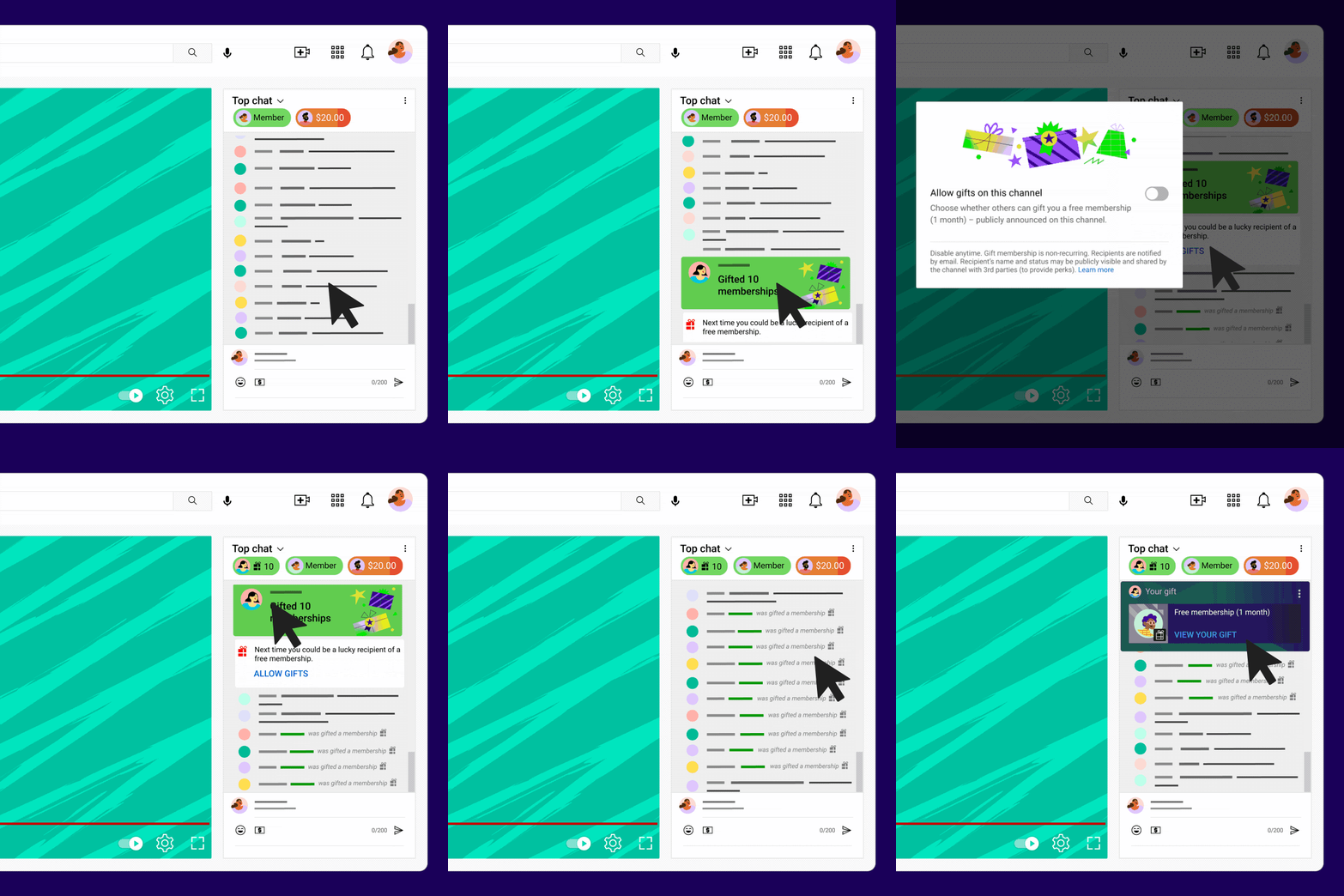
If you are a viewer looking to support a channel you love, purchasing a gift is a straightforward process. When a creator has enabled the feature, you can buy memberships directly from the live chat during a live stream or premiere video.
How to Buy a Gift
- Open a live stream or premiere on a channel where memberships are enabled.
- Click or tap the Dollar sign ($) icon next to the chat box or the membership button.
- Select the option to "Gift Memberships."
- Choose how many memberships you wish to purchase (e.g., 1, 5, 10, or more).
- Complete the payment transaction through YouTube's secure checkout system.
Once purchased, YouTube's algorithm automatically distributes the memberships to active viewers in the chat who are not already members of the channel. The lucky recipients receive a notification in the chat letting them know they have been gifted a month of channel perks, custom emojis, and loyalty badges.
How to Enable Gifted Memberships as a Creator
If you run a channel and want to let your audience buy gifts for others, you must first meet the baseline requirements for YouTube Channel Memberships. Generally, your channel needs to have more than 500 subscribers, be part of the YouTube Partner Program (YPP), and not be set as made for kids.
Enabling the Feature in YouTube Studio
- Log in to your YouTube Studio dashboard.
- Navigate to the Earn tab on the left-hand menu.
- Select the Memberships sub-tab.
- Locate your membership settings and ensure that channel memberships are active.
- Check the settings panel to ensure that gifted memberships are turned on (they are often enabled by default once memberships are active).
Once enabled, you don't need to do anything extra during your streams. The system handles the purchasing and distribution automatically. You will see notifications in your live chat whenever a viewer purchases gifts, giving you a great opportunity to thank them publicly.
Benefits for Creators and Communities
Video: YouTube Gifted Memberships Explained

The introduction of giftable subscriptions has dramatically changed how communities interact during live events. There are several clear advantages for both sides of the screen:
Increased Revenue: Every gifted membership is a paid transaction. Creators receive their standard revenue split (typically 70% after taxes and fees), just like a regular monthly subscription.
Community Inclusion: Viewers who cannot afford a subscription get a chance to experience member-only perks, custom badges, and subscriber-only chats for a month.
Engagement Boost: The announcement of gifts in a live chat drives excitement, encourages viewers to stay longer, and prompts others to participate in the generosity.
Troubleshooting Common Issues
While the system is designed to run smoothly, users occasionally run into roadblocks. Here is how to fix the most common problems associated with giftable subscriptions:
Can't See the Gift Option?
If you cannot find the button to buy a gift, it is usually because the channel owner has not enabled memberships, or you are watching a video that is not a live stream or premiere. Additionally, gifted memberships are not yet available in every geographic region or on every platform (iOS devices sometimes restrict in-app purchases for digital goods, requiring users to buy via a desktop browser or Android device).
Not Receiving Gifts?
Recipients are chosen automatically based on their activity in the live chat and whether they meet the channel's eligibility criteria. If you are active in the chat, your chances of receiving a random gift increase, but there is no guaranteed way to trigger a free membership.
Conclusion
YouTube gifted memberships represent a win-win-win scenario for the platform ecosystem. Creators get extra financial support and higher engagement, generous fans get to support their favorite creators while helping out the community, and casual viewers get a taste of exclusive perks. If you are a creator looking to deepen community bonds, make sure this feature is turned on in your YouTube Studio dashboard today.