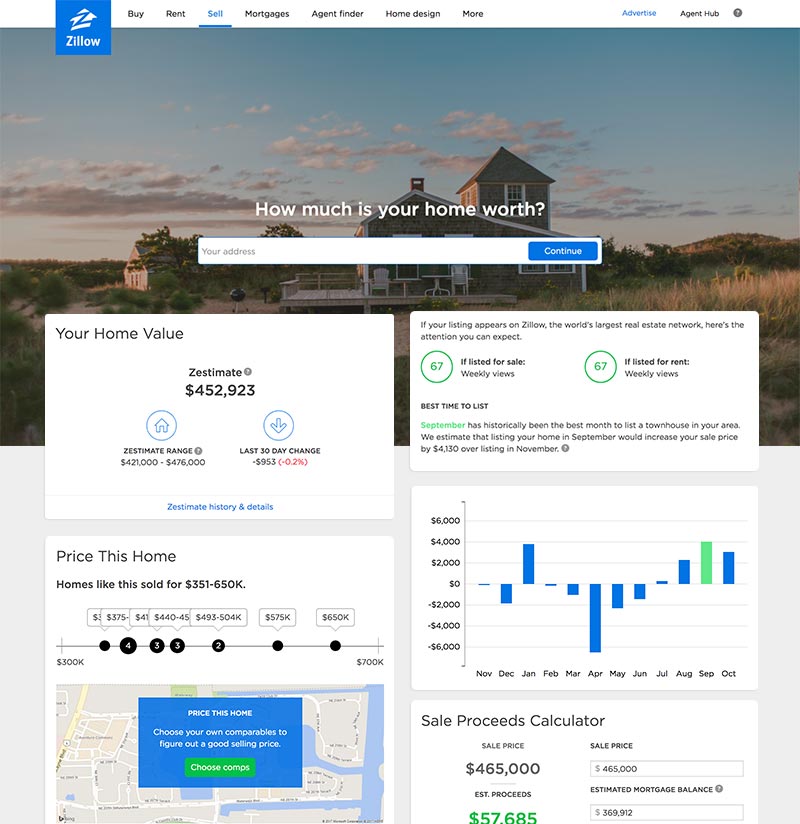
Zillow Value: How to Correct Inaccurate Estimates
When you are preparing to sell your home or simply monitoring your net worth, checking your Zillow Value has become a routine ritual for millions of homeowners. However, these automated valuations—known as Zestimates—are frequently flawed. Because they rely on public records and algorithmic modeling rather than an in-person physical inspection, they can miss major interior upgrades, structural improvements, or localized market nuances that significantly impact your property's true worth.

If your Zestimate is dragging down your home's perceived market value or creating unrealistic expectations for buyers, you do not have to live with it. While you cannot manually type in a new number, you can take specific steps to update your home profile, correct erroneous public data, and challenge the algorithm.
Understanding the Zillow Value and Why It Fails
Before you can effectively correct an inaccurate estimate, it helps to understand how the system works. Zillow utilizes a proprietary automated valuation model (AVM) that crunches numbers from tax assessments, comparable recent sales (comps), and user-submitted data. Because it relies heavily on computers rather than human judgment, the margin for error can be substantial.
Common Causes of Inaccurate Zestimates
- Outdated Public Records: County tax assessors often miss recent additions, finished basements, or luxury kitchen remodels. If the county still thinks your home is a 2-bedroom, 1-bath property, the algorithm will price it as such.
- Lack of Interior Data: The algorithm cannot see your high-end hardwood floors, custom cabinetry, or brand-new HVAC system. It only sees square footage and a baseline property type.
- Poor Comparable Sales: If your neighborhood has few transactions, the system might pull comps from a completely different school district or a vastly inferior neighborhood across a major highway.
- Market Volatility: During rapid shifts in real estate interest rates and housing inventory, AVMs often lag behind real-time market conditions by several weeks or months.
Step-by-Step: How to Challenge and Correct Your Zillow Value
Taking control of your home’s online profile requires a methodical approach. Follow these steps to ensure Zillow has the most accurate picture of your property.
1. Claim Your Home on Zillow
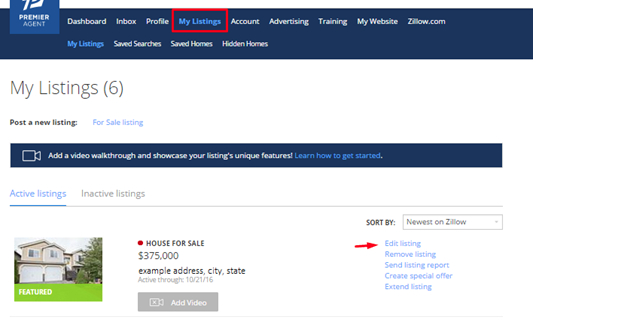
If you have never logged into Zillow as the owner, your property is managed entirely by automated data feeds. By claiming your home through the Zillow Owner Dashboard, you gain direct editing privileges over certain property details. Simply search for your address on Zillow, click the "Owner Dashboard" or "More" button, and follow the verification prompts (usually involving verifying your phone number or ownership documents).
2. Update Your Home Facts
Once you have access to your dashboard, meticulously review and update every data field. Ensure that the following details are completely accurate:
- Exact square footage of the living space and the lot size.
- Total number of bedrooms and bathrooms.
- Recent upgrades, remodels, and the specific year they were completed.
- HVAC updates, roof replacement dates, and energy-efficient installations.
Updating these facts feeds fresh data directly into the system, which can trigger a recalculation of your Zillow Value within a few days.
3. Upload Professional Photos and Descriptions
An algorithm cannot appreciate a stunning view or a pristine quartz countertop, but prospective buyers can. Furthermore, high-quality photos help validate the premium updates you listed in your home facts. Write a compelling description highlighting unique selling propositions that standard data fields miss, such as custom stonework, smart-home tech, or mature landscaping.
4. Correct Public Records at the County Level
Zillow relies heavily on county assessor data. If your square footage or bathroom count is wrong on Zillow, it is almost certainly wrong on your local government's tax card. Contact your county property appraiser or tax assessor's office to file an official correction. Once the county updates its public records, Zillow will automatically ingest that new data during its next system sync.
5. Monitor and Adjust Comparable Sales
Sometimes your home's data is correct, but the algorithm is comparing it to the wrong properties. If you see irrelevant or distressed properties listed as recent comps for your home, you cannot manually delete them, but you can counteract them. Work with a local real estate agent to pull a proper Comparative Market Analysis (CMA). While you cannot upload a CMA directly to Zillow to change the math, having a professional valuation ready is essential when real buyers or appraisers look past the online estimate.
Managing Expectations When Dealing with Online Valuations
It is important to remember that a Zestimate is simply a marketing tool and a starting point for casual browsing—it is not an appraisal. Professional home appraisers and serious buyers rarely rely on Zillow when determining market value. They look at verified recent sales, physical condition, and current market dynamics.
If you are planning to sell your home soon, do not obsess over correcting every algorithmic quirk. Instead, focus on staging, pricing your home strategically with a licensed realtor, and marketing its actual physical attributes. By cleaning up your Zillow profile and relying on professional guidance, you can minimize the impact of inaccurate estimates and ensure your home gets the accurate valuation it deserves.